
me pasa lo mismo acabo de hacer un ticket tambien
Comment actions

Hi, I purchased the Ddj-1000 everything is running perfect except every 40-60 minutes I get some mad sound glitch, it's hard to explain but it's like a glitch/sound drop out. It literally lasts 1 second then everything goes back to normal for another 40-60 minutes. Anyone else experienced this problem?
Post is closed for comments.
me pasa lo mismo acabo de hacer un ticket tambien

Try increasing the audio buffer just a bit to see if it makes a difference.
I have decreased and increased the audio buffer and still experiencing the same problem. Is there s driver update soon? I'm hoping that might solve the problem. I'm nearly 100% certain it's not a laptop issue as I'm getting no other sound issues while just music directly from a player on laptop.

If you run it on Win 10, you need to disable superfetch, it's in the Windows 'services' .Had the same issue, adressed Pioneer Dj usa and they came with this sollution
thank you christian, i have just disabled superfetch and will test out tonight :) what latency on the buffer would you recommend? i'm new to rekordbox, my laptop is a dell latitude core i5 8gb ram win 10
Hi Marc, my latency is set at 256 (standard) and i also use a Dell laptop with an 2.5Ghz i5 8Gb Win10. Works great now. When i also was struggeling with the sound glitch, i even canceled gigs, now i play all night without a single problem. But be shure to connect the ddj 1000 to the laptop, and then turn laptop on and controller. Then open rekordbox dj. Succes !
I'm still getting the same problem after disabling superfetch, My latency is set at 384 samples as well and still i hear this quite high pitched sound its not very loud tho and literally lasting not even a second. My head is baffled with it, anymore suggestions?
Does everything have to be turned on the way you just put it? Plug the DDJ in before turning laptop and controller on? Could this be causing the problem? my laptop is always already on when i connect the ddj usb then turn controller on then open rekordbox.

Hi,
Theay are several soluce (Superfetch, Turboboost, usb...). Some could work, some not.
Try this (few second os tweak) , it's works sometimes and sometimes not, and tell me :
Is all you USB port USB3 ?
Intel USB3 ?
PCI\VEN_8086&DEV_9D2F&CC_0C03
I suspect strange behabiour USB3 controller to USB2 DDJ controller, with CPU features/USB priority, because of lot data shared between PC and USB DDJ-1000
I've another soluce that i improve, but not sure it's welcome in this forum...
i will try that thanks, as far as i know all ports are usb3, i'm open to any suggestion that will solve this problem so please fire away :)
nother tweak, soluce, to try , add DWORD 32 - MaximumTransferLength :
HKEY_LOCAL_MACHINES\SYSTEM\CurrentControlSet\Control\usbstor\
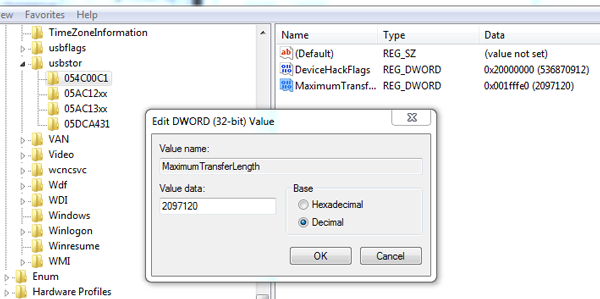
Thanks I will tru that also. Is it safe to have all these changes I've been suggested active at the same time or should I brvtrying these solutions 1 by 1? Is he issues I'm experiencing just a windows 10 problem or can 7 and 8 be the same? I'm thinking about reverting to win 7 if I can't solve the problem.
Thanks I will tru that also. Is it safe to have all these changes I've been suggested active at the same time or should I brvtrying these solutions 1 by 1? Is he issues I'm experiencing just a windows 10 problem or can 7 and 8 be the same? I'm thinking about reverting to win 7 if I can't solve the problem.
Hi,
Stay with Windows 10 and try thos different soluces separatly. it's 1803 version ?
I use WIndows 10 and DDJ-1000 without issues, but with CPU tweaks, and in my cases, it's work like a charm.
:)
thanks i'll try those suggestions. Not running on 1803, for some reason my laptop wont update to it keep getting error. ill try update again tomorrow failing that ill be calling the shop my laptop is from and returning it, its meant to be refurbished with a clean 10 install so should have no problem updating.
any idea why my laptop wont update to 1803 lol

Hi Marc, I am just wondering did you find any solution that worked for you in the end? I am having a similar problem (more regular, approx every 20-30 seconds) and would love to hear any suggestions to resolve it. Thanks.

1. How do you guys change the latency? (Win 10)
2. Should the DDJ 1000 be connected via USB 2 or 3?
@Luke > The latency (buffer) slider is in the rekordbox preferences.
It doesn't matter; the device is USB2.
OK, cool - thank you.

I have the same problem at 01.08.2020 with last update....
Please help me!
@Stefano > Please try the solution here.
Already tried... Already tried everything...
@Stefano > I'll ask you to please file an inquiry ticket here and our support team will gather some additional information to assist you in resolving this issue.

I had same Issue.I uninstal rekord box and audio driver then download both again. Rekordbox 5.xxx then update. After all Install audio driver for ddj1000 and that glitch sound stop
Thanks, I'll try

