
It worked when clicked and "marked" the "Master". Not only choose it. Need to be "marked".
So nice feature! Thx Pioneer DJ! =)
Comment actions
Hi
I have installed the 5.4.0 RBDJ and also updated my driver for my DDJ-RZ but I can not see any Traffic Light feature!?
I have marked the deck and tested diffrent decks and also Master-deck choice.
Is there any settings I am missing!? I have checked the preference every part, but can not find any setting for it.
I do not see any Traffic Light feature in my playlists...
Please help
Thank you in advance
Post is closed for comments.
It worked when clicked and "marked" the "Master". Not only choose it. Need to be "marked".
So nice feature! Thx Pioneer DJ! =)

How did you mark it?
For me traffic light is not visible too, but deck itself shows up as Master.
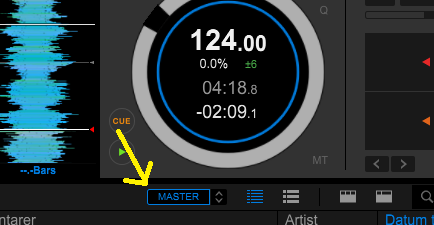
Click on the "button" between of the small arrows up and down were you choose master deck. If you for example have choosen "MASTER DECK - Traffic Ligt" and marked it in the dropdown menu. Then there says "MASTER" on a "little button" beside the arrows.
Click on the "Little button/Text" that says "MASTER" and it will turn blue.
Now it works. It is an "activation" for the feature.
Not so intuitive I could think. But the feature is supreme!! =)
Look at attached image. =)
Just click on it and it will get "activated".
Ok, thx, got it...
It is not "Master" selector on the deck but "Master" selector on the track browser.
No problem.
Not so intuitive but when you know it... you know it! =)

It worked. Thank you very much.
Questions: How do you get the tracks played highlighted so I can visually see what I already played in my set. It use to do it automatically and now it doesn't with the new update. Can't figure it out.
Great, thx for your words.
Regardning your other question I found that function in the Settings under "View/Browse". It seems to be called "Coloring of played tracks". Try to reset it and restart. It should work.

