Official comment
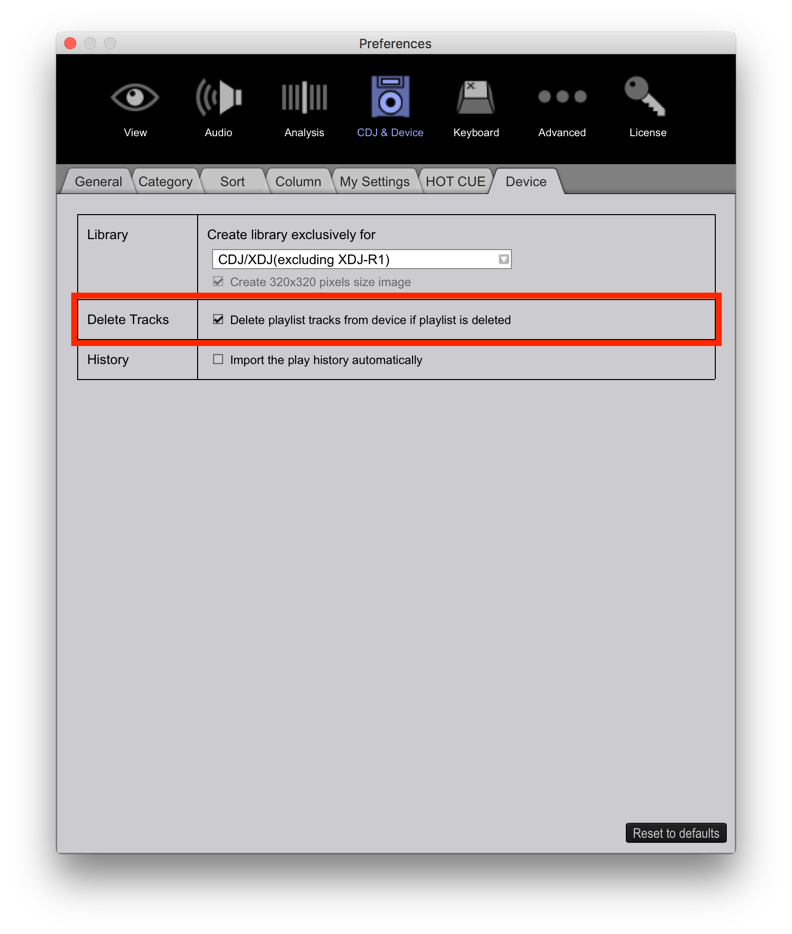
If you remove it from a playlist, it doesn't remove it from the device because it may still exist in another playlist or you may still want it on the device (for general play). The closest option you have is:
Hi all,
I have a question about the Sync Manager of Rekordbox. For the few versions that I have been using Rekordbox, Sync Manager never actually synced my playlists. It adds tracks, but it doesn't remove the ones that I've removed from the playlists. I don't use iTunes by the way, I've made my (intelligent) playlists in Rekordbox and export them to USB. Am I missing something here?
If you remove it from a playlist, it doesn't remove it from the device because it may still exist in another playlist or you may still want it on the device (for general play). The closest option you have is:

Post is closed for comments.
Thanks for your reply. You're saying it doesn't remove the track from the device because it may still exist in another playlist, but the fact is that the track does not exist in another playlist. Also, if my desire is to remove the track regardless of which playlists it exists on, then this is not possible? Can't the sync manager be designed in such a way that it detects that I have removed tracks, and upon syncing confirms that these tracks should be deleted, either completely or from specific playlists? I don't know how other users use the sync manager, but only then it would become usable to me.
@Leon > That checkbox would be the option you want -- to remove it from the drive if you delete the playlist.
Hi there,
I'm sorry for digging up a very old topic, but the option you mentioned does not have the desired result. Ideally I would like to be able to sync any changes made to my tracks in Rekordbox. Right now, it doesn't delete any removed files and it doesn't update any metadata that I've changed. Am I wrong in expecting a sync feature to do just that - syncing changes made to content in Rekordbox to the USB contents? Thank you.
Are you using the sync manager or exporting?
Hi there,
As stated before, I am using sync manager.