Have a feature request or suggestion? Post your idea here!

Post

3 followers Follow
0
Avatar

How to use an external HDD to store my collection and playlists, without having to import/export to pc/laptop

Hi,

A couple of months ago I took on the arduous task of moving my master database to an external HDD, as I would be travelling and needed to be able to work from my laptop instead of my desktop pc. 

Long story short, everything got messed up and now in the same playlist, my files apparently are on 3 different locations.

Now I believe one of the reasons things got messed ups is because Rekordbox recognizes my external HDD as a device. Why is that a problem? Because if I want to update the playlists on my external HDD (which also has the master database on it), and then I want to export those playlists to a USB stick that I can use to play with in the club, I first have to import the playlists from the external HDD to my laptop/pc, and then export that playlist to my USB sticks.

Why is that a problem? Because the file locations get changed and my music gets lost.


What do I want? I want a really simple solution and I really hope it is already there but I simply have not found it.

1) I want to be able to use my external HDD as my Master Database, as well as the place with all my music collection as well as the place where I have all my playlists

2) I want to be able to export the playlists that I create on the external HDD, without any problems, to a USB stick that I can use to play with in the club.

What is the best way to go about this? Is this even possible? If not, what would you advice me to do? 

Deep Filip

Post is closed for comments.

8 comments

0
Avatar

It's not a problem at all, unless you're using rekordbox 4.

I use an external SSD as my master database AND music storage location. I can use that same SSD or another USB drive as an export device (which I often do, so I don't have to take the master drive with me to events).

The beauty of rekordbox 5 is it no longer exports a duplicate to the drive if that drive is also the source; it simply links a pointer to the original file.

My suggestion is first to clean up your collection to ensure everything is on the external drive so you could move between computers and have the same collection of music everywhere that drive goes. Move the physical audio files from the internal to the external, then use the mass-relocation tool to point the database to the new location of those songs.

Pulse 0 votes
Comment actions Permalink
0
Avatar

Thanks for your response. I am on the latest rekordbox version, 5.4. 

I am not sure if we have understood each other completely.

1) I have my master database AND all my music on my external harddrive

2) I have pointed (relocated) all my tracks to the external harddrive


Now one of the problems that I am having is that both my laptop and desktop pc recognize the external harddrive as an external harddrive (device). This seems to be logical. 

However, due to the fact that the external harddrive is recognized as a device, I cannot directly export playlists from the external harddrive to a USB. I first have to import the playlist to my laptop/desktop pc, and then export that playlist to a USB. 

This creates a couple of problems and when I then want to connect the external harddrive and USB to another laptop, the playlists are not being recognized anymore, due to the obligatory import of the playlists from my external harddrive to the other pc/laptop. 

I hope I explain myself better now and I wonder how I can best approach this challenge?

Deep Filip 0 votes
Comment actions Permalink
0
Avatar

Is there anyone from Pioneer who could help out please?

Deep Filip 0 votes
Comment actions Permalink
0
Avatar

Please guys, I have a gig soon, I need to fix this issue ASAP

Deep Filip 0 votes
Comment actions Permalink
0
Avatar

Are there any Pioneer hero's or master engineers who could help me out with this issue? Would be much appreciated guys

Deep Filip 0 votes
Comment actions Permalink
0
Avatar

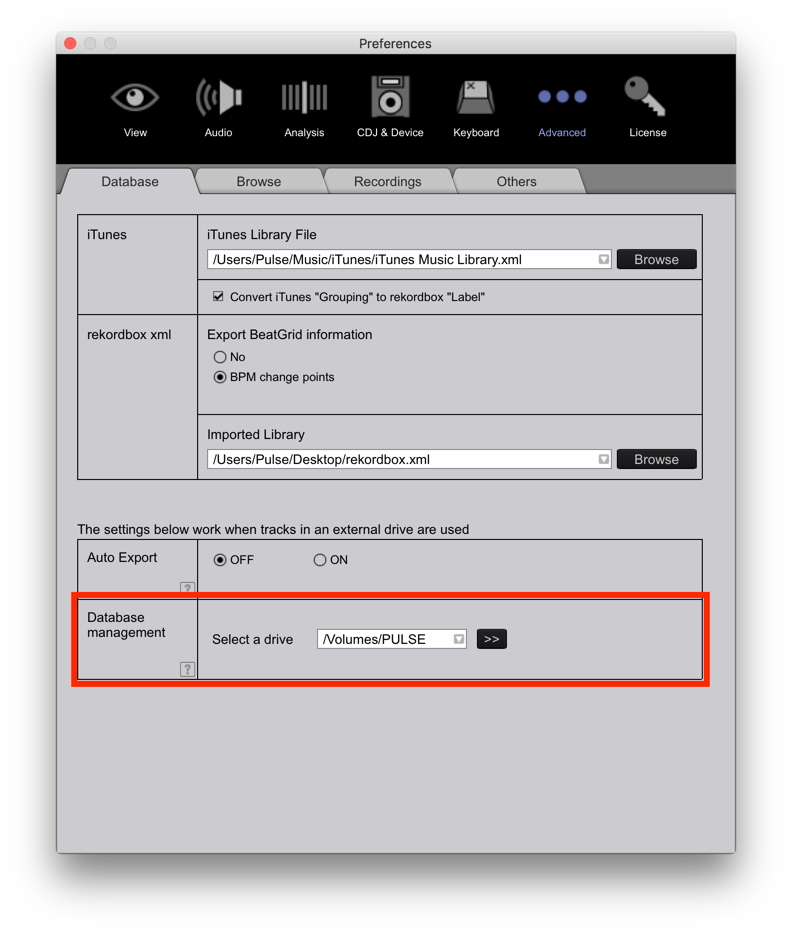
@Deep Flip > When you connect your MASTER DATABASE to another computer and want to load it as the master, you need to select that within the rekordbox preferences:

It will be the source of your collection as well as visible as a device.

If you don't do that, it will ONLY be available as a device, and if you haven't previously exported anything to it, no content will show.

Pulse 0 votes
Comment actions Permalink