Have a feature request or suggestion? Post your idea here!

Post

3 followers Follow
0
Avatar

Mapping DDJ1000 sample volume knob to crossfader curve setting.

Mapping DDJ1000 sample volume knob to crossfader curve setting.


Is this possible? I read a post on here a while ago and someone said it could be done, and it seems like a better use of the knob for me. 

I've got as far as the midi maps but not sure how to progress. 


Cheers

Chris Weeks Answered

Official comment

Avatar

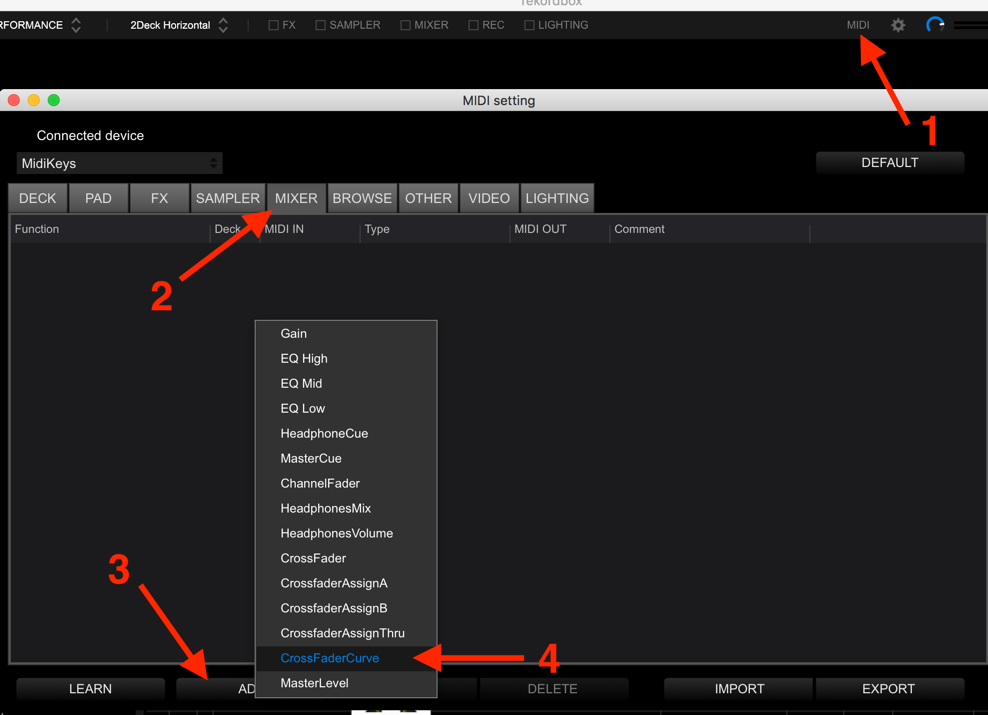
1) Open MIDI

2) Select MIXER

3) Click ADD

4) Click CrossFaderCurve

5) After it's added to the list, click LEARN

6) Turn the knob you want to use. It may tell you it's in use; go find that entry in the SAMPLER tab and delete it.

7) Go back to the MIXER tab and select the CrossFaderCurve again, then turn the knob.

8) Once it's saved, click LEARN again to disable it.

9) Close the MIDI panel.

Pulse
Comment actions Permalink

Post is closed for comments.

3 comments

0
Avatar

This was really helpful. Been looking for this almost a year. 

Thank you.

Shabba 0 votes
Comment actions Permalink