Official comment

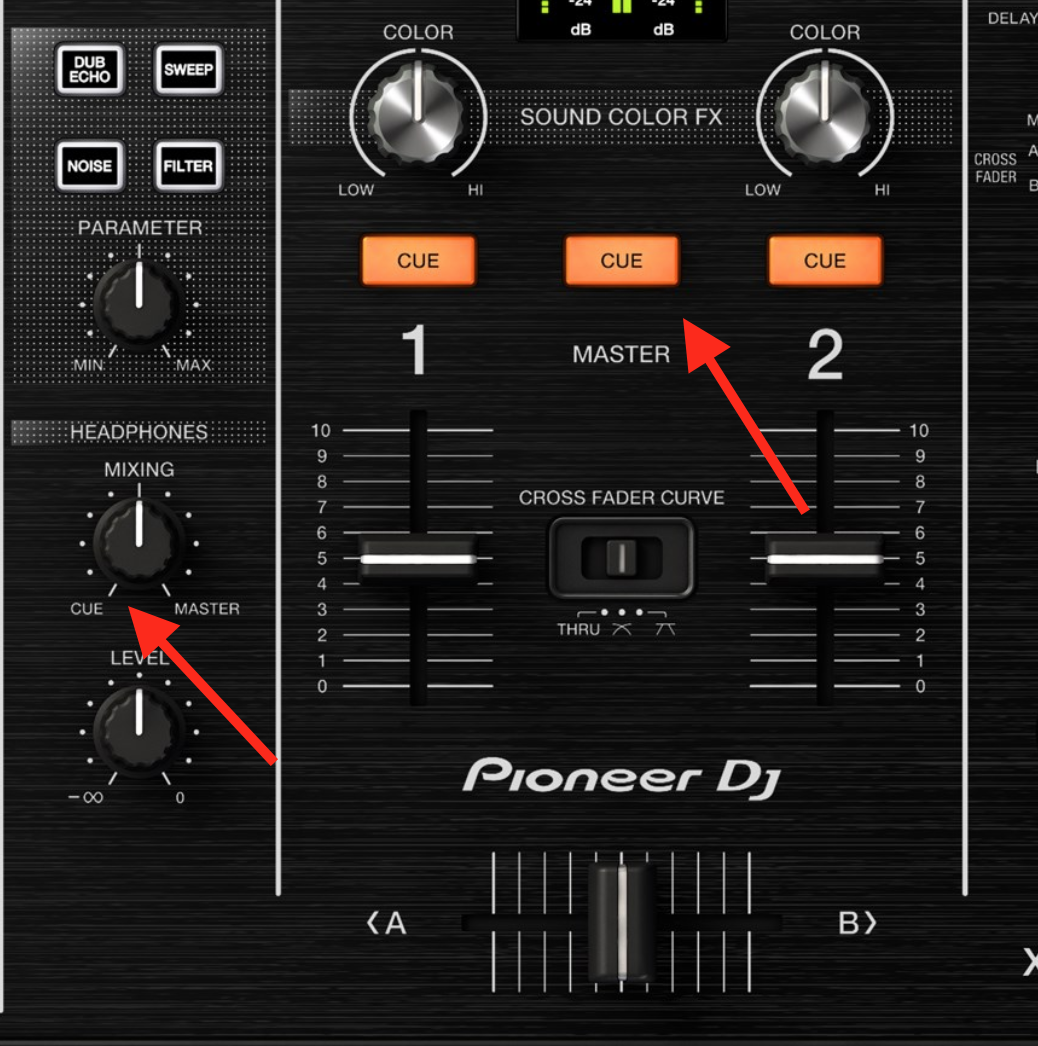
Either press the master CUE button to disable that preview, or turn the headphone mix knob over to the CUE side.


Comment actions

Hi there, I have recently upgraded to an xdj RX2 controller. I am playing at a lot of events, weddings etc and I want to use a line in to play people’s playlists on Spotify/iTunes etc. However I don’t want it to continuously play as I like to mix in tracks on Rekordbox on the other channel and back again etc. The issue is when I want to cue in the line in channel I can hear both the currently playing track AND the line in music at the same time. I want to just hear the line in sound, how do I eliminate the other channel when cue ing up the line in? Thanks
Either press the master CUE button to disable that preview, or turn the headphone mix knob over to the CUE side.
Post is closed for comments.
Hi, thank you for your quick response however i have tried both of those options and still i hear the other deck playing in my headphones. Is it because the other music i have is playing on my laptop and is there a setting in Rekordbox to change for this or do i need to change the device i am playing a playlist on to something like my phone or ipad etc?
Thanks again!
If you're playing from an application using the RX2 as the audio device, such as iTunes, it doesn't have the preference to route the audio through a channel; it's direct to master, so you have no control over it. There's nothing you can do with that on the hardware or rekordbox to change it. I'd suggest not using those applications and sticking with a DJ application instead.