Have a feature request or suggestion? Post your idea here!

Post

2 followers Follow
0
Avatar

Recovering music from an export device. To Copy, or not to copy?

I recently had to restore my DJ collection using my Rekordbox formatted USB drive.

It's a simple process, and I very thankful the feature exists now.

When you choose to import, it asks you to select location (default file path is chosen first) and then you can choose to copy, or not copy (importing only)

If you chose to not copy, and only import the songs into your collection, where would the file data be?  Would you be able to play the songs?  Or would RB say that the file is lost, and ask you to point it to the file location?

thanks!

J


beatsnbikes Answered

Official comment

Avatar

If you don't copy, the USB drive exists as the source drive and must be connected any time you want to play that music within rekordbox. The data file is located internally, but you could then move it to the export device.

Pulse
Comment actions Permalink

Post is closed for comments.

8 comments

0
Avatar

Thanks Pulse.


So, I copied my library from USB back into Rekordbox, and all of my playlists fell into place, but not of my cue points made it over. 

So you have all info, my computer crashed and I had to do a fresh install of OS, which wiped everything out (without backup)

Essentially I am pulling the library from my USB onto a new system.

Any help is appreciated!

beatsnbikes 0 votes
Comment actions Permalink
0
Avatar

Let's rewind... what exactly did you restore -- was it a backup that you created from rekordbox? Or was it just an export drive you used with players?

Pulse 0 votes
Comment actions Permalink
0
Avatar

Hey Pulse,  never heard back from you on this.

Just wondering if there is something I can do import my collection from the export drive I use with players, and still retain all of the cue point information?

The playlists all came into place, but no luck with cue points.

beatsnbikes 0 votes
Comment actions Permalink
0
Avatar

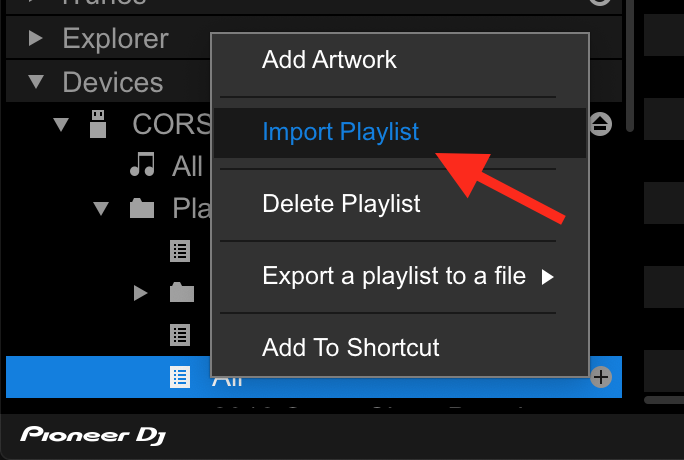
My recommendation would be to create a new playlist on the device (call it All), then drag all of the songs under the device's All Tracks listing to that playlist. Next, right-click on the All playlist, and select Import Playlist:

That will import all of the songs, their waveforms, and any hot cues / loops you have stored on them. Be careful of the tags tho, if that's not the collection you normally sync with, they will be lost or converted.

Pulse 0 votes
Comment actions Permalink
0
Avatar

Thanks for the reply.  I tried your suggestion.  When the 'ALL' playlist import was complete, there were more cue points saved than any other time I tried before, but still not all of them.  So I wiped clean and tried again, three different times, and by the third import there were hardly any cue points saved at all.  It seemed to be less effective with each attempt.  Feeling like I should've just stuck with the first try, but I was really hoping I could get them all.  Seems like there is no rhyme or reason as to why it saves certain track information one time, and not another.

beatsnbikes 0 votes
Comment actions Permalink
0
Avatar

Hey Pulse,  just checking back to see if you might have any other ideas.  Appreciate the help!

beatsnbikes 0 votes
Comment actions Permalink