Official comment

Yes!


Comment actions

What are the hotkeys to nudge songs forward or backwards in Rekordbox? Just nudging, not changing the bpm. In serato the left deck had TY and the right deck being GH. The longer you hold the key the track would slow or speed up exponentially. In the slower until the track actually stopped.
This feature particularly comes in hand when using internal mode where you didn't have a platter on a deck to nudge or brake. Also when you had someone trying to talk to you in the booth while you are DJing and you need to keep the blend on beat.
Any help is appreciated. If these nudges are mapped to the DDJ-XP1 please let me know where to find that as well as the laptop keyboard.
Yes!
Post is closed for comments.
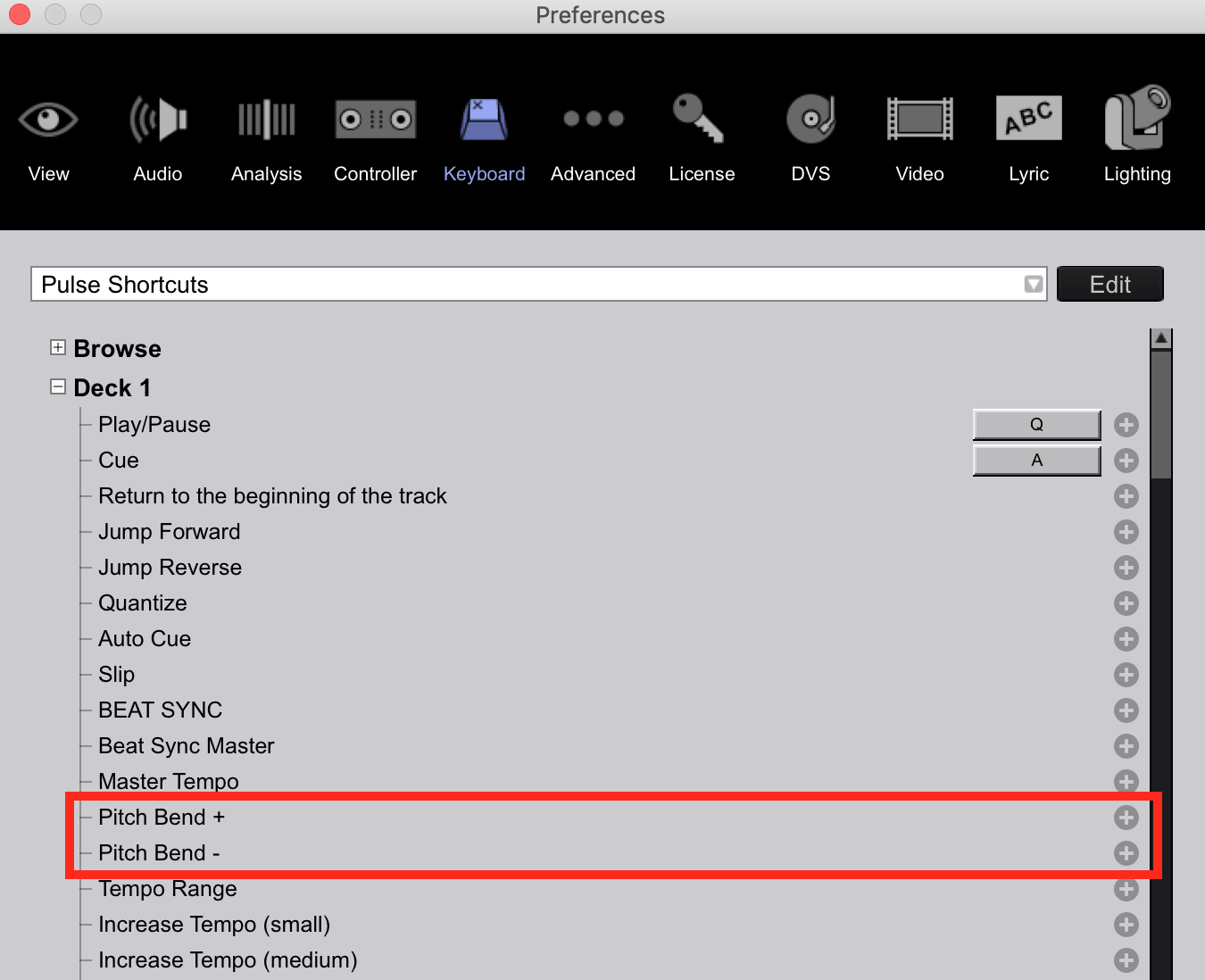
In Rekordbox I went to the hotkey section like you showed above and saw that "E" and "W" were the keys for the 1st deck to pitchbend up and down. One thing that I noticed is that these hotkeys do not work in relative mode. Is there a reason for that? That was a huge feature in Serato that I used in every set. I'm sure others could and would benefit from this. Especially open format DJs that might have to keep a blend while someone is talking to them or trying to make a request.
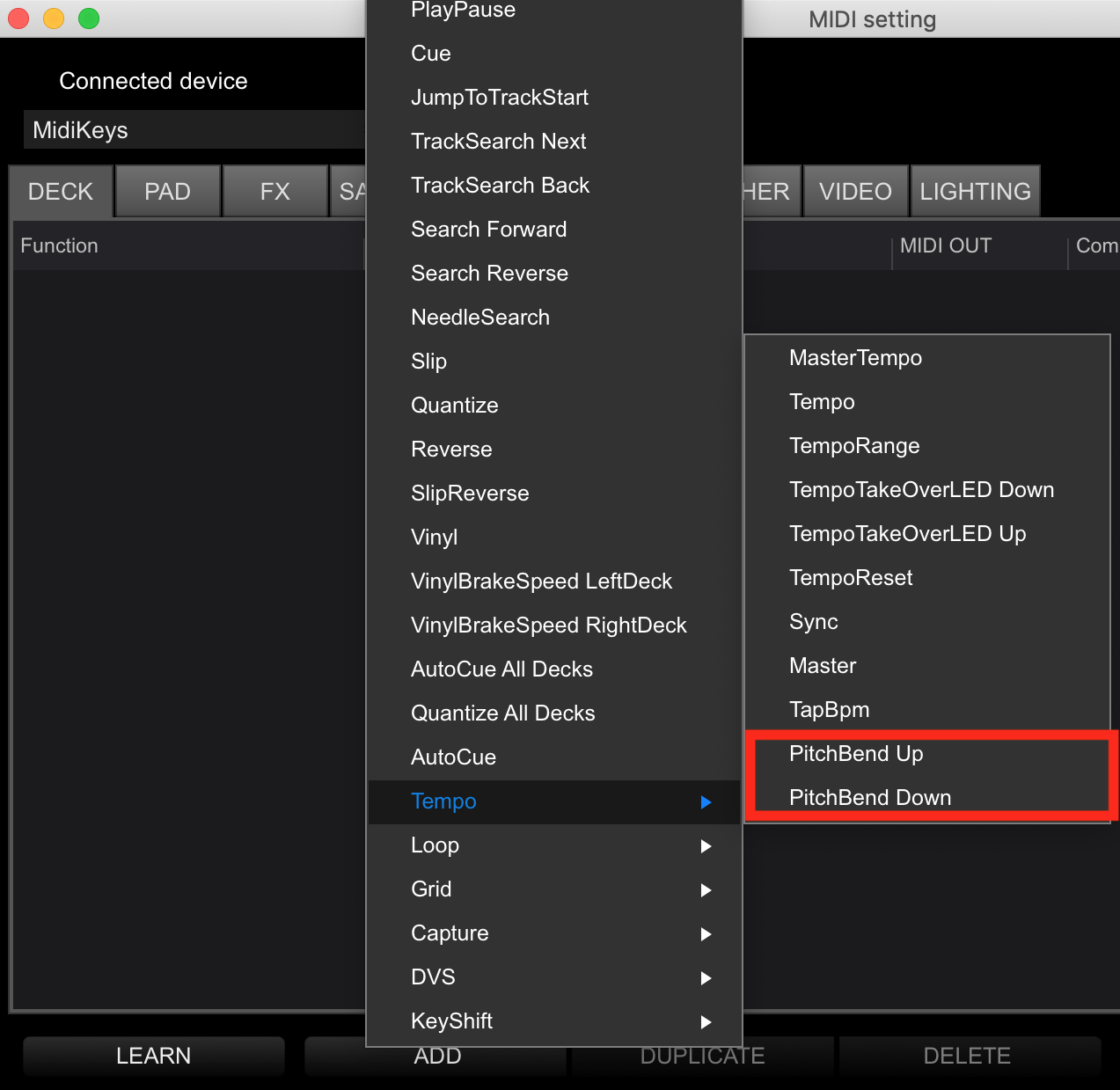
What was the second image you showed me here? It looks like a midi setting. Is there an app to midi edit the DDJ-XP1 or do I have to do that within Rekordbox Performance?I haven't edited anything on the xp1 or Rekordbox as I'm very new to using Rekordbox performance.
Ok, I see the pad editor using the "pad" button at the top of Rekordbox next to the MIDI button. However, when I click on the pad button to edit it does not give me any way to do so on the pads. I tried clicking and right-clicking but nothing happens.
I'll check today about pitch bend while in DVS mode (you didn't mention that).
The first screenshot is the keyboard shortcuts (as you can see, mine are unassigned). The second screenshot is the MIDI editor, where mine is blank. You'd have to first ADD > Tempo > PitchBend Up, then click LEARN and press the button on the controller you want to map.
After a bit more investigation, those aren't exactly pitch "bend" commands, which is why they don't work in DVS mode; they're actual pitch change. I'll be passing this along to our rekordbox team.
Wanted to bump this as I am really hoping this will get added. I've had a few instances where it would have really helped me out.
Trying to see if there is any progress on this. Essentially it would be 8 hot keys. For each of the 2 decks there would be a pitch up & down then pitch bend up & down. The pitch bend would be like pushing or braking the platter, nudging it without changing BPM. This would work in both internal and relative mode.
Then the regular pitch keys for each side would actually change the bpm. This feature would work for internal mode and not in relative. If you need me to give any more information or elaborate then please let me know.
@Zebo > Unfortunately this is a relatively low priority item as you are the first (and only) one requesting it. It's on the list, but I can't say if/when it would be added.
I appreciate the info and honesty here. I am surprised that I'm the only DJ asking for it. I will check here periodically to see if there are any updates. Thank you.
I did some playing around it is an actual nudge or "bend". I'm referring to the W E & I U hotkeys you mentioned before. They only change the BPM when you add the shift button to it. I hope this helps in some way. The bend works really well in internal mode.