Have a feature request or suggestion? Post your idea here!

Post

5 followers Follow
0
Avatar

Serato mapping broken on DDJ-SB3

Hello,

So, this is weird. I've been using the DDJ-SB3 with both Serato Pro and Virtual DJ for a little over a month. I've used it on both a laptop and desktop and everything was great. Today, I decided to not use the desktop anymore, and moved the controller back to the laptop. Now, the controller acts as if all the mapping has changed.

Example: The button to load a song into deck 1 now sorts the music library by bpm.

Example: The play/pause buttons plays the track, but doesn't pause, just goes to the head of the track and starts playing again.

Example: Pressing FX1 only scrolls through the FX instead of activating it.

And the very weird thing is it's now behaving the exact same on the desktop I just took it off from. I even tested my MacBook Pro and it's doing the same thing there. It is also doing weird mapping things in Virtual DJ, but in different ways.

Sooo, help? Any ideas. I made sure the firmware is up-to-date, tried different USB cables. As I said, tried different systems with the same results.

Any advice would be awesome!

Thanks!

ingramworks

Post is closed for comments.

12 comments

0
Avatar

If the controller is behaving erratically on different computers with different cables and different software applications, then things do point to the controller being the source of the problems, but just to be sure, let's try some signal troubleshooting...

Download this app for your Mac.

With your SB3 connected and the app running, configure your environment as such:
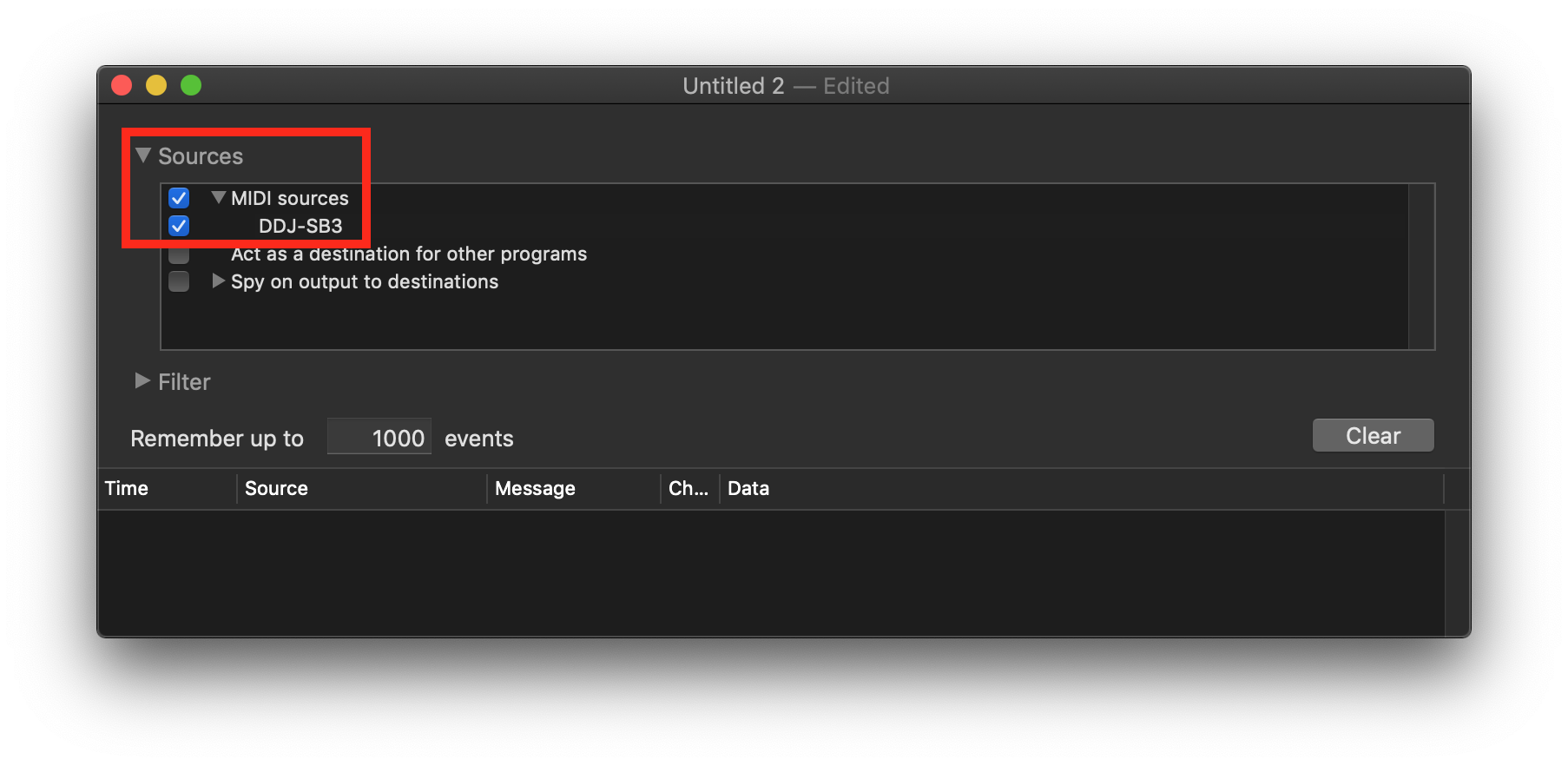
And open the preferences to change your settings to match:
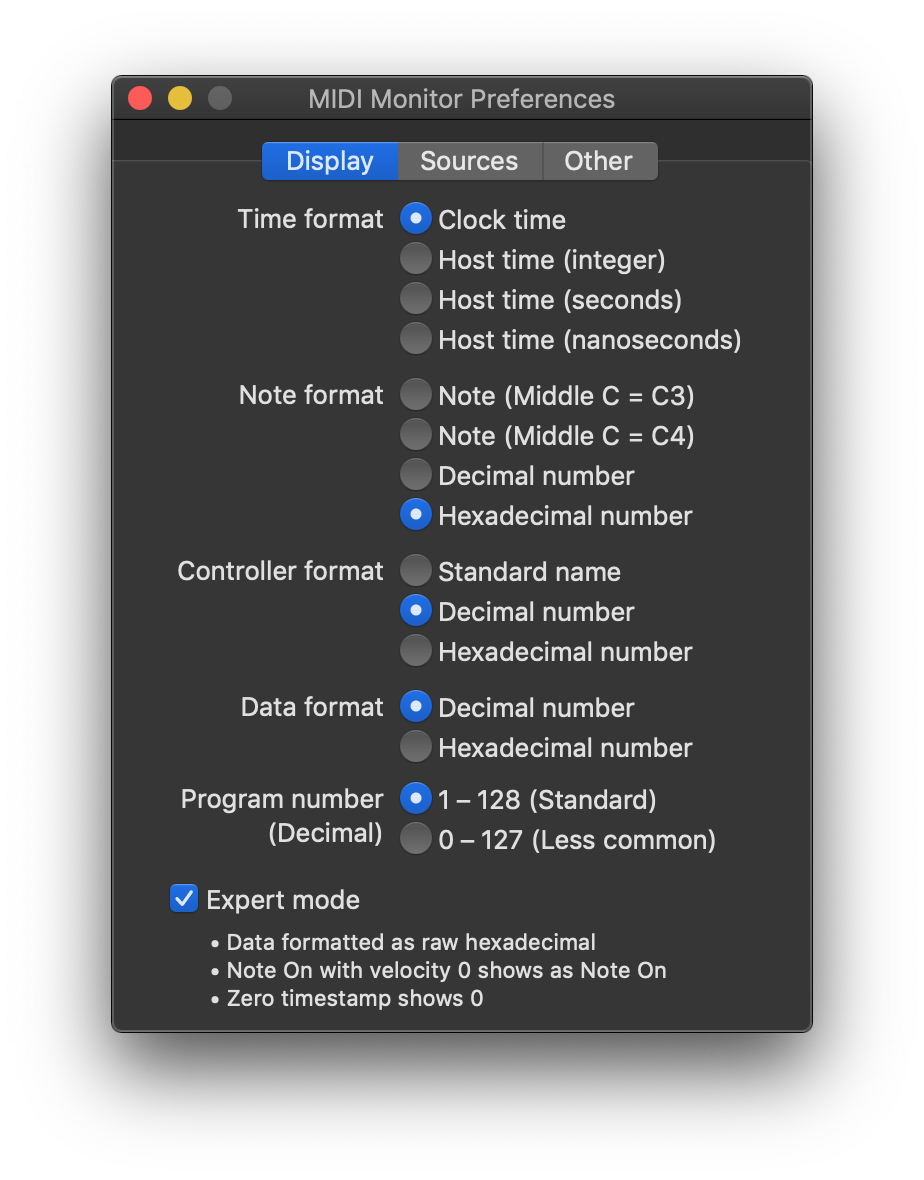
Next, press these buttons in this order:

- CH1 LOAD
- CH1 HOT CUE
- CH1 FX 1
- CH1 CUE
- CH1 PLAY

You should see these values appear in the log window:
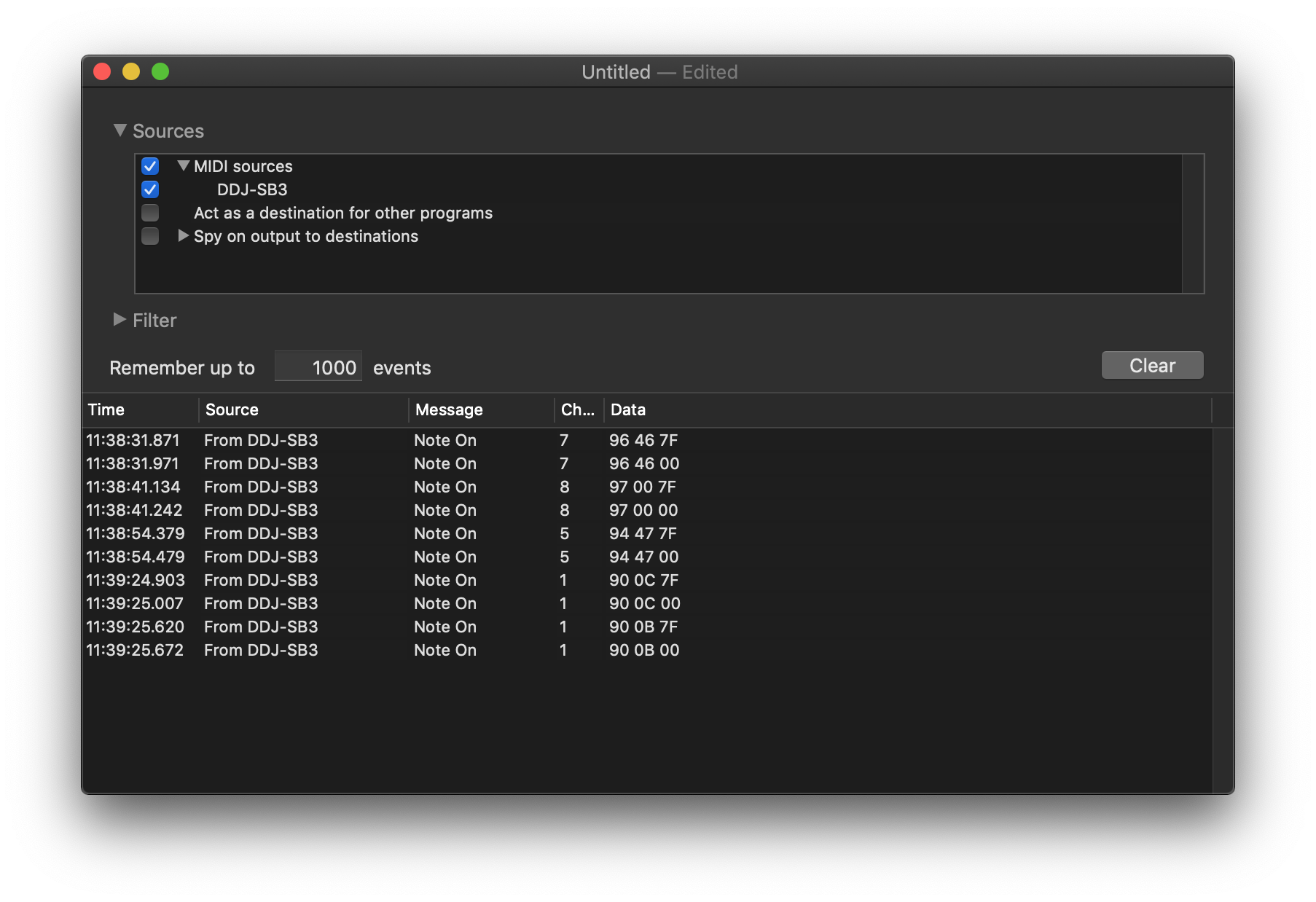
Repeat the process with the same buttons on CH2:

- CH2 LOAD
- CH2 HOT CUE
- CH2 FX 1
- CH2 CUE
- CH2 PLAY

You should see these values:
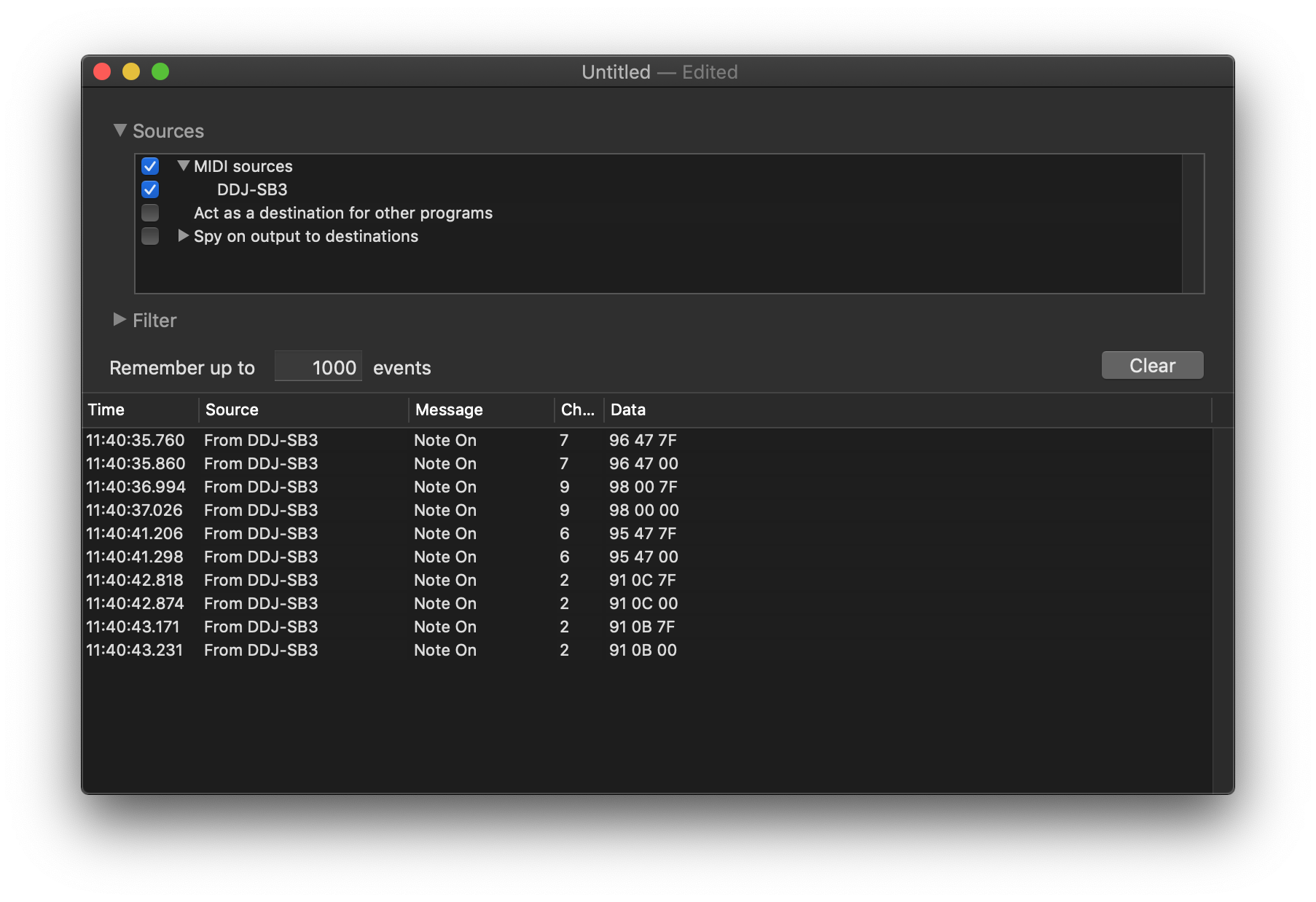
If your values do not match those shown above, then there's likely to be a hardware problem, but we can try narrowing things down by resetting the MIDI device within the OS. First, quit MIDI Monitor, then open the Audio MIDI Setup app, and open the MIDI Studio window from the menu:

Click the drop-down at the top of the window and select "New Configuration..." - give it a name and click OK.

You should see your DDJ-SB3 there, and nothing else (except maybe the IAC Driver):
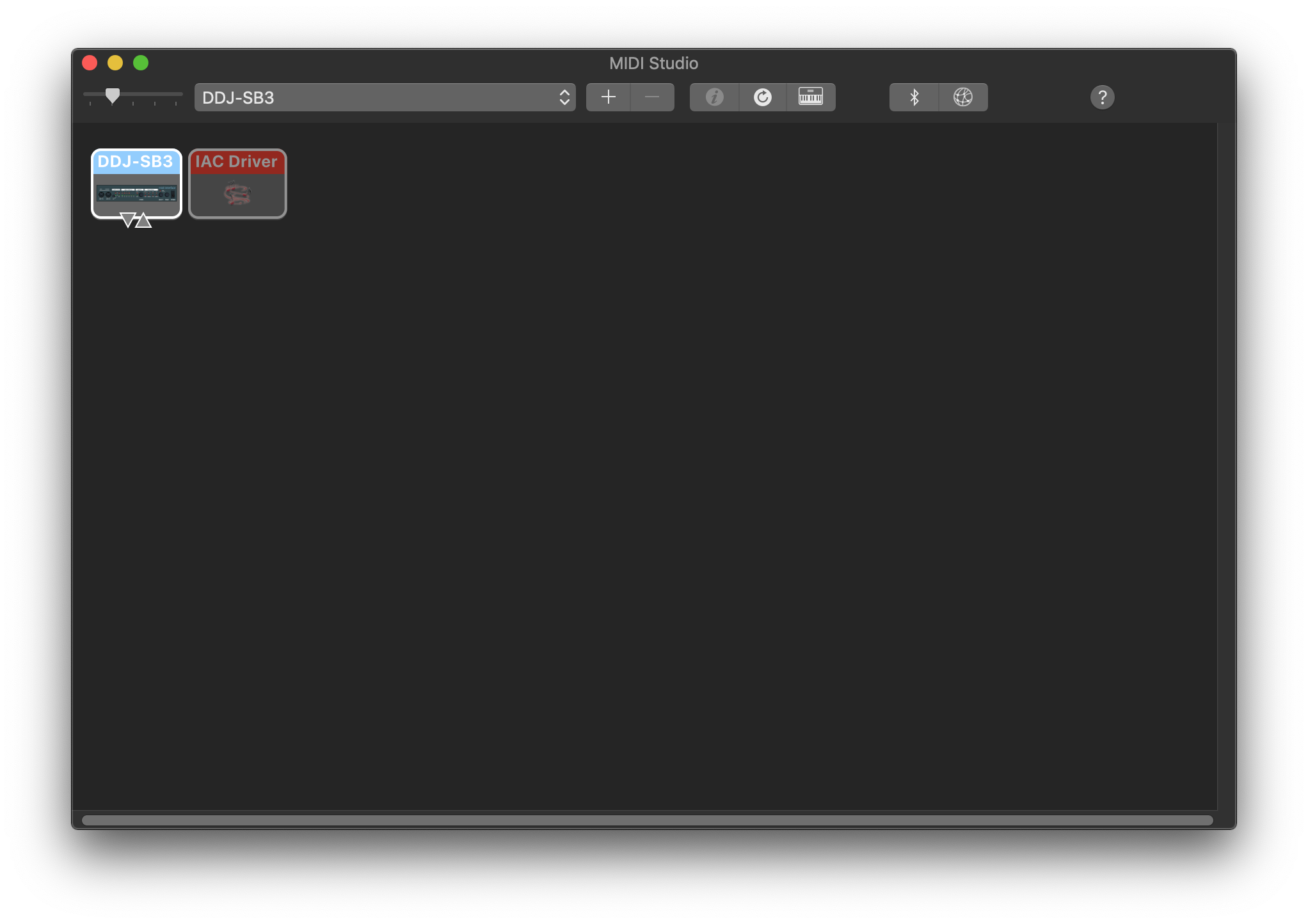
Open the MIDI Monitor app again and see if the values match what I posted above. If they do, please test using your DJ software again and let me know how things go.

Pulse 0 votes
Comment actions Permalink
0
Avatar

Hello,

Thanks for responding! I ran the software as you directed and yes, the values are different from your examples. I've pasted my results below:

CH1

19:25:21.019 From DDJ-SB3 Note On 7 96 58 7F
19:25:21.174 From DDJ-SB3 Note On 7 96 58 00
19:25:25.458 From DDJ-SB3 Note On 1 90 69 7F
19:25:25.670 From DDJ-SB3 Note On 1 90 69 00
19:25:30.090 From DDJ-SB3 Note On 5 94 63 7F
19:25:30.258 From DDJ-SB3 Note On 5 94 63 00
19:25:36.086 From DDJ-SB3 Note On 1 90 48 7F
19:25:36.266 From DDJ-SB3 Note On 1 90 48 00
19:25:47.574 From DDJ-SB3 Note On 1 90 47 7F
19:25:47.739 From DDJ-SB3 Note On 1 90 47 00

CH2

19:26:54.730 From DDJ-SB3 Note On 7 96 59 7F
19:26:54.914 From DDJ-SB3 Note On 7 96 59 00
19:27:02.586 From DDJ-SB3 Note On 2 91 69 7F
19:27:02.758 From DDJ-SB3 Note On 2 91 69 00
19:27:17.277 From DDJ-SB3 Note On 6 95 63 7F
19:27:17.417 From DDJ-SB3 Note On 6 95 63 00
19:27:21.645 From DDJ-SB3 Note On 2 91 48 7F
19:27:21.801 From DDJ-SB3 Note On 2 91 48 00
19:27:28.914 From DDJ-SB3 Note On 2 91 47 7F
19:27:29.078 From DDJ-SB3 Note On 2 91 47 00

I went through the steps in Audio MIDI Setup and the results were the same.

So, from what you've said, a hardware issue seems likely. What would my next steps be?

Thanks!

ingramworks 0 votes
Comment actions Permalink
-1
Avatar

Let me pass this up to the engineers and see if they have any suggestions ... the functions are all working, just transmitting the wrong signal.

Pulse -1 votes
Comment actions Permalink
0
Avatar

Is there an answer to this? Having the same exact issue.

Eddie Acosta 0 votes
Comment actions Permalink
0
Avatar

Hi Eddie,

I ended up having to take my deck to get repaired. Not sure what it was, but I'm pretty sure they replaced the logic board on the deck.

ingramworks 0 votes
Comment actions Permalink
0
Avatar

Hey Ingramworks, Do you think you can direct me to where I may be able to get my controller fixed?

Jonathan Naraja 0 votes
Comment actions Permalink
-1
Avatar

@Jonathan > The most common cause of controller problems with bus-powered devices is they aren't receiving adequate power from the host. Before considering servicing, please try using a different USB cable, a different port, or a powered USB hub.

Pulse -1 votes
Comment actions Permalink
0
Avatar

@Pulse I own an SB3 and it works perfectly fine but when I use my girlfriend's this issue occurs. Is it possible to get it serviced? By the way, I tried what you recommended  but it still did not work

Jonathan Naraja 0 votes
Comment actions Permalink
0
Avatar

I’m also having the exact same issue with my ddj-sb3. I’m using my controller on a windows computer but I’m assuming this is a hardware issue. How would I go about getting this repaired and where do I to a take the controller to get it fixed?

Liam Eldering 0 votes
Comment actions Permalink