Did you follow the instructions to allow the driver to be fully installed?
Comment actions

ok so I just did a quick format on my Mac wiping everything. I installed Traktor scratch pro latest version.
I'm running Mojave Mac OS.
I downloaded djm 900 version 1.32 driver. when I click on the install button it says waiting from djm 900 connection. which is plugged in.
ive disabled bluetooth I've disabled all other network connections also. I have no clue why this is happening
Post is closed for comments.
Did you follow the instructions to allow the driver to be fully installed?

ive tried every step. is 1.32 driver good for Mac Mojave?
its asking me to uninstall the driver. how do I do that?
NOTE: If [Allow] button is NOT shown in [Security & Privacy], you must reinstall the driver by following the steps below.
2.2. How to reinstall the driver software 2.2.1. Uninstall the driver software
1) Remove your equipment from your computer.
2) Download the installer of your equipment from Pioneer DJ support page.
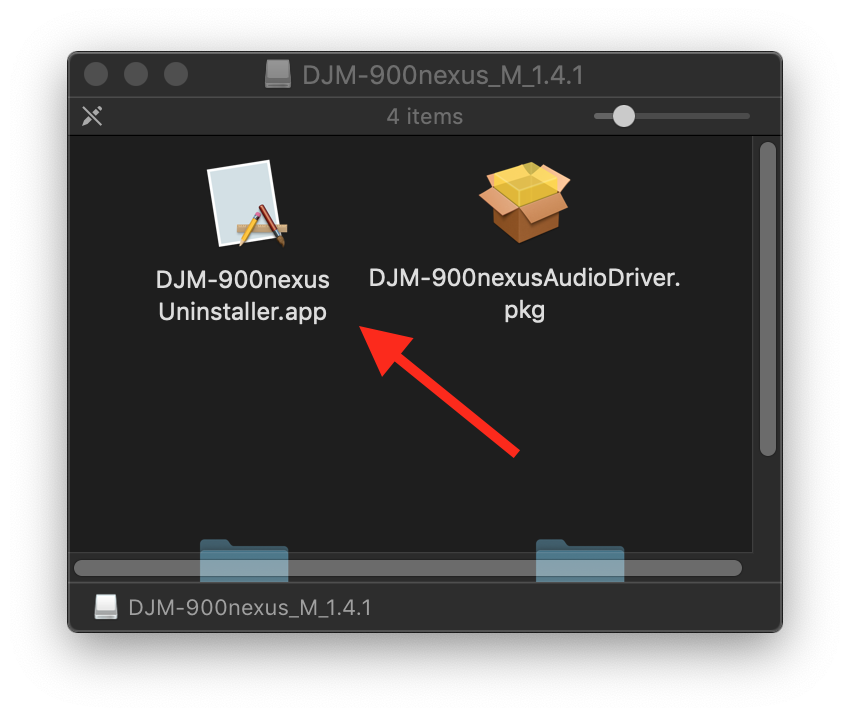
3) Unzip the downloaded file [XXXXX.zip] and double-click the unzipped .dmg file [XXXXX.dmg]. 4) Double-click [XXXXX Uninstaller.app] in the mounted disk image to start.
Follow the instructions on the screen. Be sure to reboot after uninstallation.
You uninstall by opening the driver zip file, there is the UNINSTALLER within the DMG disk image: