Have a feature request or suggestion? Post your idea here!

Post

2 followers Follow
0
Avatar

Relocating missing files HELP!! PLEASE!!

So I have searched topics and tried all of the ways to relocate "missing files" with NO LUCK. I have dropped down the FILE tab, clicked on display missing files. Then I have tried finding the 1st one, like stated in other posts...Doesn't work.  I have also clicked on display missing files from the FILE tab and tried to relocate all of the highlighted files.... Doesn't work.

Dear God please someone help me with this.  I have over 10,000 tracks on rekordbox and this has been a constant problem with me.  If I can't get this issue figured out I'm totally considering being officially done with Pioneer and making the switch to Denon and their platform.

ANY help would be GREATLY appreciated.

Thanks

matthew-j detroit

Post is closed for comments.

8 comments

1
Avatar

Hey there, we can certainly get things fixed for you - but before we get going, please don't open/close rekordbox!

Go to this folder:

Win 7/8/10: C:\Users\yourusername\AppData\Roaming\Pioneer\rekordbox
OSX: /Users/yourusername/Library/Pioneer/rekordbox

...and copy these files:

datafile.edbdatafile.backup.edb, datafile.backup2.edb,datafile.backup3.edb

...to a safe place (not in that folder).

Now we have a backup, let's figure out why your music is missing!

- Where was it located? Internal / external drive?

- Was it managed by iTunes at all?

- Have you moved or deleted the files anywhere?

Pulse 1 vote
Comment actions Permalink
0
Avatar

I have OS X and I've tried to follow your steps, but when I get to USERS, then My Name, I can select PIONEER DJ, then I see nothing about rekordbox. I see nothing in regards to those files you want me to copy....????

I've searched my computer for files that are similar, like datafile.edb datafile.backup.edb etc. none of those are located....????

I'm stuck :-(


matthew-j detroit 0 votes
Comment actions Permalink
0
Avatar

The Library folder is hidden; go to it directly:

From the menu bar, click Go > Go to Folder... and paste in ~/Library/Pioneer/rekordbox/

Pulse 0 votes
Comment actions Permalink
0
Avatar

I have done what you directed me to above and no folder is found. nothing is found when I paste that in :-/

matthew-j detroit 0 votes
Comment actions Permalink
0
Avatar

There's nothing in that folder at all? Can you tell me if you had your database stored on an external hard drive?

Pulse 0 votes
Comment actions Permalink
0
Avatar

No, nothing in that folder at all with any of those files you stated in the first response.  Yes, I have stored all of my music on an external HD.  I had it plugged in yesterday while trying to use rekordbox and was still getting the files missing alert.  What should I do now?

matthew-j detroit 0 votes
Comment actions Permalink
0
Avatar

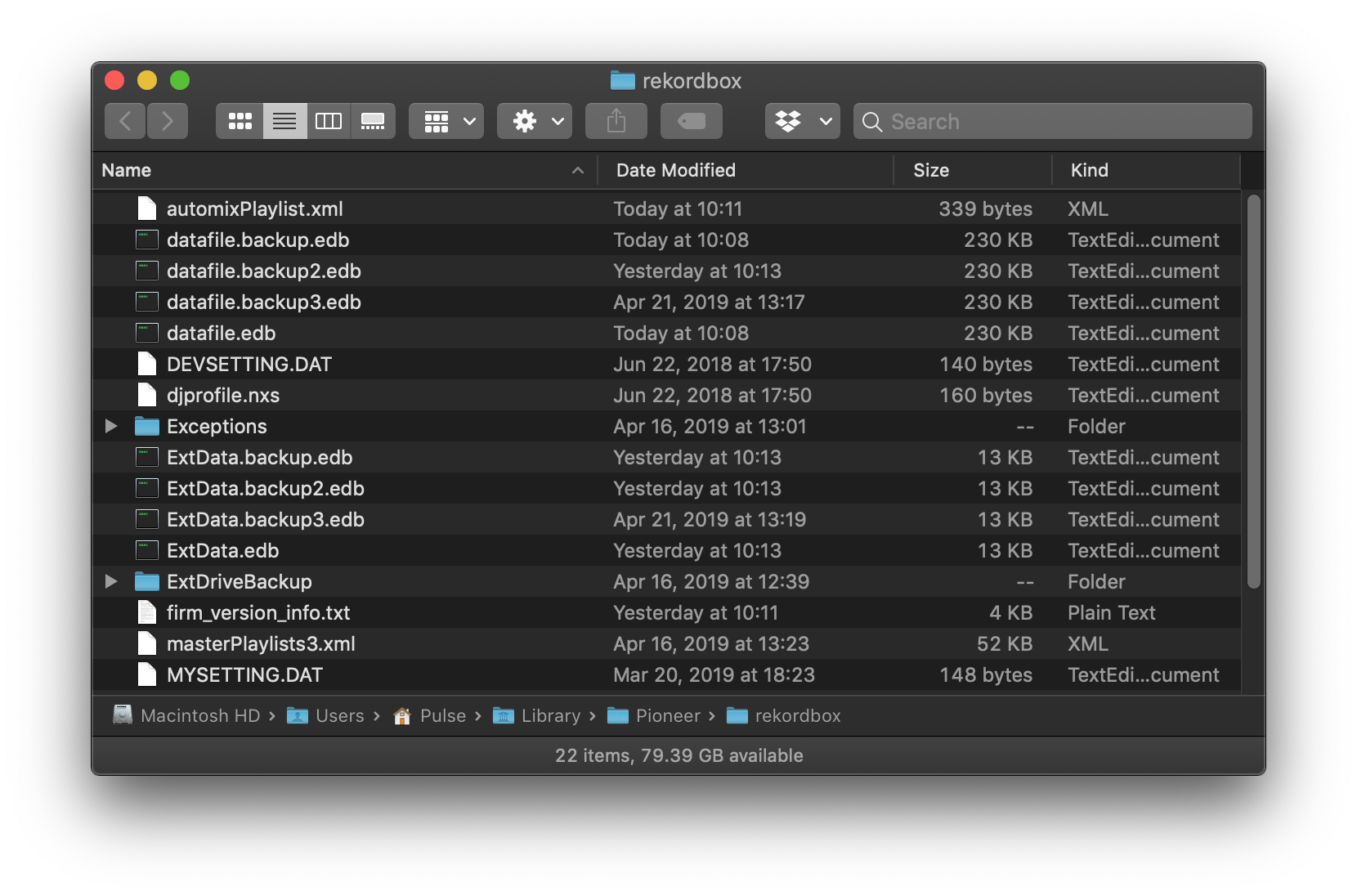
So if in your Finder, you go to this folder:

~/Library/Pioneer/rekordbox/

...which resolves to this:

/Users/yourusername/Library/Pioneer/rekordbox

...you don't see any of these:

I just want to confirm, because I want to make sure we're on the same page before proceeding further.

Pulse 0 votes
Comment actions Permalink