Official comment

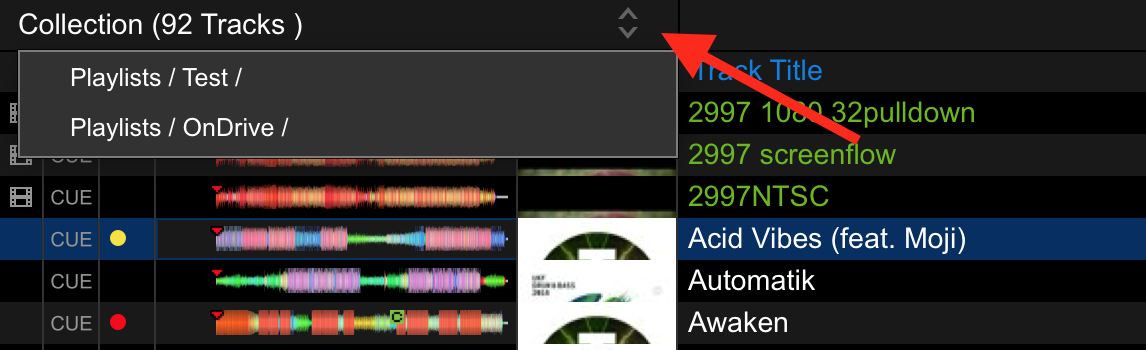
Anywhere you are (collection or playlist), click a track, this will appear if the song is in other places - click it and all locations are listed.


Comment actions

I had a whole Folder with FLAC Files, from a Friend a few years Back. Many of those went in to Playlists i played semi regularly.
Now i encountered a CDJ900 setup where FLAC dont work, so i converted them all to MP3 320 Files.
Obviously the FLAC Files are missing, and i have to Relocate them. Since the Relocate OpenFile Dialog filters on File extension, this is not possible.
Im aware that Cue Points and/or grid analyise and all that would have to be re-done, whicht would be fine.
So i now have to leave in the Missing Files in my library, and when i go to a playlist, and encounte the [!] Symbol, i look this file up by name, to play it.
So when i remove a Track, it would be really Helpfull to know in which playlist it is still in use, otherwise all my playlists will lose some tracks that i converted and removed.
I have no way to tell which tracks from which playlists get removed, so i just let them in there.
A feature to find where my tracks are used would really helpfull!
Like as a Filter the Sub-Explorer Window.
Bonus: if it would also show the Historie-Playlists filtered, it would be a super easy way to find which tracks i allready played after/before that one, which could be a very welcomed improvement when looking for the next track to play ;)
Anywhere you are (collection or playlist), click a track, this will appear if the song is in other places - click it and all locations are listed.
Post is closed for comments.

You can click the little down arrow next to the playlist name, it'll show you every playlist that the select tune is in.
i dont see that arrow, i only have a plus sign next to my playlist... could you make a Screenshot?
Thx in advance!