Official comment

1) Create a loop on the player.
2) Press the button of the hot cue slot to which you want to store the loop.
3) Profit.
Comment actions

How do you record a loop to a hot cue on a CDJ 2000 NXS2?
1) Create a loop on the player.
2) Press the button of the hot cue slot to which you want to store the loop.
3) Profit.
Post is closed for comments.
Ha! Easy.
Got it.
Many thanks
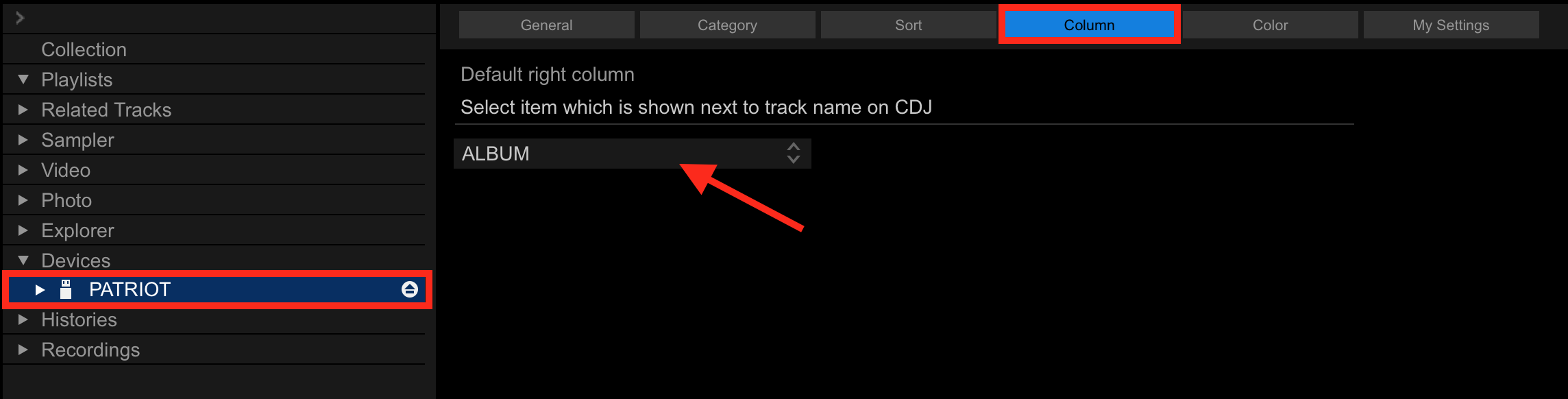
Also if you make a playlist in Rekord box and export it to an external hard drive is there a way of having the player displays the name of the artist as well as the track name in playlist (currently only displays track name)?
With your USB device connected to rekordbox, click it on the tree, then click the COLUMN tab and select which field you'd prefer displayed in that view on the drop-down.