Have a feature request or suggestion? Post your idea here!

Post

2 followers Follow
0
Avatar

Error While Opening "DDJ_RX ASIO" 2

I have trouble getting the Rekordbox to use the ASIO on the Audio selector.


I have tried several times reinstalling the Asio driver, unistaling my ddj-rx, installing the driver with disabled signed drivers check, and nothing has worked. I also changed the configuration of my windows sound making my laptop sound card and the rx as the default output and I have not been succesful.


I dived into the DDJ-RX in the Device Manager and I noticed its driver is the Microsoft Windows standard version 10.0.18362.1.


Hopefully you can help me solve this problem because I really cannot find a solution everywhere I have searched and with all my attempts.


Antonio Dominguez

Josean

Post is closed for comments.

8 comments

0
Avatar

Go into the device manager and uninstall the DDJ-RX anywhere you find it.

Disconnect the USB.

Run the driver uninstaller from the applications panel.

Reboot the computer.

Install the drivers again.

Reboot the computer.

Connect the USB cable and test it out.

Pulse 0 votes
Comment actions Permalink
0
Avatar

I already tried that a couple of times ans still does not work. Any other ideas?

Josean 0 votes
Comment actions Permalink
0
Avatar

I have Windows 10 CoreSingleLanguage (10.0.18363.628) and I did the last update on February the 3rd.

Josean 0 votes
Comment actions Permalink
0
Avatar

I followed the instructions and did the process three times. Unfortunatelly it didn't work.


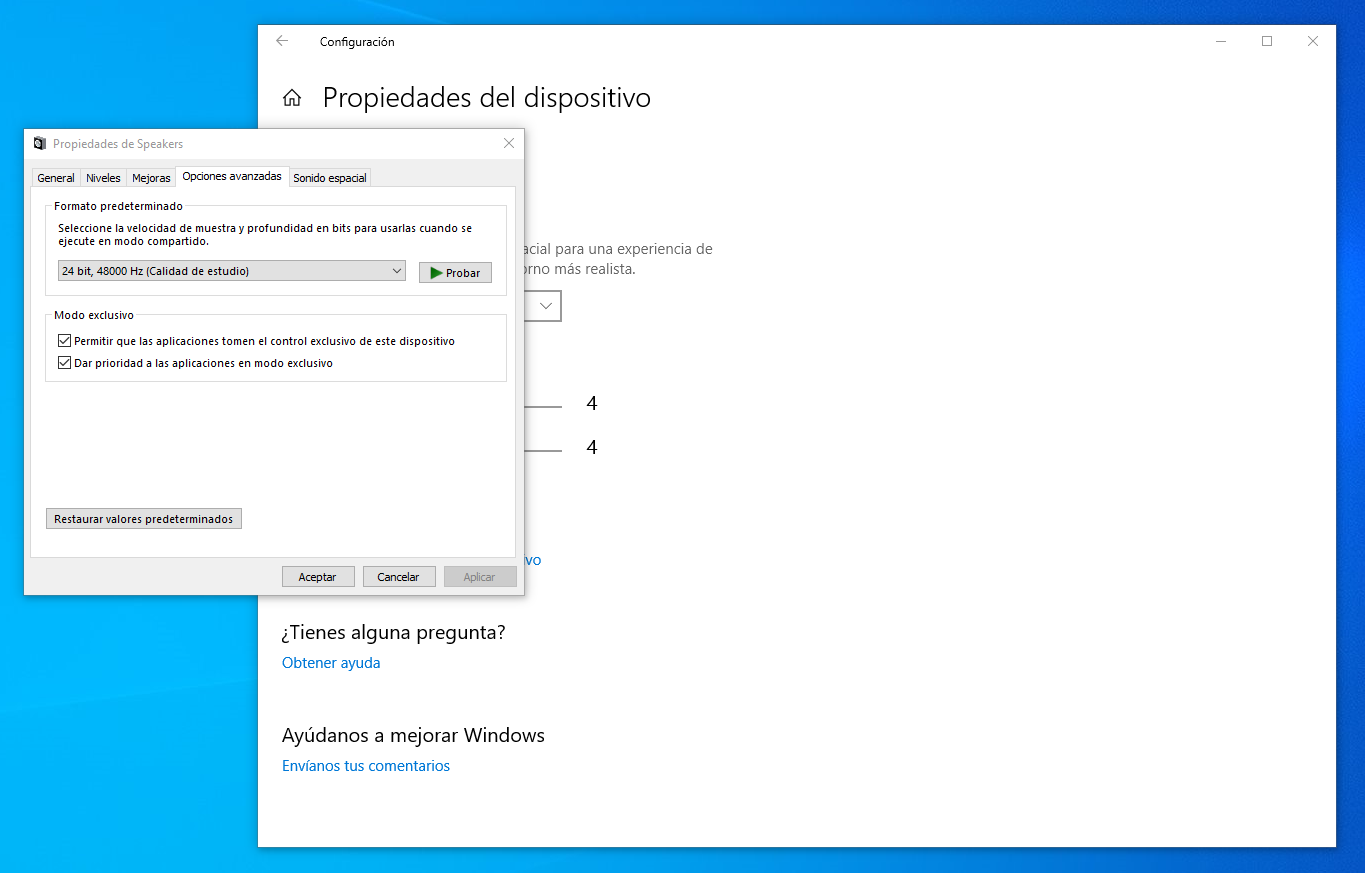
Nevertheles on my last try, I tryed different configurations to make it work. I deactivated the App exlusive control of the "speakers RX" and that did the job.


Hopefully this will help someone else.

Josean 0 votes
Comment actions Permalink
0
Avatar

@Josean > I'm a bit confused as to what you mean by "exclusive control of the speakers RX"?

Pulse 0 votes
Comment actions Permalink
0
Avatar

My Windowsis in Spanish, so I wouldn't know how it is defined in english, but here is the thing I changed (this is not the RX Speaker, so it has activated both yhing regarding exclusive mode).

Josean 0 votes
Comment actions Permalink