
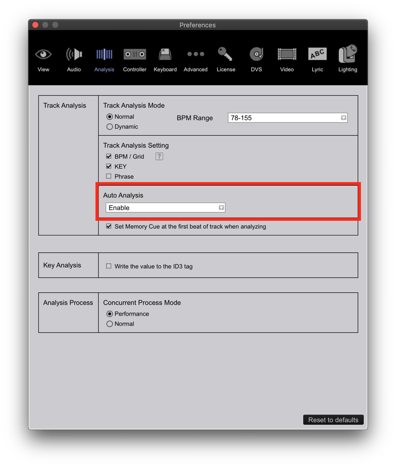
Can you check at the bottom left and tell me if it's analyzing any tracks? The status bar would tell you what it's doing, if anything. You can also check the auto-analysis setting in the preferences:


Comment actions

Hi,
I was able to analyze tracks post the upgrade to v5.8.3 initially.. But it appears that today when I tried to import tracks like I normally do - it won't go any further. Just says that its stuck at 0%. I've tried everything from analyzing the tracks individually and testing out with different tracks as well. Same problem. Is there anybody who's able to help me out please? would be greatly appreciated.

Post is closed for comments.
Can you check at the bottom left and tell me if it's analyzing any tracks? The status bar would tell you what it's doing, if anything. You can also check the auto-analysis setting in the preferences:
Hi there,
The bottom left status bar states that it's analysing tracks, but it never goes any further than 0%, and auto analysis is set to "enabled"
Have you tried removing the 0% tracks from your collection and re-importing a smaller batch of them to see if that helps?
Hi, as mentioned in the initial post - I've done that as well. I removed that particular batch and tried to import a brand new set of tracks and I'm still experiencing exactly the same issue.
Hi @ Pulse.. you still there?

HI
I have the same Problem
yesterdays all track get analyzed and today no track get further then 0 %
Auto-Analyze is also enabel / I have tried to Import all tracks but it still not analyzed anything / Reinstall the Software is useless
Please help
Where are you importing the tracks from? (Local / external drive)
How are you importing them / adding them to your collection? (Drag & drop / menu / sync / iTunes)
What are the filetypes of the songs which are not analysing?
@pulse:
Thanks for your request!
I Import the tracks from local
I use the Explorer menu in rekordbox to Import Folder as a playlist
the filetypes are mp3,aiff & wave
My Version from rekordbox was 5.8.3.
I install the Version 5.8.1 and the analysing continues until i start rekordbox!

Hi guys, i had the same problem i imported 5000 tracks and it stayed on 0%, until i read a really old thread saying turn the wifi off on the computer, i thought that would never work but it actually does.

Same issue here. Recently I've analyzed a batch of about 6000 tracks, and tonight I wanted to do a dynamic analyse on some existing tracks with unsteady beats, but analyse got stuck on 0% progress. Also when rebooting, etc. etc.
The Wifi Off trick did it, thanks Simon!
@Pulse, I think that a small update/patch will be mandatory to prevent mass questions/complaints.

How Bizarre, This WIFI switch off trick seemed to work for me too. Does anyone know why WIFI is stopping the analyzing function? Also what is being missed from the analyzing function when Rekordbox can't connect to the internet, it does mention in the progress bar that it can't connect to the internet so It must be reaching out for some data.

Hi guys, I've just had the same problem with both recent versions of RB 5 & 6.0
The only way to analyse tracks was to load onto a deck & wait forever!
& disabling the WiFi off didn't work for me.
I didn't see any preview info for my tracks but I managed to kickstart it into analysing them by selecting all my tracks & right-ckicking & choosing 'Reload Tags' or from selecting the menu tab 'Tracks' & 'Reload Tag'
It then jump-starts into analysing if set to Enabled in Settings.
Or you can right-click & 'Analyze tracks'
Also in both versions V5 & V6.0 I notice if you analyse tracks it puts them in the 'Collection' list.
Also in Preferences it didn't matter what Track Analysis or Analysis Process were set to Normal, Dynamic or Performance
Hope that helps!

Hi guys...i manage to solve this problem...issue was tracks will analyse and stop analysing totally...
Solution: delete all other files i.e. pictures, album arts etc...
I basically deleted all the jpg, png gif files from my music folders and this solved the problem
I hope this help....