Have a feature request or suggestion? Post your idea here!

Post

2 followers Follow
0
Avatar

Setting Start Cue Point (Does not save)

Hi

I have researched this issue and cannot seem to find an answer that works. I own the latest version of Rekordbox and use it with a DDJ-1000 controller on a Mac running Catalina.

Here's the issue:

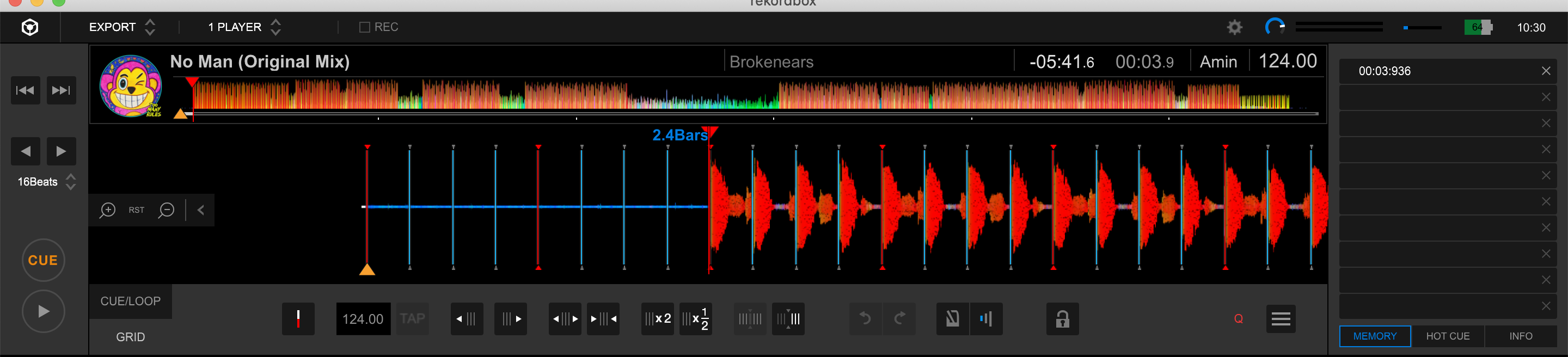
- I load a track and the Yellow cue marker is at the beginning of the track. But the beginning of the track is just dead air. So it's impossible to play the track in a set from that beginning cue point as it's dead air

- The first beat of the track starts at the 3rd bar - and this is where I'd like to set the first yellow cue point

- I then open export mode and manually set the yellow cue marker to the first beat (3rd bar)

- I also use the "Set First Beat Of a Bar To to current location" feature to setup the new start cue location (yellow triangle)

- And finally I save it to the first Memory slot

- However, when I go back to Performance mode and load the track onto one of the decks it reverts to the original cue point at the beginning of the track where there's just dead air.

- In Settings I have "Set Memory Cue to a first beat..." checked

- This happens intermittently and only with certain tracks


Please help explain why this happens


Ebrahim Hyder

Post is closed for comments.

2 comments

0
Avatar

Howdy!  I'm not positive whether this will fix your issue or not, but there's another option you can check called "Playback starts at memory cue nearest beginning of track".  You can find it in the DECK tab of your CONTROLLER section of preferences in Rekordbox.  Give that a shot.  It basically says "when you load a track, start at the first cue point".

I was confused by the same thing because for SOME tracks it would already land on the first beat automatically, while others would revert to that silent section even though I set the first cue point to the actual 1.1 hit.

So in other words, even though you set cue points, Rekordbox will NOT automatically jump to the first cue point you've set unless you check that option.

Alan Maas 0 votes
Comment actions Permalink
0
Avatar

Thanks. I will try that. Hopefully it fixes it. It's a bit of a nuisance if you're trying to switch quickly between songs


Thanks again

E

Ebrahim Hyder 0 votes
Comment actions Permalink