Hello,
Here we go again!
Objective: Streaming a live set through OBS Studio, using Rekordbox and physical Pioneer hardware gear.
NOTE: I don't need (or want) any sound coming out from my laptop speakers at all. The only sound that i want to hear, is the sound coming from my external speakers (and also the headphones connected to the mixer, of course).
My HARDWARE setup is:
A DJM 450 mixer connected to two CDJ's via RCA cables. All these devices are then connected to an USB Hub. This Hub is then connected to my laptop via USB. The sound is going out from the mixer, using the Master 2 output, to an external amplifier (Pioneer A-20) using RCA cables as well. Finally, the external speakers are connected to this amplifier using the usual cables for this matter.
I also have two turntables (PLX-1000) connected to the mixer's Phono inputs using RCA cables. Nevertheless, i do not intend (for now) to use these two girls on my live streaming sets, anyway.
My laptop (firmware/BIOS, drivers updated) is a pretty powerful one as i have 2 SuperRAID SSD's, parallel processing, plenty of RAM, etc. So, this guy will never be a problem.
My SOFTWARE setup is:
1) Windows 10 Pro (updated);
2) Rekordbox (updated);
3) VoiceMeeter Banana (updated);
4) OBS Studio (updated and with an ASIO driver plug-in installed, if needed in devices).
What i did achieve: i have successfully obtained a sound signal in VoiceMeeter Banana, coming from Rekordbox, using a physical mixer, two physical CDJ's, a physical amplifier and two physical speakers.
What i didn't achieve (yet): getting this sound signal from VoiceMeeter Banana to OBS Studio using exactly the same gear described above.
My setup scenario, so far:
Image 01: Available devices installed in my O.S. (right now i have those VoiceMeeter as Playback defaults).

Image 2: Available devices installed in my O.S. (right now i have those VoiceMeeter ones as Recording defaults).

Image 3: Audio driver selected in the Rekordbox (the usual DJM-450 ASIO driver that comes out-of-the-box with Rekordbox does not allow it to work with other software, as OBS Studio, does it?). In this image, you can also see the mapped INPUTS of that VoiceMeeter driver as well as i have chosen External as Mixer Mode.

Image 4: The OUTPUT logical channel mappings of that VoiceMeeter driver.

Image 05: All the possible drivers that my system allows to be selected in Rekordbox Audio.

Image 06: The OUTPUT physical mappings between Rekordbox and the mixer.
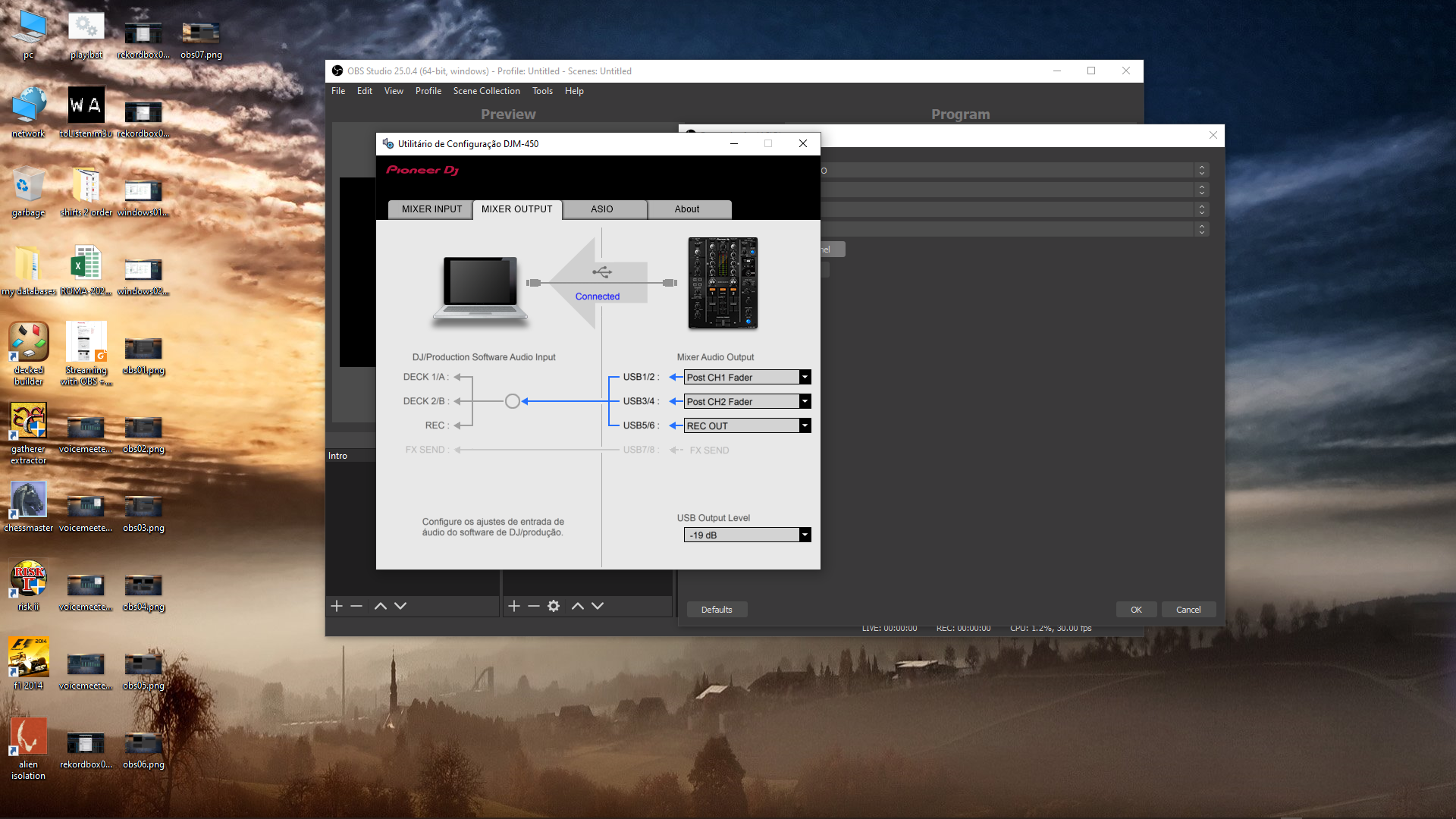
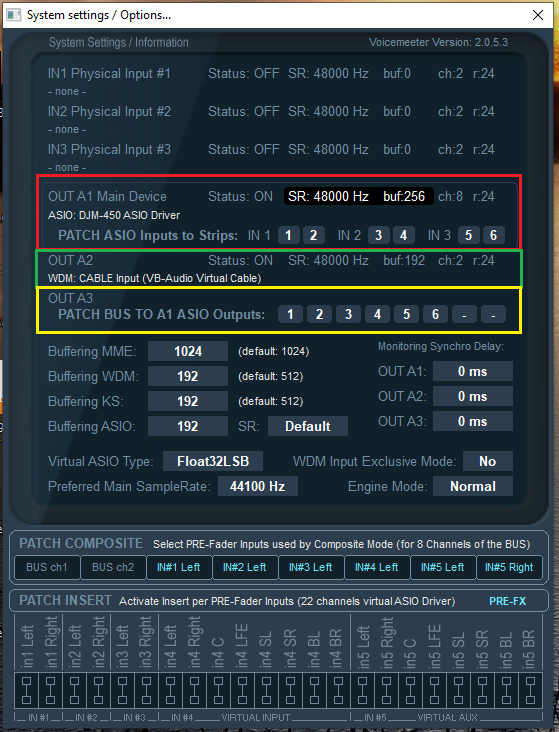
Image 07: An actual proof that i have been able to "bring" sound from Rekordbox to VoiceMeeter Banana. As you can see in the image, i have green leds showing up. At this point, i'm completely able to play tracks on both physical CDJ's (individually), mix them through the physical mixer without any problems whatsoever and getting output sound on my external speakers (not the laptop ones). The different colors help identify the main settings that i have on each one of them. I am a knoob using this software so, i know there's an high probability of any of these settings are wrong or misplaced or whatever. But the thing is that i actually DO HAVE a sound signal here.

Image 08: The A1 Hardware Output mapped with ASIO: DJM-450 ASIO Driver. It seems that this driver is actually the original out-of-the-box driver that comes up with Rekordbox. Correct me if i'm wrong, please.

Image 09: The A2 Hardware Output mapped with WDM: CABLE Input (VB-Audio Virtual Cable).

Image 10: The System/Settings configuration that i have made in VoiceMeeter Banana to be able to have a sound signal here. I'm going to be honest: i don't have a clue if these settings have any impact on the sound that needs to go to OBS Studio or not. I think that A2 (or A3) OUTPUTS should be the ones that have to be mapped with the correct driver to achieve such objective, but i'm not sure how to do it. Nevertheless, these settings are working here, so far. I have tested a few different ones and try to reflect them in OBS, without any luck. Of course i would like to have any advice on how to correctly configure these as well.
Beyond this point, all images are about OBS Studio. As i said earlier, i didn't get this OBS part of the puzzle to work, yet. It seems possible, but something's missing, dunno why.
Image 11: The Audio settings in OBS. What should be configured here, considering all that i have available and described so far?
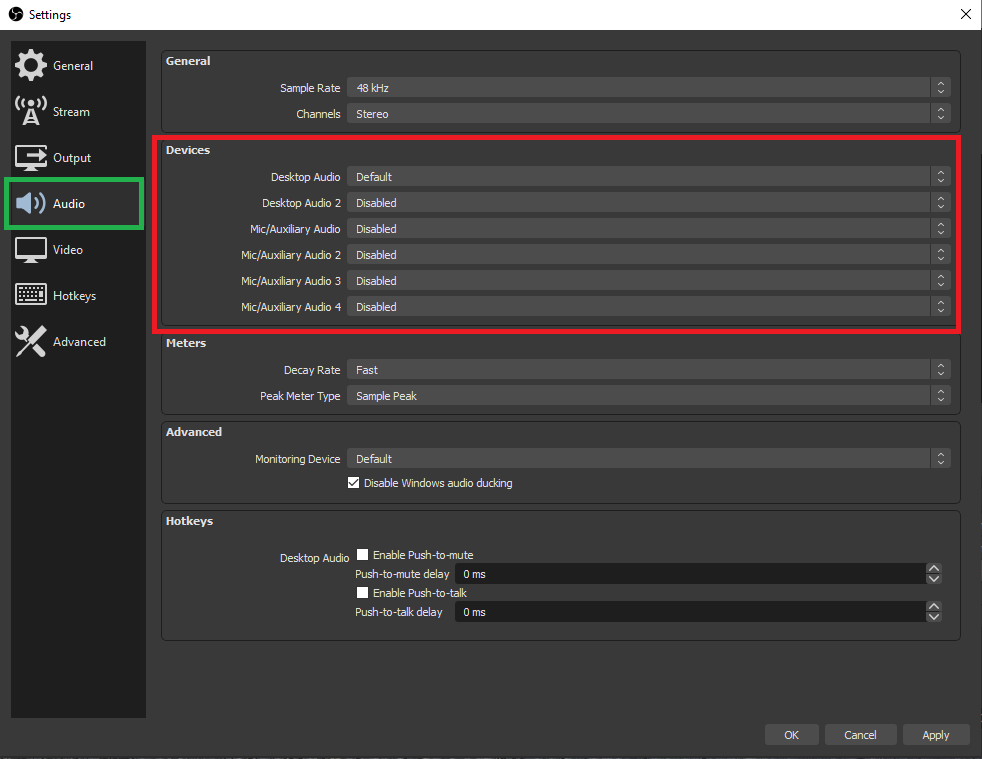
Image 12: The Audio settings in OBS (continuation). The image shows the available devices for Desktop Audio my system has to be used. What should be configured here (if any), considering all that i have available and described so far?

Image 13: The Audio settings in OBS (continuation). The image shows the available devices for Mic/Auxiliary Audio my system has to be used. What should be configured here (if any), considering all that i have available and described so far?
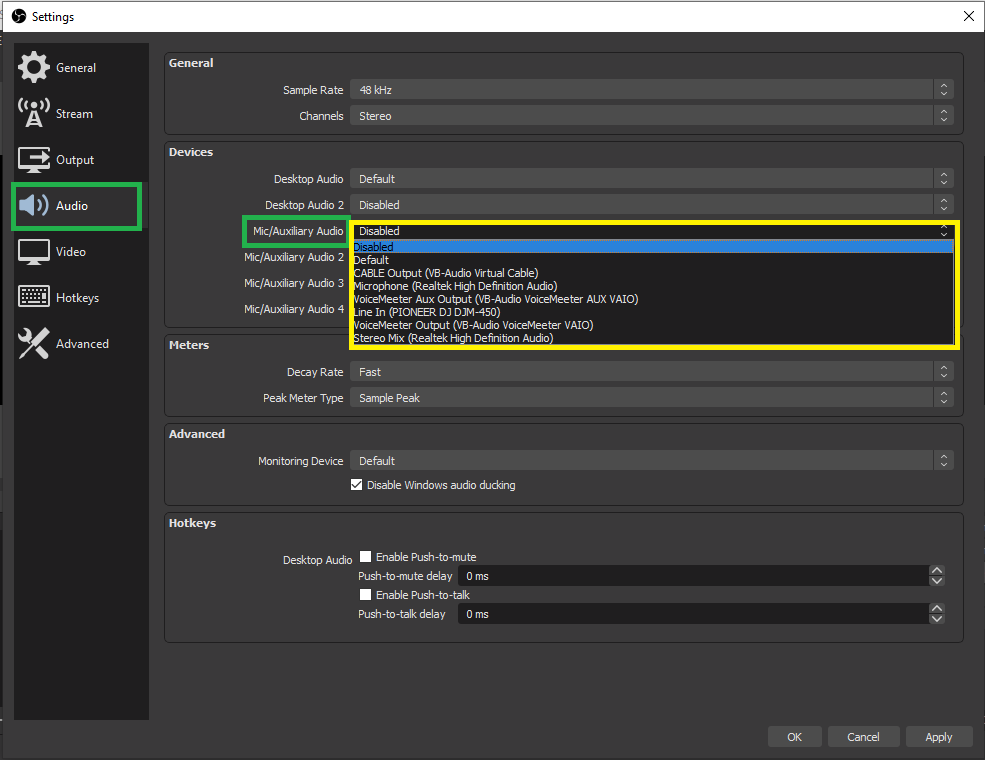
Image 14: The New Source list in OBS that is available in my system. Note the ASIO option that i have (this option is not coming out-of-the-box with the tool). I had to install a plug-in on it to thus be shown here.

Image 15: After choosing an ASIO source in the step before, this is the list of available devices in my system. What should be configured here (if any), considering all that i have available and described so far?
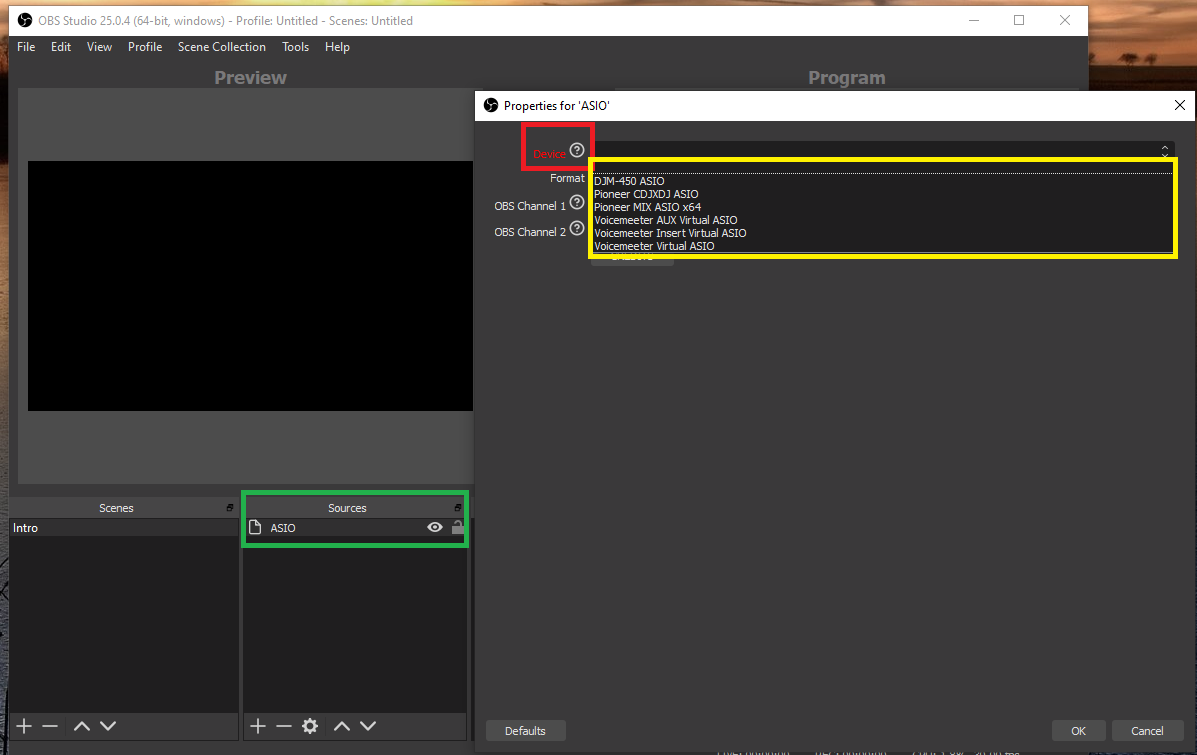
Image 16: If i have chosen VoiceMeeter Virtual ASIO as the device in the step before, this is the list of available Channels in my system (note that these channels are the exactly same ones that are being mapped in Rekordbox INPUT and OUTPUT when i chose the same driver there).
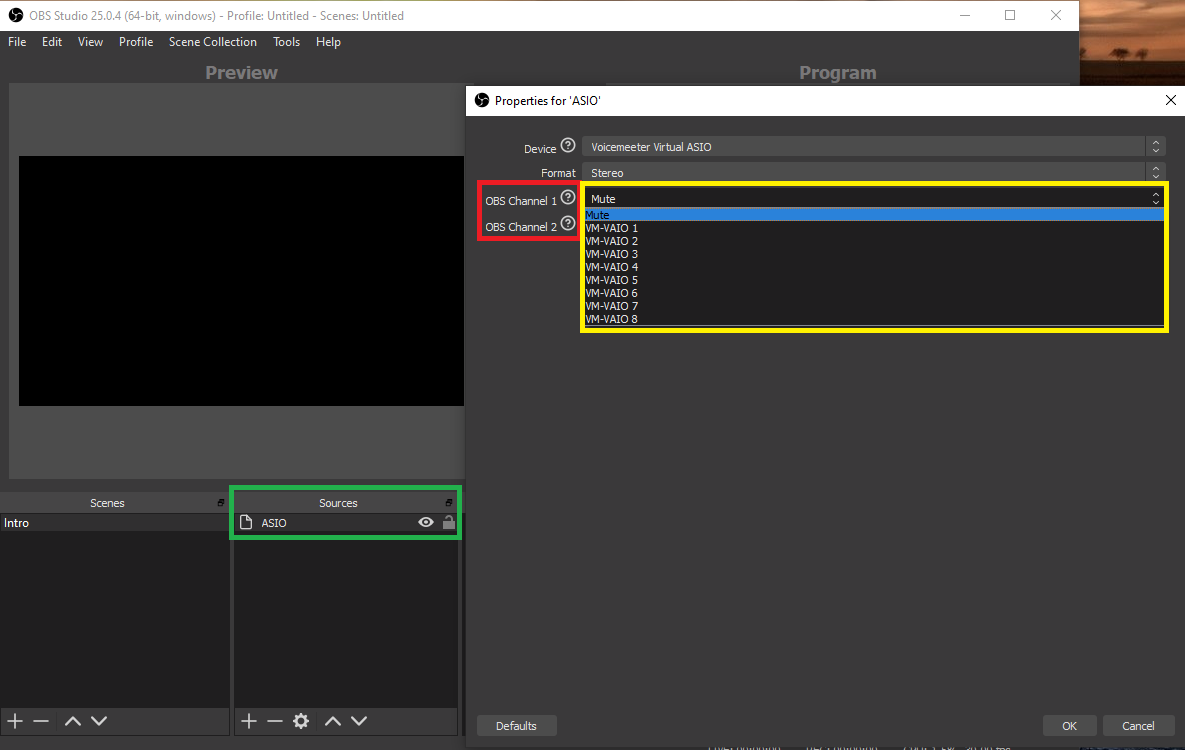
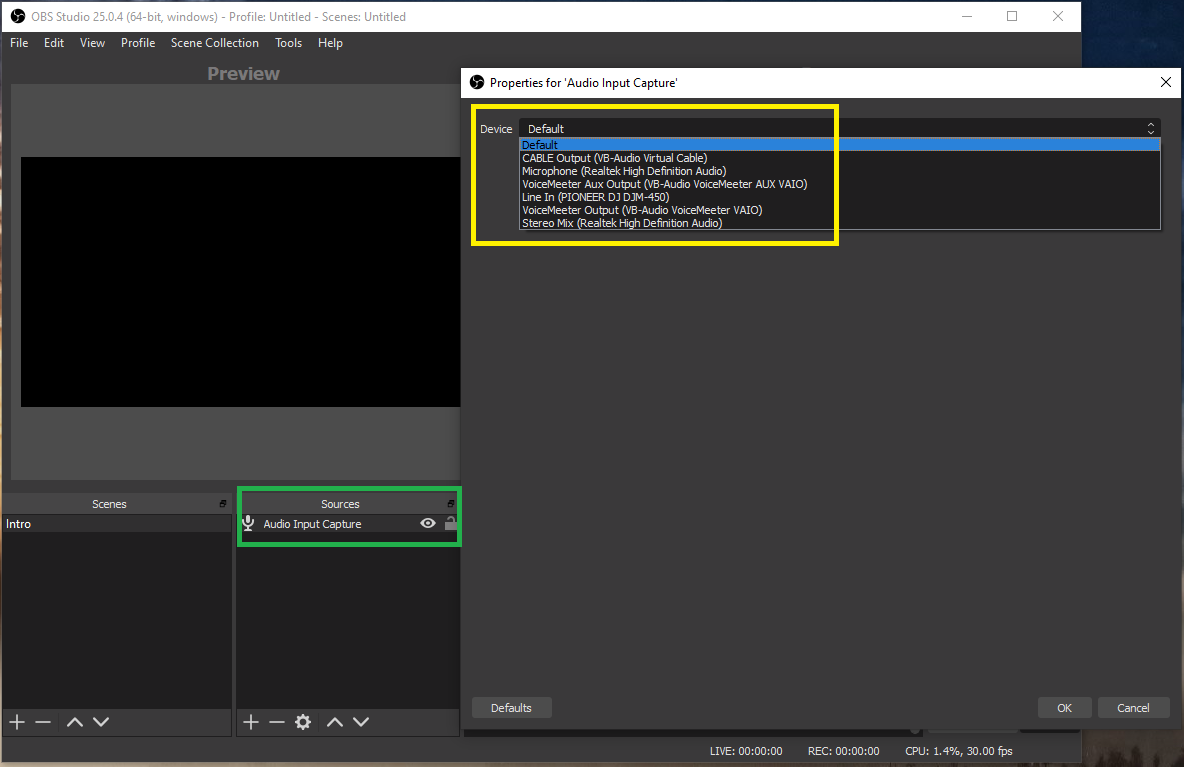
Image 17: This image shows another alternative to the ASIO source that i have mentioned before. Here we have the list of available Devices on my system if i choose the Audio Input Capture option. This is the most common option that everybody is using in every video tutorial i have seen so far. I have tried everything from this list, i think (even things that don't make any sense at all, due to my despair, i really lost the count...). What should be configured here (if any), considering all that i have available and described so far?
One last thing. I love Pioneer gear, i really do, as you already have noticed from my setup. I have worked with this brand for almost 20 years now and i will still recommend it to anyone that asks me if it is worth its value for the money you pay for it.
With this being said and, with all the respect, i think that the support you guys are giving is, sometimes, insufficient. What i mean by this is that some of the answers (not all) are short of more detailed information.
Some setups or support requirements are really hard to set/get, you know? We do need more details from you, really. Sometimes, only a tutorial with possible configurations and images is needed for each particular case (i mean, the difficult cases like my own and others i have seen).
And we are doing our best to get it to work because, in the first place, we do love our gear and want to stick with it in the future. It would be much easier to change brand and gear, in some cases, for getting things to work, but hey, that's not my case.
Anyway, i swear i will not give up until someone (from Pioneer staff or not, i don't care) will CLEARLY tells me that this ain't possible with this setup (until now, no one clearly told me that, yet). I am expecting something like: "That is not possible!" or "What you are trying to do will not work!" or "Your particular gear/setup do not allow you to achieve your goal!".
If any of these are on the table, i prefer that you guys tell me tight away, allowing me to close and forget this issue once and for all, or, allowing me to try out any other solution that will pass by not using Rekordbox, for example (this would be my last resource, i must admit).
This f***** thread cost me more than 4 hours to compile...
Anyway, thank you for your help, in advance.
J Amorim


