Have a feature request or suggestion? Post your idea here!

Post

4 followers Follow
0
Avatar

Need help with Windows -> Rekordbox -> VoiceMeeter -> OBS Studio -> Live Streaming

Hello,

Here we go again! 

Objective: Streaming a live set through OBS Studio, using Rekordbox and physical Pioneer hardware gear.

NOTE: I don't need (or want) any sound coming out from my laptop speakers at all. The only sound that i want to hear, is the sound coming from my external speakers (and also the headphones connected to the mixer, of course).  

My HARDWARE setup is: 

A DJM 450 mixer connected to two CDJ's via RCA cables. All these devices are then connected to an USB Hub. This Hub is then connected to my laptop via USB. The sound is going out from the mixer, using the Master 2 output, to an external amplifier (Pioneer A-20) using RCA cables as well. Finally, the external speakers are connected to this amplifier using the usual cables for this matter.

I also have two turntables (PLX-1000) connected to the mixer's Phono inputs using RCA cables. Nevertheless, i do not intend (for now) to use these two girls on my live streaming sets, anyway.

My laptop (firmware/BIOS, drivers updated) is a pretty powerful one as i have 2 SuperRAID SSD's, parallel processing, plenty of RAM, etc. So, this guy will never be a problem.  

My SOFTWARE setup is:

1) Windows 10 Pro (updated);

2) Rekordbox (updated);

3) VoiceMeeter Banana (updated);

4) OBS Studio (updated and with an ASIO driver plug-in installed, if needed in devices).

What i did achieve: i have successfully obtained a sound signal in VoiceMeeter Banana, coming from Rekordbox, using a physical mixer, two physical CDJ's, a physical amplifier and two physical speakers.

What i didn't achieve (yet): getting this sound signal from VoiceMeeter Banana to OBS Studio using exactly the same gear described above. 

My setup scenario, so far:

Image 01: Available devices installed in my O.S. (right now i have those VoiceMeeter as Playback defaults).


Image 2: Available devices installed in my O.S. (right now i have those VoiceMeeter ones as Recording defaults).


Image 3: Audio driver selected in the Rekordbox (the usual DJM-450 ASIO driver that comes out-of-the-box with Rekordbox does not allow it to work with other software, as OBS Studio, does it?). In this image, you can also see the mapped INPUTS of that VoiceMeeter driver as well as i have chosen External as Mixer Mode.


Image 4: The OUTPUT logical channel mappings of that VoiceMeeter driver.


Image 05: All the possible drivers that my system allows to be selected in Rekordbox Audio.


Image 06: The OUTPUT physical mappings between Rekordbox and the mixer.
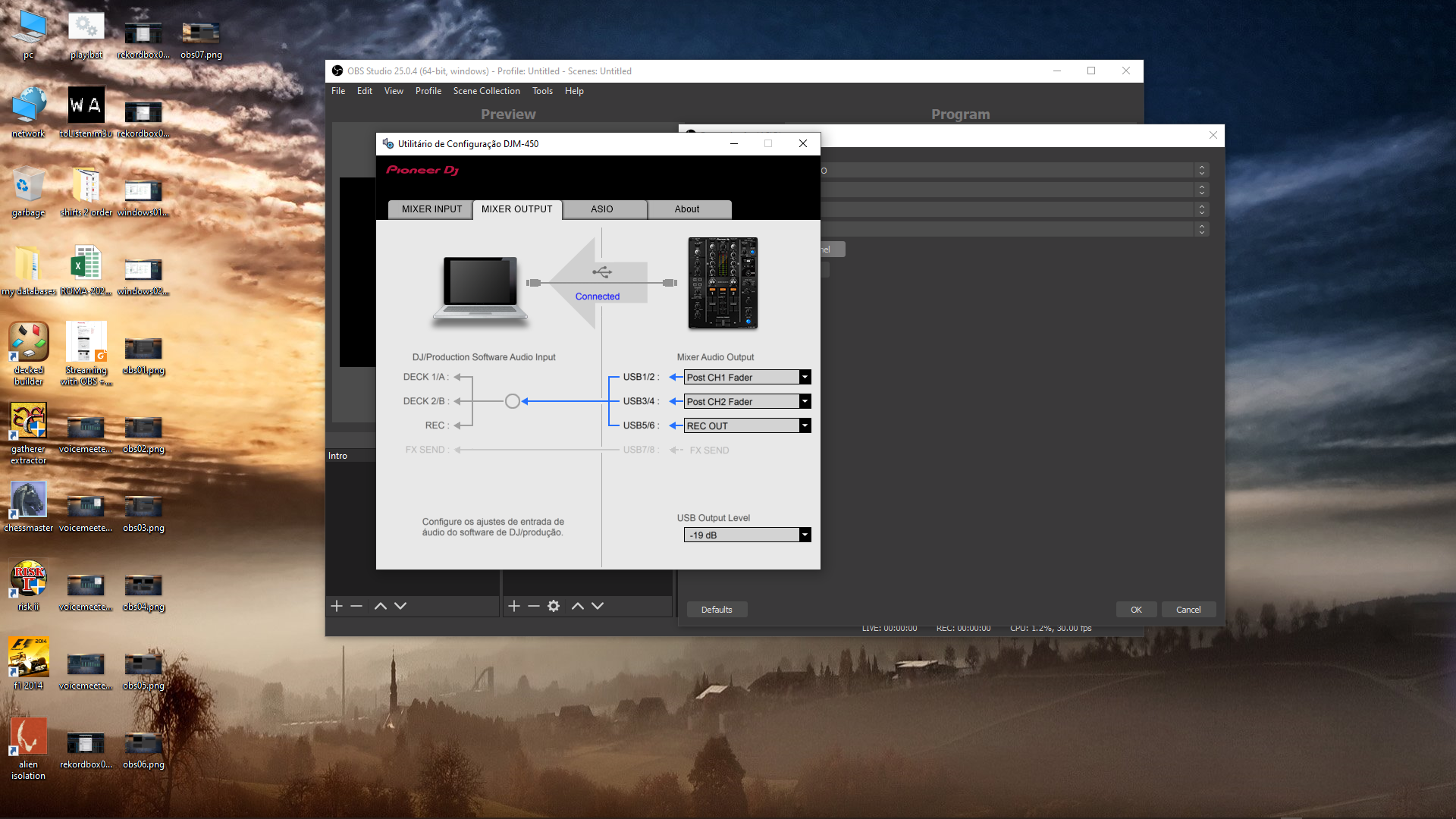
 

Image 07: An actual proof that i have been able to "bring" sound from Rekordbox to VoiceMeeter Banana. As you can see in the image, i have green leds showing up. At this point, i'm completely able to play tracks on both physical CDJ's (individually), mix them through the physical mixer without any problems whatsoever and getting output sound on my external speakers (not the laptop ones). The different colors help identify the main settings that i have on each one of them. I am a knoob using this software so, i know there's an high probability of any of these settings are wrong or misplaced or whatever. But the thing is that i actually DO HAVE a sound signal here. 


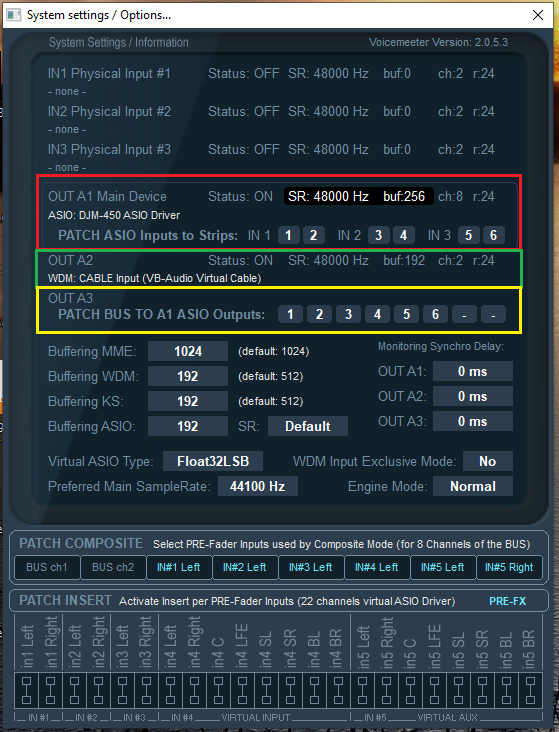
Image 08: The A1 Hardware Output mapped with ASIO: DJM-450 ASIO Driver. It seems that this driver is actually the original out-of-the-box driver that comes up with Rekordbox. Correct me if i'm wrong, please. 


Image 09: The A2 Hardware Output mapped with WDM: CABLE Input (VB-Audio Virtual Cable)


Image 10: The System/Settings configuration that i have made in VoiceMeeter Banana to be able to have a sound signal here. I'm going to be honest: i don't have a clue if these settings have any impact on the sound that needs to go to OBS Studio or not. I think that A2 (or A3) OUTPUTS should be the ones that have to be mapped with the correct driver to achieve such objective, but i'm not sure how to do it. Nevertheless, these settings are working here, so far. I have tested a few different ones and try to reflect them in OBS, without any luck. Of course i would like to have any advice on how to correctly configure these as well. 
 

Beyond this point, all images are about OBS Studio. As i said earlier, i didn't get this OBS part of the puzzle to work, yet. It seems possible, but something's missing, dunno why. 

Image 11: The Audio settings in OBS. What should be configured here, considering all that i have available and described so far?
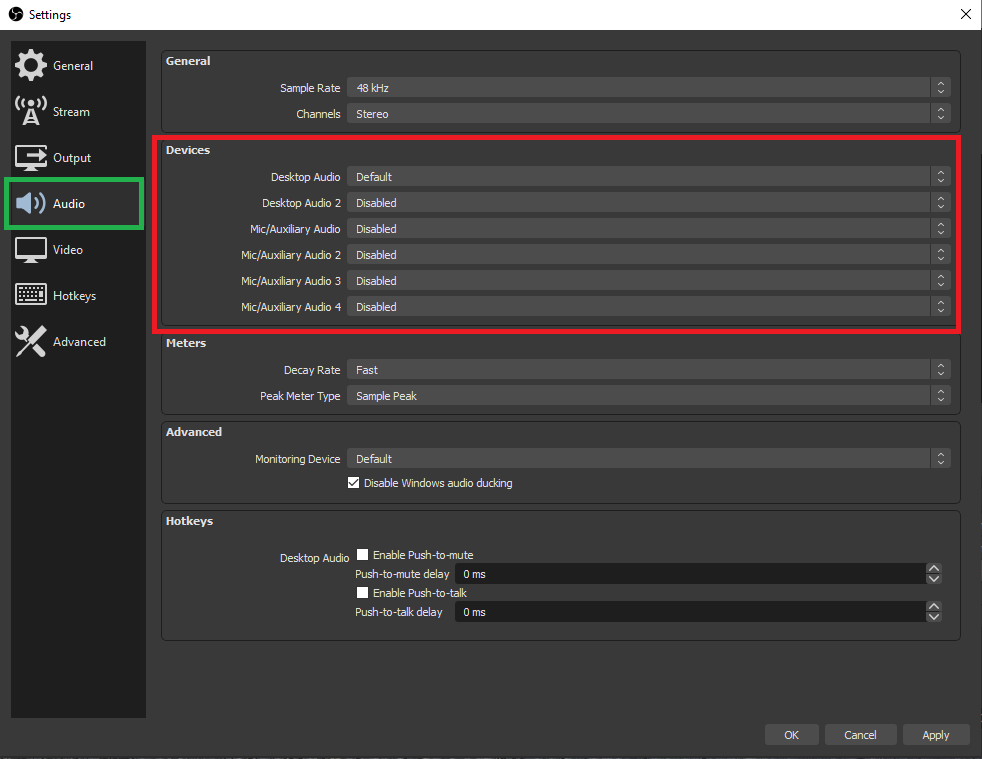
 

Image 12: The Audio settings in OBS (continuation). The image shows the available devices for Desktop Audio my system has to be used. What should be configured here (if any), considering all that i have available and described so far?


Image 13: The Audio settings in OBS (continuation). The image shows the available devices for Mic/Auxiliary Audio my system has to be used. What should be configured here (if any), considering all that i have available and described so far?
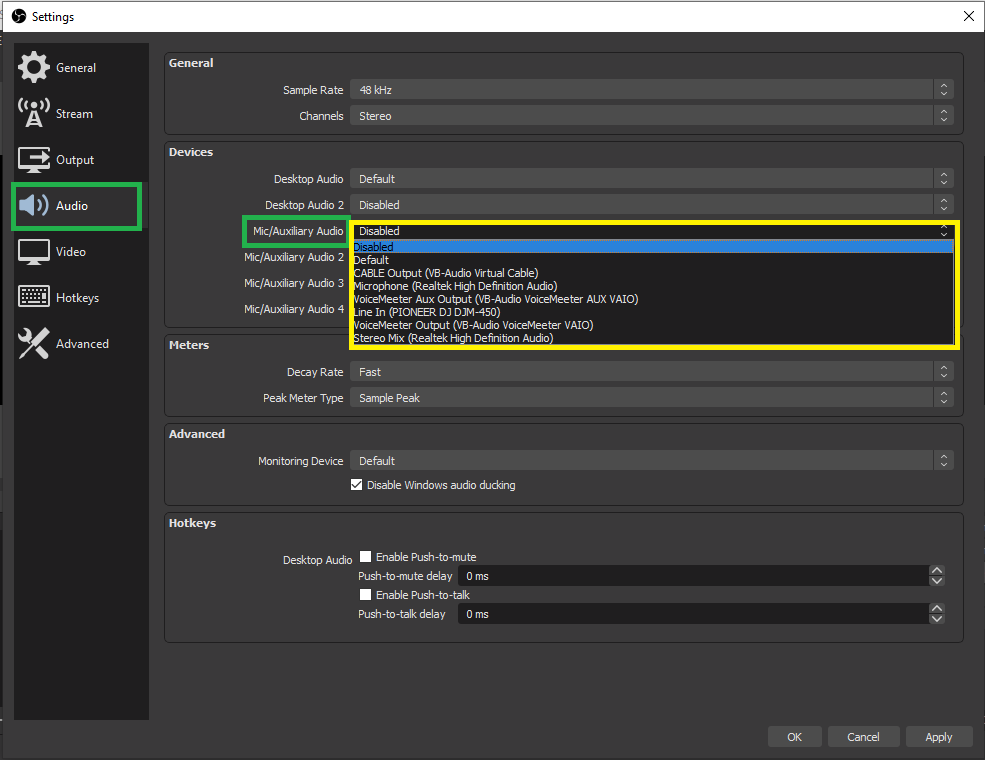
 

Image 14: The New Source list in OBS that is available in my system. Note the ASIO option that i have (this option is not coming out-of-the-box with the tool). I had to install a plug-in on it to thus be shown here.  


Image 15: After choosing an ASIO source in the step before, this is the list of available devices in my system. What should be configured here (if any), considering all that i have available and described so far?
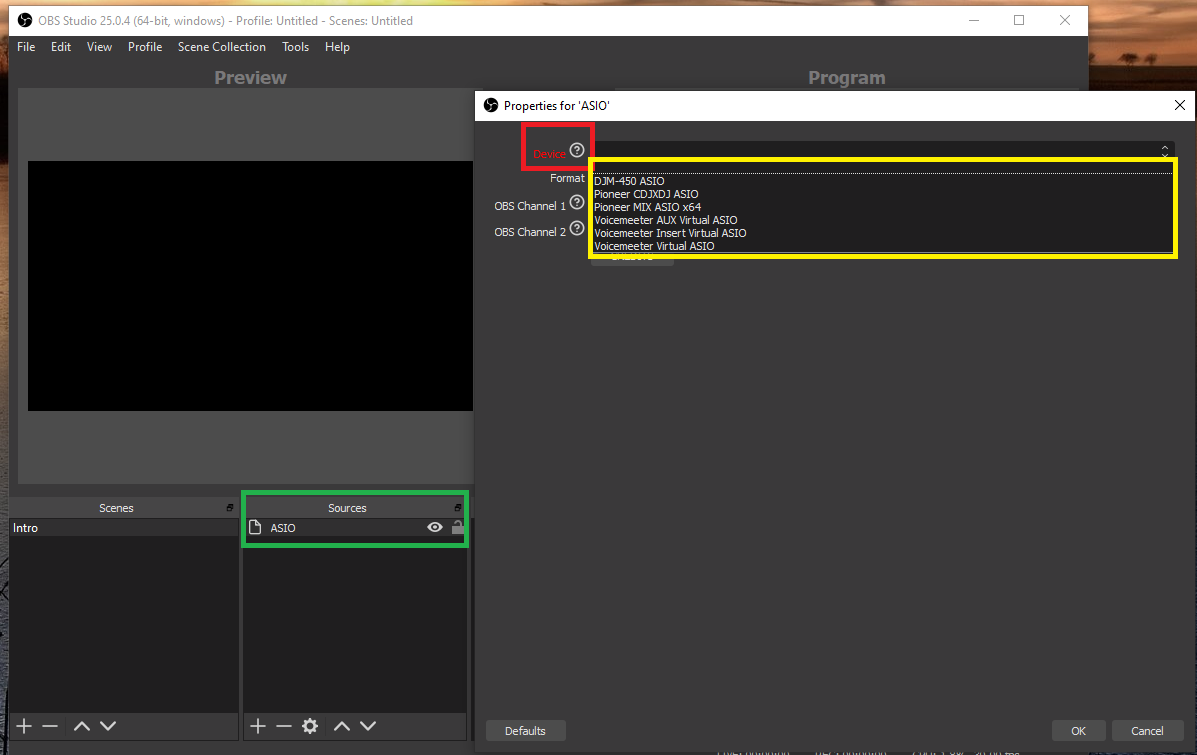
 

Image 16: If i have chosen VoiceMeeter Virtual ASIO as the device in the step before, this is the list of available Channels in my system (note that these channels are the exactly same ones that are being mapped in Rekordbox INPUT and OUTPUT when i chose the same driver there). 
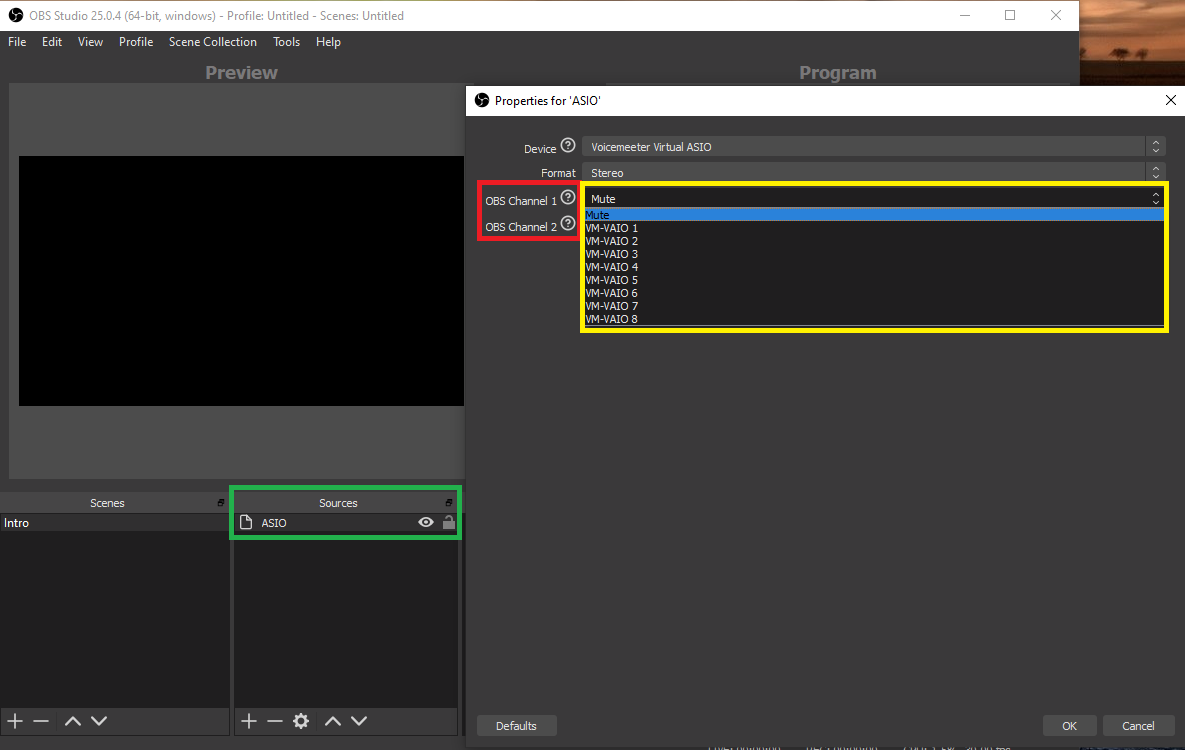
 

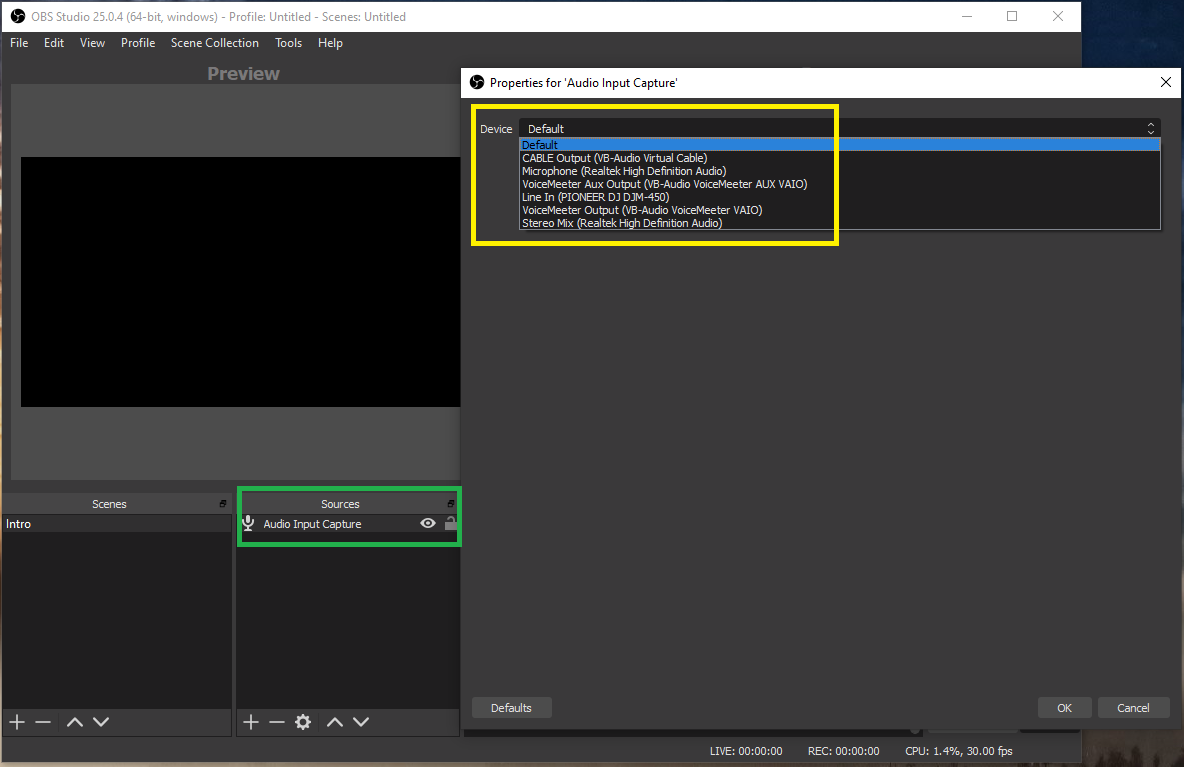
Image 17: This image shows another alternative to the ASIO source that i have mentioned before. Here we have the list of available Devices on my system if i choose the Audio Input Capture option. This is the most common option that everybody is using in every video tutorial i have seen so far. I have tried everything from this list, i think (even things that don't make any sense at all, due to my despair, i really lost the count...). What should be configured here (if any), considering all that i have available and described so far? 
One last thing. I love Pioneer gear, i really do, as you already have noticed from my setup. I have worked with this brand for almost 20 years now and i will still recommend it to anyone that asks me if it is worth its value for the money you pay for it.

With this being said and, with all the respect, i think that the support you guys are giving is, sometimes, insufficient. What i mean by this is that some of the answers (not all) are short of more detailed information.

Some setups or support requirements are really hard to set/get, you know? We do need more details from you, really. Sometimes, only a tutorial with possible configurations and images is needed for each particular case (i mean, the difficult cases like my own and others i have seen). 

And we are doing our best to get it to work because, in the first place, we do love our gear and want to stick with it in the future. It would be much easier to change brand and gear, in some cases, for getting things to work, but hey, that's not my case.

Anyway, i swear i will not give up until someone (from Pioneer staff or not, i don't care) will CLEARLY tells me that this ain't possible with this setup (until now, no one clearly told me that, yet). I am expecting something like: "That is not possible!" or "What you are trying to do will not work!" or "Your particular gear/setup do not allow you to achieve your goal!". 

If any of these are on the table, i prefer that you guys tell me tight away, allowing me to close and forget this issue once and for all, or, allowing me to try out any other solution that will pass by not using Rekordbox, for example (this would be my last resource, i must admit).

This f***** thread cost me more than 4 hours to compile...

Anyway, thank you for your help, in advance.

J Amorim

alllright

Post is closed for comments.

10 comments

0
Avatar

1) If you're using an ASIO plugin for OBS, why are you bothering at all with Voicemeeter? A proper ASIO plugin should be able to capture the REC-OUT from the DJM directly.

2) Guides haven't been created for each and every possible combination of equipment because many are the same, and we don't always have access to every single piece and in every potential configuration. As such, some guides require users to "bridge the gap." It's my personal opinion that if you are interested in partaking in a technical task such as online streaming, you should have at least some capacity to find the information available and adapt it to your specific needs if it's not 100% answering the question... and if it doesn't, ask.

3) Speaking of guides, did you find this one in your 4 hours of effort?


Pulse 0 votes
Comment actions Permalink
0
Avatar

4) Thank you for you feedback.

5) I have found a solution today. Yes, with VoiceMeeter included and a "proper" ASIO plug-in. Without VM, OBS does not receive any input sound signal at all. Do you have a link to a "proper" ASIO plug-in? I have tested 3 different ones. Now i see that all three worked well, but always using VM in the middle of the equation.

6) Mapping REC-OUT to channel 1 as someone has recommended before does not work at all. What is does, is blowing up the sound system through the speakers (distortion included) and no control whatsoever of the sound on the mixer.

7) Yes, i saw that guide you mention on the link. I think i even tried that with plenty of different settings but it never worked with DJM-450. At least, with mine it didn't.

8) The solution i found is very simple, indeed. Now, it makes sense. That's how you learn. That "bridge the gap" thing is called life. I found it by myself, with no help whatsoever. The empiric way, recursively, you know. Being stupid the first time and trying to be even more stupid the following ones, if you know what i mean.

9) Thank you again for your 5 minutes of effort in your answer.


alllright 0 votes
Comment actions Permalink
0
Avatar

After 5 minutes of searching, I found this solution. I tested it out using a DJM-900SRT and it works great without needing Voicemeeter.

REC-OUT does work for that plugin, just match the channels you assigned in the DJM utility to the channels you select on the plugin within OBS. And no, you don't have control over the level within OBS from the master on the mixer - that's because the REC-OUT is taken prior to the master level. Adjust the USB output level in the DJM utility; -10 should be fine if you're taking the channel levels to peak around 0dB on the meters.

Pulse 0 votes
Comment actions Permalink
0
Avatar

Well, that is exactly the same plug in i am using.

The thing is:

If i select Mixer: Internal Mode in Rekordbox and scroll down to map the REC OUT (5/6) to Master Output, i am able to get that sound signal in OBS for both channels using VoiceMeeter. But i can't control anything physically on the mixer, because its mode has been set to Internal.

If i select Mixer: External Mode in Rekordbox, then, when i scroll down, that Master Out option to map the REC OUT (5/6) is no longer available. In this case, i can only get a sound signal for a channel at a time in OBS, because i cannot map 5/6 REC OUT on that ASIO plugin there. I can only map channel 1 OR channel 2, but not both at the same time. If i map channel 3(5/6) i have no sound signal in OBS. But i can control everything physically on the mixer, because it has been set to External, as expected. That channel 3 is weird because my mixer only has 2 physical channels (1 and 2). But i suppose it has to be interpreted as a logical channel that, in this case, contains the REC OUT, not a physical one.

So, all i described do far is by using VoiceMeeter and with VoiceMeeter ASIO Driver Aux selected in Rekordbox.

What you are saying, i think, is using the default ASIO driver that comes out with Rekordbox (DJM-450 ASIO), right? It has to be, if you are considering not using VoiceMeeter anywhere here. And thus, in Rekordbox, we have the usual settings like Mixer Mode: External; Channel 1 -> Line In CDJ 1 (1/2); Channel 2 -> Line In CDJ 2 (3/4); Channel 3 -> REC OUT (5/6). Everything set by default, including the two connected CDJ's. No changes have been made in Rekordbox whatsoever, so, everything has been mapped as normal, automatically by the software. 

If this is the case, then i have a problem in OBS because when i create a new ASIO source using that ASIO plugin (image 15) and then select the Device as (DJM-450 ASIO), OBS crashes right away because the ASIO driver is "locked?!" by Rekordbox.

I suppose the original ASIO driver used by Rekordbox has been written in a way to allow only one software at a time to be using it, but not more than one. I actually tested this behavior in the reverse. I have closed Rekordbox, selected that DJM-450 ASIO driver in OBS and then, when i started Rekordbox again and tried to choose that same driver, it does not allow me to, so that "locked" point is somehow been "proven".

So, this is the reason why i had to include VoiceMeeter in this equation.

In resume, it seems that, in OBS, i can only catch the audio signal from both channels of the mixer when i select Internal as mixer mode (which i don't intend to, because i want to mix physically, not logically through Rekordbox). 

If i select External as mixer mode, then i am only able to get a sound signal of one channel at a time in OBS (the one that i mapped 1/2 OR 3/4). I have never been able to map 5/6 in OBS and getting a sound signal.

This is how i interpreted your answer, but i might be wrong.

Tricky stuff here.

alllright 0 votes
Comment actions Permalink
0
Avatar

You should be using external mixing mode if you're using DJM-450. Full stop. Don't borhter with internal mode unless you're using a controller that has no audio mixing functionality.

I'll rewind my earlier comment and say that the OBS + plugin solution works if you're using hardware only, but as you're using rekordbox, it may not be the full solution and I haven't tested that functionality directly.

I'll get back to you after testing the plugin.

Pulse 0 votes
Comment actions Permalink
0
Avatar

Thank you and yes, i should and must be using External mode. 

The other "must" is to use Rekordbox with the hardware because almost my whole music collection is there, properly sorted as i have spent hours doing it for a long time now.

That is why i have asked for help here in the first place.

So, using another software is not even a valid option for me. Additionally, i do like Rekordbox a lot, because i think the whole software is very well designed and never let me down, until now, that i need to stream live. It has some things that could be improved, but hey, which software doesn't?

Last night i almost got this thing to work with that VoiceMeeter piece of software. Of course i had to change Rekordbox default driver to this one but, after that and with proper settings on VoiceMeeter, i did get a sound signal in OBS. I am a knoob using VM but after so many attempts on trying to solve this, now i think i can do the basics. The software is a little intimidating but it also seemed powerful enough to solve this whole problem.

If i could only get a solution for OBS to allow that REC OUT mapping on 5/6 channel... As i said earlier, at this moment i can only get one channel at a time there (1 or 2, not both).

If i try to map channel 3 there, that has the REC OUT (5/6) mapped, i never get sound whatsoever, even doing the "upside down" on VoiceMeeter and trying almost every possible setting out). But i might be wrong there, i wish i was, really.

The last thing is that if this is not possible, then i would be very sad, but hey, life goes on. Probably i need to buy an external audio interface with an RCA input to get the Master 2 Output from the mixer and an USB connection to connect it to my laptop and try to map things from there to OBS, i don't know.

Thank you again for your help, mate. 

alllright 0 votes
Comment actions Permalink
0
Avatar

Hi, I've tried many solutions to stream with djm / xdj (cdj), rekordbox and OBS.
voicebannana
obs-asio plugin
virtualcable
Nothing worked, the only way I can do my stream is ...

1. Set the PC sound card in the PC sound settings https://ibb.co/8XRmtkz 

2. In DJM all set to REC OUT https://ibb.co/xDScz3v , https://ibb.co/17qLcMq 

3. In rekordbox audio setings - Pioneer cdj/xdj audio https://ibb.co/vYffZLP 

4. and in OBS input in (pioneer DJM) https://ibb.co/Z8W0SL9 


Vitt3k 0 votes
Comment actions Permalink
0
Avatar

Hi Jakub,

Thank you for your feedback mate!

Nevertheless, i've already found a simple solution for my problem.

I have an A-20 amplifier connected to my DJM-450. This amp has a Record Out RCA output. I have grabbed an RCA to 1/4'' cable and then plugged this cable in that RCA output and on the other end, plugged the 1/4'' Jack to my laptop's Mic In input.

Then, i have mapped the microphone signal as my input line to OBS and "bang!", i have the signal there when i create a new Mic device.

This simple solution was always in front of my eyes, but i was late to see it. Thank you again.

Cheers  

alllright 0 votes
Comment actions Permalink
0
Avatar

Eww - don't use the MIC input unless it can intelligently switch to a LINE input; it would distort the audio coming through a mic pre-amp.

Pulse 0 votes
Comment actions Permalink
0
Avatar

Yes, i forgot to mention in the previous post that i have mapped that Mic input into a Cable Input (VB-Audio Virtual Cable) before grabbing that as an Output in OBS. 

I already have tested streaming live and the sound is just as good as if it were being captured directly from the mixer. So, case closed.

alllright 0 votes
Comment actions Permalink