
If you are on MacOS Catalina, check that Rekordbox has been added to the pane "full disk access" in the Security and Privacy system preferences.
It's one of Apple's annoying new protective things.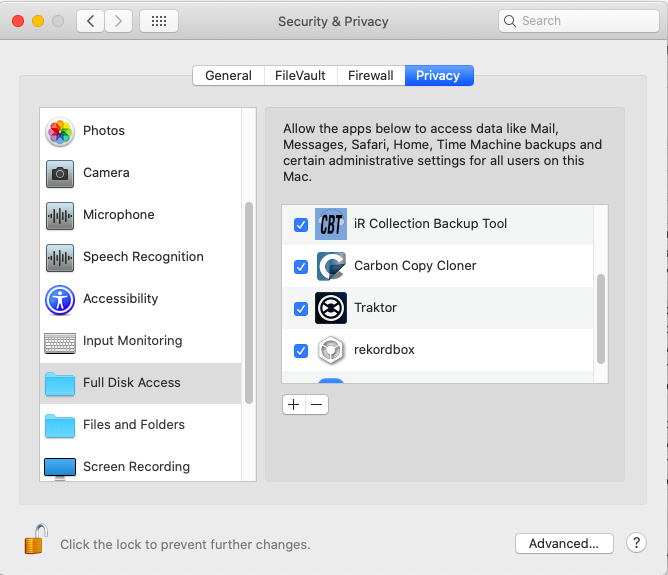


Comment actions

I have just switched from windows to Mac, and as I had my database stored on an external drive, migrating my library was really easy to do; but I have now discovered a problem. Rekordbox obviously finds the external HDD as it loads the program and database, but does not show it as an export drive in the Devices tab in the left hand column. I have an XDJ-RX2, so exporting playlists back to the same external drive is kind of really important for standalone use. I’m very new to Macs, so I’m not sure if this is a Mac or Rekordbox problem. The same external HDD always showed up in devices on my old windows machine... Hope someone can help me with this Thanks in advance
Post is closed for comments.
If you are on MacOS Catalina, check that Rekordbox has been added to the pane "full disk access" in the Security and Privacy system preferences.
It's one of Apple's annoying new protective things.
I have tried this but it hasn't solved the problem. External drive still isn't showing up in 'devices'
how is this drive formatted? ExFAT? FAT? NFS?
It is formatted to FAT32 and into two partitions (Lacie & Lacie 2) with all of my music and rekordbox database in the first partition. When i was using it on my old windows machine, both partitions would show up in the 'devices' column. Now i'm on this Mac, neither is appearing. Rekordbox is obviously recognising the drive, as its opening up the master database which is stored on there too, its just not showing up in devices...
@Pulse might be the one who can confirm. But as far as I'm aware partitioning performance drives is not a good idea and not officially supported (which isn't the same as it doesn't work in certain instances, it just won't work under all circumstances).
I have been using the same drive partitioned in the same way for almost a year when I was on a windows machine with absolutely no problems. It has only been since i plugged it into this mac that this problem has started, I even think it was showing in the devices section on the mac before today. I'm not 100% sure of this though, as today was the first time I created a new playlist on the mac and tried to export it. If i plug any of my memory sticks into the Mac, they all show up

I had the same problem. I upgraded the Mac to catalina and reinstalled rekordbox in version 5.8.5 and it does not recognize any external devices. I can't export or import anything to external drives. I've been using rekordbox for 5 years and I've never had that kind of problem. Very annoying that!

Are you sure you allowed Rekordbox to access file and folders?
System Preferences > Security & Privacy > Privacy tab > click on FILES AND FOLDERS (below full disk access) and check "removable volumes".
I’ve just tried that and still nothing...

@Martin > Reasons rekordbox can't see a drive:
- it's not connected via USB
- there is more than one partition on the drive
- it's not formatted FAT32 or HFS+
- you're on Catalina and didn't allow rekordbox access to removable devices
@pulse. Rekordbox box does recognise the drive as it loads the database from it. It just doesn’t show in the ‘devices’ section for exporting to. It is formatted to FAT32, it does have a partition but that partition was there all the time I used it with my windows machine...
@pulse rekordbox has access to removable drives, and full disk access