Have a feature request or suggestion? Post your idea here!

Post

4 followers Follow
0
Avatar

HELP! Problem with Rekordbox 6, importing history and notification analysis data

Hi,


Ever since I updated to Rekordbox 6 I am experienceing some ploblems. I am using the free version to record mixes in combination with the DJM-450 mixer, and two XDJ-700's. I converted my library from rekordbox 5 to rekordbox 6 and followed the intructions. After a while I received the message that everything was converted succesfully. However, everytime I start rekordbox I receive a message.

See below,
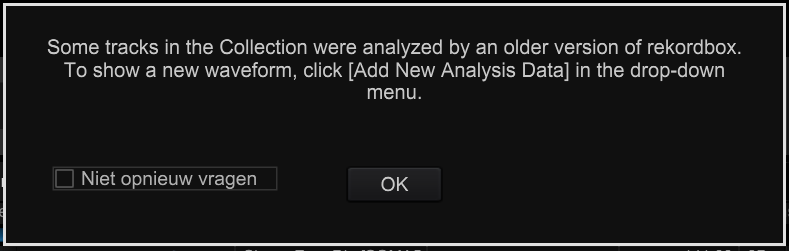
I have re-imported and re-analyzed all tracks in the selection, but I still receive this message everytime I start rekordbox. Also, I can not find where I can "add new analysis data". 


The second problem I have is with importing history. I export my tracks to a FAT32-converted usb flash drive. When I played a set, the history folder looks fine on the XDJ-700. Every track I played is there, in chronological order. But when I import the history in rekordbox 6, the history folder only shows a few tracks. Sometimes only 5 of the 20 tracks are in the history folder, sometimes 4, sometimes 7 etc.. The one's that are there in the history are only tracks that I downloaded after updating to rekordbox 6 and thus imported in rekordbox 6 (and not converted from the library from rekordbox 5 to rekordbox 6). 


Anyone have any idea how to solve these problems?


Thanks in advance!  

Don de Haan Answered

Official comment

Avatar

@Don > Select all your songs, right click on one of them and click Add New Analysis Data and that will be resolved.

As for your history, it could be a hiccup due to the rekordbox 5 > 6 changeover, but it's best if you remove the contents of the USB drive and re-export them all with the updated data.

Pulse
Comment actions Permalink

Post is closed for comments.

11 comments

0
Avatar

I added new analysis data the way you said. It turned out that one older track in my selecten was not analyzed. I analyzed it and I have not received the message again, so that's solved! However, the other problem is still there. Also, I already emptied the flash drive en re-exported the tracks a few times. I even emptied the drive and re-formatted it (FAT32). But, the problem persists..    

Don de Haan 0 votes
Comment actions Permalink
0
Avatar

I have the same problem. It shows only tracks which are added after I switched from RB5 to RB6.

I also cleared the tracks from the drive and added all tracks new, still shows only the new tracks

Robin Meyer 0 votes
Comment actions Permalink
0
Avatar

Exactly! Very annoying. I am still searching for a solution

Don de Haan 0 votes
Comment actions Permalink
0
Avatar

Ah yeah, sorry my bad.
I aslo did a firmeware update of the RX2, but didn't help.
It's definitely a Rekordbox issue.
I had also an issue that it didn't show the options I have done to the RX2 and which are aaved on the USB stick. This is solved now.
Will try today if the history issue is also vanished

Robin Meyer 0 votes
Comment actions Permalink
0
Avatar

Yeah I'm sure it's a rekordbox problem. Do you still have the history problem?

Don de Haan 0 votes
Comment actions Permalink
0
Avatar

Yes, problem still exists.
I did delete all the tracks from the USB, updated the cue points, waveform is already translated to Band3.
I played a 5hours set, just 8 tracks were in the history.
And all tracks in the history are the new ones added after the RB6 switch.
I made a test. I changed the option that the usb history isn't automatically imported and deleted from the USB stick.

The dunny thing is, you open the usb stick on RB6, see the complete history. Then click import and it imports just the new tracks, let the old ones on the stick.

Robin Meyer 0 votes
Comment actions Permalink
0
Avatar

Same histories problem here. Exported to a clean new USB from Rekordbox 6. Played a long set (4 hours). On histories import it only shows about 5 or 6 tracks out of at least 30+ I know I played.

VeeringEast 0 votes
Comment actions Permalink
0
Avatar

If your collection had the updated data and the export drive was wiped and re-exported with rekordbox 6, and you're still having problems, please file an inquiry ticket here and our support team will gather some additional information to assist you in resolving this issue. Thank you.

Pulse 0 votes
Comment actions Permalink