
Same here. Tried on both my ddj-400 and another midi controller (korg nanokontrol2)
Comment actions

I did the mapping and it doesn't work
Post is closed for comments.
Same here. Tried on both my ddj-400 and another midi controller (korg nanokontrol2)

Hi,
That feature is enabled when the CFX is set to USER mode and single mode.
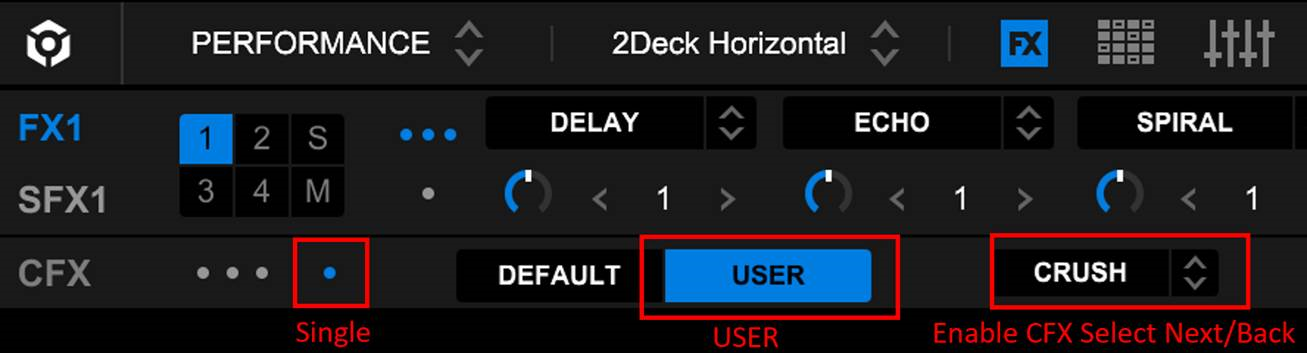
Hey masanori. Yeah, that's how I'm trying to use it. The CFX on/off maps perfectly, but the next/back don't do anything after mapping.
Hi Javier,
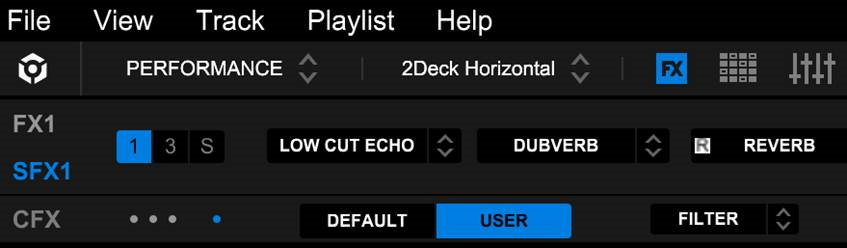
Just wanted to double check if you have chosen "USER" not "DEFAULT"
Thanks,
Masanori
Hey. I am. Single / User. Tried using different buttons in the hardware to no avail. Tried with CFX turned ON or OFF. Doesn't work irregardless 

Same here!
Tried using different MIDI maps, mapped to buttons of pad, or any other, nothing. The ON/OFF mapping works, the NEXT/BACK does not.
Was using "user" mode.
Please fix it Pioneer.
We have found that the CFX Select Next/Back does not work with the DDJ-400.
Since the DDJ-400 does not have the CFX button.
Our rekordbox engineering team is investigating how that feature can be feasible on the DDJ-400.
Thanks for your understanding for now.
Regards,
Pioneer DJ Support

It is happen too with my ddj sx2 unlocked with ddj xp1.
The on off is working but the next midi mapping is not working.

Here the CFX next and back commands didn't work either only the on/off works. The fact that the ddj 400 doesn't have a CFX button doesn't justify the commands that don't work since the on/off one works. I was very happy when I read in the release notes that:
"Added the following long-awaited features to MIDI LEARN:
CFX Select Next/Back (only in the CFX USER mode of the Sound Color FX single mode)."
I look forward to correcting the problem and having the same happiness as when I read the notes before updating.
Waiting for a Pioneer response. Why we have the Midi Learn then??
We can't assing a simple button for a function?
I don't think either, the fact that ddj don't have the button itself justify the blocked function on the software, it's a simple command.
Waiting for updates
The CFX is npw available on those models with rekordbox ver. 6.6.0.
DDJ-FLX6/DDJ-400/DDJ-200
DDJ-RR/DDJ-RB
DDJ-SX2/DDJ-SX/DDJ-SR/DDJ-SB2/DDJ-SB
DDJ-WeGO4/DDJ-WeGO3
(Windows only) DDJ-WeGO2/DDJ-WeGO/DDJ-ERGO
Thanks,
Pioneer DJ Support

What about the keyboard shortcut to toggle through the cfx settings?
MicVerb I have the same question


