Have a feature request or suggestion? Post your idea here!

Post

5 followers Follow
0
Avatar

XDJ 700 issues with latest version of Rekordbox.

Good morning from Australia and I hope all are well and safe. I subscribed to the latest version of Rekordbox to use with a pair of my XDJS 700. I updated the firmware of the players connected them to the macbook Pro as I always did using the previous versions of the software. Unfortunately I don't get any song information at the players screens or can use the software using the controls of the XDJ. I thought was a firmware issue therefore I updated at the latest version. Ccan you please help?

Thank you in advance.

Emmanuel Seimenis

Post is closed for comments.

16 comments

0
Avatar

I use 2 XDJ-700s with RB 6.1.1 and have no issues. Please provide some details. Are you in Performance mode using USB connections? Or are you in Export mode using the ProDJ link for ethernet connections?

DJ Joel 0 votes
Comment actions Permalink
0
Avatar

Thank you for your comment. I am using the software in Peformance mode using USB cables. I appreciate any help I can get. Thank you

Emmanuel Seimenis 0 votes
Comment actions Permalink
0
Avatar

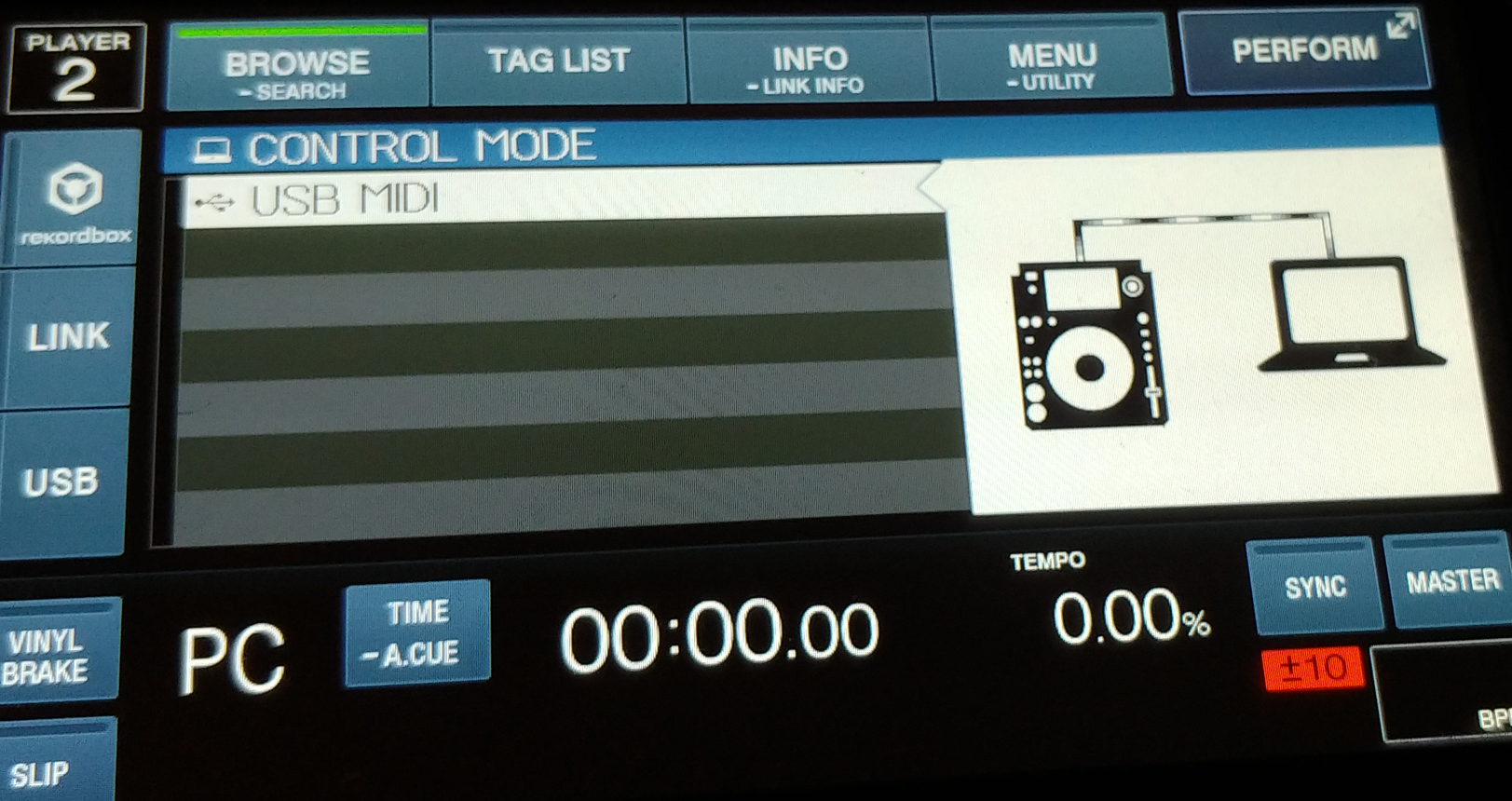
Ok, did you link the players in Performance mode? This is done by pressing the link button on the left side of the screen. You will then see the screen switch to Midi mode. Twist the selection knob until the screen matches the player number and then press the selector button. The player will now function as a controller to the RB software. You will not see the playlists on the player screen, just the track loaded.                                                                                                                                                                                                                                                        If you wish to use the players and display playlists, you have to use a USB stick or connect to RB using ethernet cables. You then use the Pro DJLink mode to link the player to the software. 

DJ Joel 0 votes
Comment actions Permalink
0
Avatar

" Twist the selection knob until the screen matches the player number and then press the selector button."

Good evening!

I know it's been a long time since you were active, but I have a simmilar problem.

I have issue with my XDJ700's. When I click the Link button it shows me that it is connected to PC, but when I twist the knob then nothing happen, I can't select player number. Then I also can't see my xdj's in Recordbox audio options and the same in Traktor. I installed the last Windows driver. I have Windows 11. What am I do wrong?

Lukasz Zebrowski 0 votes
Comment actions Permalink
0
Avatar

The sequence to select deck should be:

Hit "Link" button on the left side of display

Press the selector knob down once

Twist Selector knob to select the deck number and press Knob once.

Check you mixer switches on the top to see if they are on Computer.

Hope this helps.

DJ Joel 0 votes
Comment actions Permalink
0
Avatar

Thank you, but I do like you said, but when I twist the knob nothing happen. There is no option to select deck.

Lukasz Zebrowski 0 votes
Comment actions Permalink
0
Avatar

Ok, press the knob once and then turn it to get the player number.

DJ Joel 0 votes
Comment actions Permalink
0
Avatar

Ok, I did some testing on my system. If Rekordbox is not running and not in Performance mode, I get the same results you are seeing. Are you connected to the computer using USB cables? Is RB running? Are you in Performance mode?

DJ Joel 0 votes
Comment actions Permalink
0
Avatar

Thank you very much for what you do for me :)
Yes, they are connected with USB cables, I turned on Recordbox in Performance mode and it's the same. Earlier, I also tested with and without turned on. There must be some software bug on the decks. Unfortunately, there is probably no way to reinstall the latest version of the software.


Lukasz Zebrowski 0 votes
Comment actions Permalink
0
Avatar

@Lukasz > Do you have a subscription for rekordbox 6? Or a compatible hardware unlock device connected?

Pulse 0 votes
Comment actions Permalink
0
Avatar

hi, I am having exactly the same issue with connecting to rekordbox. 

Did this issue get resolved? how'd you fix it?


Bipin Rao 0 votes
Comment actions Permalink
0
Avatar

@Bipin Rao > Same as above, do you have a subscription or compatible unlock device connected?

Pulse 0 votes
Comment actions Permalink