Have a feature request or suggestion? Post your idea here!

Post

4 followers Follow
0
Avatar

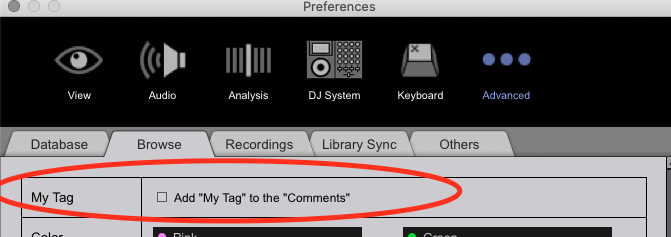
How does »Add "My Tag" to the "comments"« exactly work and how does it deal with comments that were there before?

Hello,

Do i understand it correctly that this option has the single use to make "My Tags" searchable on when playing on a CDJ ? Therefore the ID3 comment will contain the list of "My Tags" ?

But what if i already had one comment written there? Like "Start from 1:33 on", "Mix out before 3:44", or something like that.. This will get overwritten? I hope not...
Or will the "My Tags" get added to the original comment?

Also, when RB6 processes the tracks when i check the option, will the tracks without any "My Tag" assigned be left out/skipped — or will they also get processed (= comment would be blank then, and my comment that was there before gets erased) ?

(RB 6.4.2 + macOS 10.15.7)

Andre P Answered

Official comment

Avatar

@Andre > Existing comments are maintained, the My Tags added to the end of the comment field, and are contained within a structure such as:

/* tagname */
/* one tag / two tags / three tags */

So you could always use an editor later to intelligently remove anything between those delimiters.

Any changes are made in realtime and are saved on the file metadata.

Pulse
Comment actions Permalink

Post is closed for comments.

11 comments

1
Avatar

I can't comment on how exactly this works but I would imagine that your comment would get overwritten the moment you change MyTags for a certain track.

Alternatively, you could use rekordcloud to upload your library and set the MyTags option there to copy to the Label or Composer field. Then you will preserve your comments and still have your MyTags searchable.

Christiaan (rekordcloud) 1 vote
Comment actions Permalink
0
Avatar

Great, thanks for the info, Pulse.
Glad it doesn't delete the original comments (This info should maybe get added to the manual).

But one question: The tag feature is such a strong and useful feature of RB6. Why is the implementation via the ID3 comment field the only way to get this info to the CDJs? Feels a bit basic.

It would be much more elegant to transfer the "My tags" via the database that's being transferred to the CDJs (including waveforms, cues, etc). And to have a dedicated interface to search for these tags then on the CDJs, such as the interface in Rekordbox. 

Or is this something i missed and is already possible?
Should be no problem with a firmware update for the CDJs/XDJs.
Is this in the plans? Should be...

And thanks for the info about rekordcloud, @Christiaan. I'd just use a fraction of the features, so the abo is a bit pricy in my case, but looks cool.

Andre P 0 votes
Comment actions Permalink
0
Avatar

The My Tag fields are exported...  they're available under the Track Filter.

Pulse 0 votes
Comment actions Permalink
0
Avatar

Ah, but this only works on the CDJ-3000 ?
What about the older models, it shouldn't be really a problem to implement it via a firmware update — at least for the 2000 and XDJ-1000.

O saw this thread, this looks exactly how i had it in mind how it would make sense ;)
https://forums.pioneerdj.com/hc/en-us/community/posts/900002879743-CDJ-3000-Track-Filter-MyTag

But honestly, why no update for the older models?
Technically this shouldn't be any problem at all.
Or did i miss a button to press here?

I have the XDJ-1000MK2 at home:

Andre P 0 votes
Comment actions Permalink
0
Avatar

Press and hold the TRACK FILTER button, then on the left of the screen, tap the MY TAG button.

This is available on the CDJ-2000NXS2 and XDJ-1000MK2.

Pulse 0 votes
Comment actions Permalink
0
Avatar

Thanks!

Yeah, i guess that feature was added later on, right? It's def not in the manual of the XDJ-1000MK2 and also not the CDJ-2000NXS2, i checked before asking here.. I'd suggest it gets added, right? Or at least as an addendum..

The manuals are from the year 2016...
https://www.pioneerdj.com/en/support/documents/player/xdj-1000mk2/
https://www.pioneerdj.com/en/support/documents/player/cdj-2000nxs2/

Andre P 0 votes
Comment actions Permalink
0
Avatar

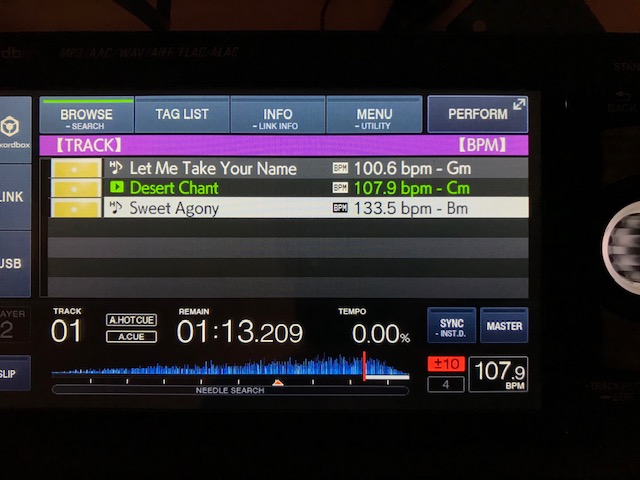
I have been researching the hell out of this same question. I am using two CDJ-900NXS units and I select 'TRACK' then push MENU and I have:

DEFAULT
ALPHABET
ARTIST
ALBUM
etc.
 
But no COMMENTS is this because I only have the CDJ-900NXS? Can anyone confirm?
movingzachb 0 votes
Comment actions Permalink