Have a feature request or suggestion? Post your idea here!

Post

3 followers Follow
0
Avatar

External Drive database Issues

I had an external drive crap out and a host of other related issues. Now that all is fixed I cant get my RB database work on my main Mac Pro 2019.

I use an external drive with my Mac Book Pro to download and add music to Rekordbox stored on the main drive of the macBook Pro.

I take the same drive and connect to my  new Mac Pro 2019 and use rekordbox on that to stream music. But when I plug the drive in it asks about my tag, I remember clicking NO to this and Rekordbox used to see all the new files and after playing it would keep the histories in green of what I played on the old Mac Pro 2012

But now for some reason the RB on the M Pro 2019 does NOT see the new changes I put in. 

When I connect the ext drive to M Pro 2019 it says It cannot find database, do I want to use main drive so I click yes and then go into RB prefs and change location and still does not work.

I believe this all went south when I swiped my old M Pro 2012 for the new M Pro 2019 as the old ran High Siera and the runs Catalina.


How can I correct this?

There was an old post I remember finding I followed and it worked but I can't find now.


>??

Ralphie Dee

Post is closed for comments.

6 comments

0
Avatar

Wow the more I read about this issue the more I think this is a widespread problem? My workflow was always external drive connected to MBPro running Catalina used to populate new tracks crates etc. Then using ext drive to play connected to my mac Pro 2012 which ran High Sierra worked fine, kept histories and xml file.


Now Same situation except now Mac Pro desktop is 2019 running Catalina and ext drive does not keep history nor the xml file. If I go to choose xml in prefs it only finds and old one but does not see the the latest one. If I search for the xml manually It's there but I cannot use it ???


I need the history to work and xml file to be recognized. I have RB 6 but never used, Oh man I need help!!

Ralphie Dee 0 votes
Comment actions Permalink
0
Avatar

XML has nothing to do with it; that's only needed for if you're importing content from an XML file, or trying to sync some external data.

I keep my database on an external USB and have no problems moving between devices. If you launched rekordbox WITHOUT the drive connected, it would default to the internal database. You would certainly be asked about syncing MyTag because it thinks that's an EXPORT drive (which it can be; for use with a CDJ or XDJ in stand-alone), but you can than open the prefs to select that drive as the source of your database.

So long as you haven't manually changed any of the settings files, it should load an external database without issue.

Pulse 0 votes
Comment actions Permalink
0
Avatar

OK one step at a time, just so you know workflow.

Mac Pro 2019 has Rekordbox 

I use External Hard Drive which has all music.

when ext HD is connected to Mac Pro 2019 all the music ( playlists and tracks) are only seen in the External hard drive dropdowns.

The Rekordbox Collection and Playlists are empty on the Mac Pro 2019, I would think I would copy all of the tracks / playlists to the collection manually for now?


So what do I do from here?

Ralphie Dee 0 votes
Comment actions Permalink
0
Avatar

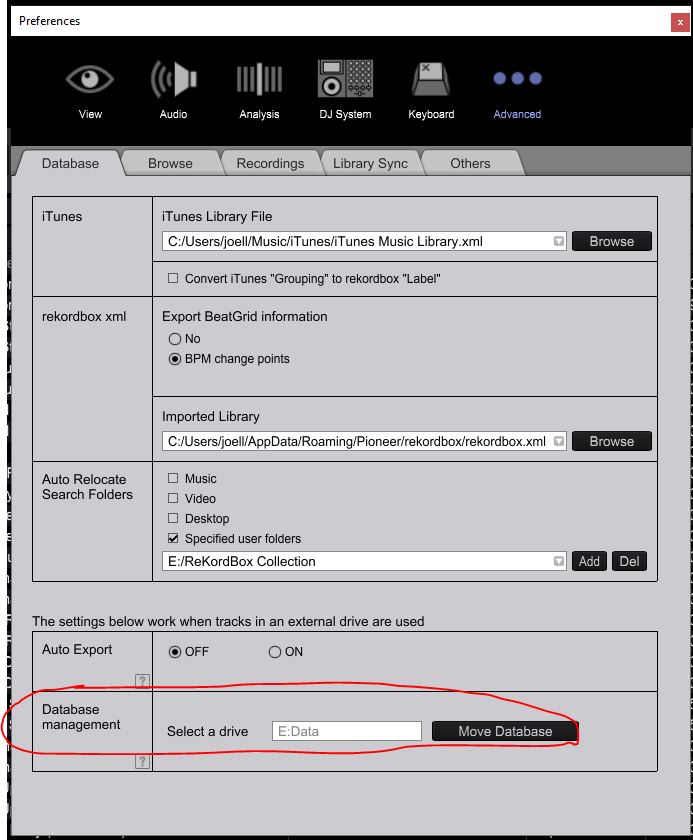
Under Preferences/Advanced, what does it show for your database location? Does it match the external hard drive/folder location?

DJ Joel 0 votes
Comment actions Permalink
0
Avatar

Ok I think I found issue my Serato library was in two spots, when I was going from Serato to RB it was seeing the library on my Main Drive NOT the library on my external. I now corrected and so far I see the tracks and playlists in the RB collection.


Let me work with it to make sure this is right thx keep u posted 

Ralphie Dee 0 votes
Comment actions Permalink
0
Avatar

Ok I still have issues, everything was fine I don't know what the heck I did. All I want to do is to keep the rekordbox database on my external drive, which I also use Serato for. Serato is fine it's Rekordbox thats the issue.


Workflow:

Add tracks from various sources to the external drive which is connected to my MacBook Pro laptop, drag tracks into new RB playlist  set cue points then save. 


Disconnect ext drive connect to my main Mac Pro 2019 I will get the my tag info and I have to let Rekordbox default to the main drive on the Mac Pro 2019, then I go into prefs and change to the external drive and all the tracks are there. 


NOW, I play the tracks from the external drive list but there is no history. I also notice that the only way I get history is to copy the tracks / playlists to the COLLECTION.  


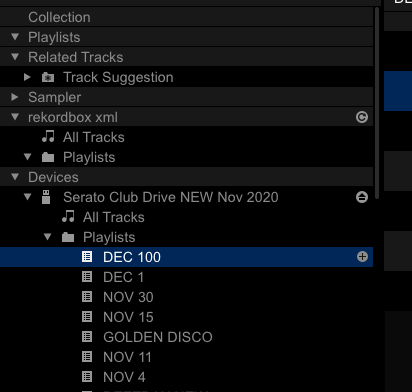
Screenshot shows no tracks in collection, the collection should be on my external drive no?

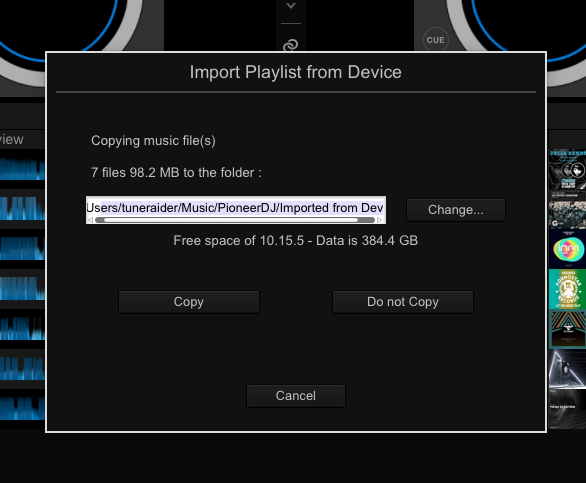
I also notice Rekordbox.xml is empty too. But If I drag a playlist to the collections playlist I get the following box see second screen shot, its set to copy the tracks on to the MAIN hard drive I dont want that where do I copy or do I even copy???


See the screenshots below

Ralphie Dee 0 votes
Comment actions Permalink