Have a feature request or suggestion? Post your idea here!

Post

2 followers Follow
0
Avatar

Moving iTunes Library & Rekordbox Library over to external drive

As my laptop storage is nearly full, I plan on transferring my music library over to an external SSD. I use itunes to manage my library & make playlists, then use rekordbox to set hot cues/export the playlists etc. Last time I moved my entire itunes library, then changed the itunes media folder path within rekordbox it re-imported my entire library, subsequently losing all hot cues and memory cues I had set.

If I transfer over my library, then use the relocate files method to locate the moved files, when I change the 'iTunes Library File' within the rekordbox settings, will rekordbox re-import the entire library and lose the cues & grids I have set? If so, how can I avoid this?

Thanks

Freddie Causton

Post is closed for comments.

6 comments

0
Avatar

The reason why you lose your cues/loops/grid is because the filepaths to the audio files changes see this tutorial:

Why cues, loops etc can disappear from your DJ software aka filepaths matter

easiest way to fix for now and in the future:

Don't let iTunes copy your audio files

for iTunes:
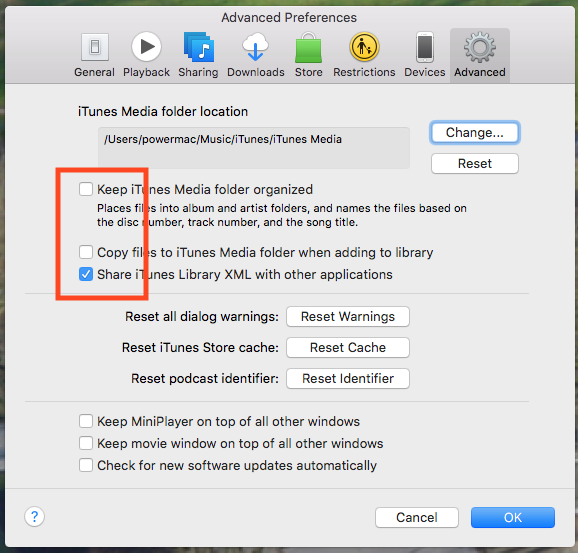
for Music:


And finally, if you're on MacOS then I've developed an app which will do what you're looking for.

Shareable backup from a Rekordbox or iTunes collection for back-to-back preparation and more

MixMasterG 0 votes
Comment actions Permalink
0
Avatar

Brilliant video, thanks very much for the response. I've changed the iTunes settings as described in the video. So when I've relocated all tracks within rekordbox, I can change the 'iTunes Library File' in rekordbox without having to worry about losing cues, loops etc?

Freddie Causton 0 votes
Comment actions Permalink
0
Avatar

Okay I've moved the files however when I display all missing files, then relocate one, the option to relocate all missing files is not appearing, and the tracks i have relocated are still being flagged as missing.

Freddie Causton 0 votes
Comment actions Permalink
0
Avatar

Ah thank you, it appears I was highlighting tracks to relocate within my itunes playlist, however I have now chosen the songs within my collection and it's worked for me, appreciate the help!

Freddie Causton 0 votes
Comment actions Permalink
0
Avatar

Awesome! Yeah, can't relocate within iTunes. ;) Glad you got it working.

Pulse 0 votes
Comment actions Permalink