Have a feature request or suggestion? Post your idea here!

Post

2 followers Follow
0
Avatar

New RB6.5 user migrating from Traktor Pro 3 with a few questions

Hi all

Thankfully this doesn't seem too much of a different software in terms of how to use it, but I have a few questions which hopefully someone who's already made this transition can comment on.

1) on Traktor (and using my s2 Mk3) there is a button on the controller that expands the collection/music list to full screen, to help make it easier find/scroll through songs.  Can Rekordbox do this, if so how please?

2) Samples no.1 .this seems equally as much of a ballache as Traktor. However, from what I've read, "one shot" samples (ie: clips I've made from tracks) getting them to sync with the playing track BPM seems impossible.  I've tried having them set as loop, but still makes no odds....I'm a bit confused.

3) Samples no.2 - I figured this out with a mate's controller ages ago (I've now got the same Pioneer DDJ RR) how to capture samples using the controller and rekordbox.  Buggered if I can remember or figure it out now....if someone could explain how to do this I'd appreciate it.

4) Finding similar songs based on what's currently playing - read this is supposed to be a really handy feature, but if I have a track playing, it doesn't seem to identify anything similar? Am i missing something?

Thanks in advance.

Russell Jones

Official comment

Avatar

Hey Russell,

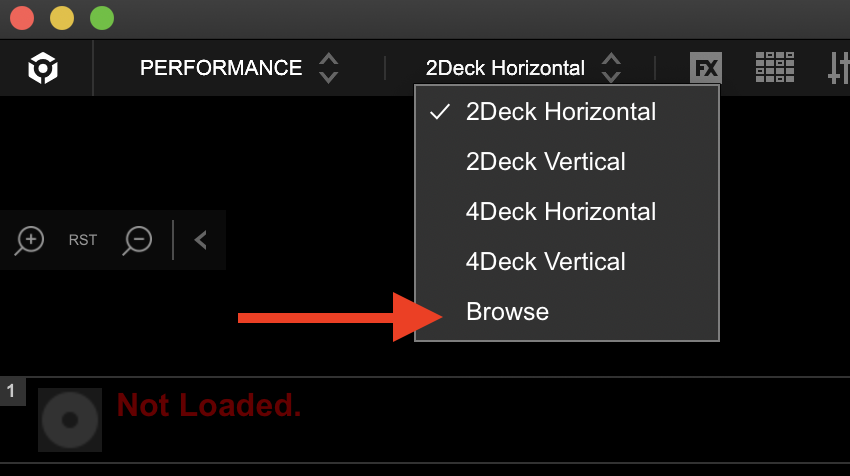
1) The default is the spacebar; give that a shot. Otherwise you can change the view from the 2/4 deck options to the "Browse" expanded library view from the dropdown at the top left.
2) One-shot samples don't sync, sorry.

3) Capture samples by creating a loop on a track, open the side panel to the right of the waveforms (between them if in horizontal view) and click the scissor icon. The loop will change from orange to blue - grab that and drag it to a sampler slot. The other way (using hardware) is to create a loop and press the CAPTURE button. Presto.
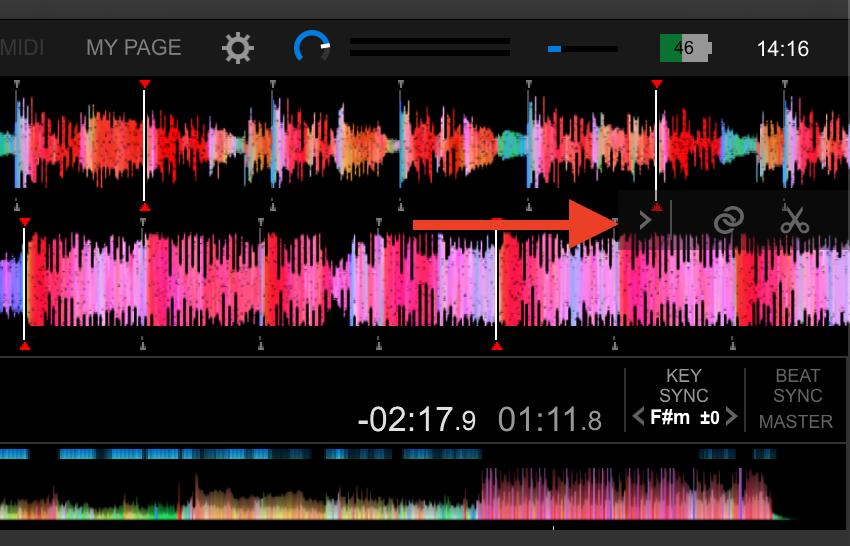
4) There's two ways of this being shown, first being the "traffic light" system - activate this by clicking this button (or choose another source if you want to match to a track which is not the master):
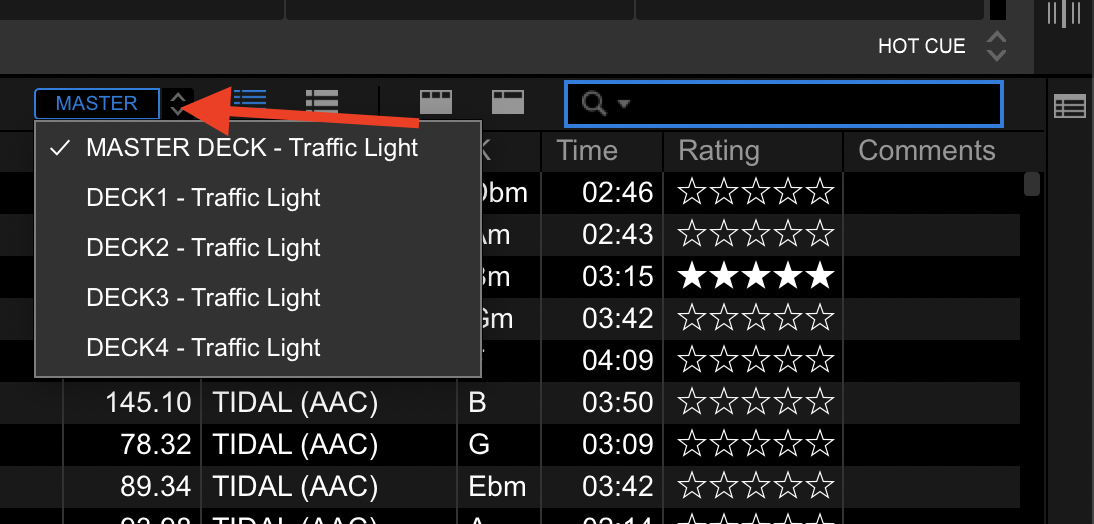
The other way is to use the RELATED tracks function, which has a lot more matching criteria available than just the key, and you can even customize them well beyond that.

Pulse
Comment actions Permalink

Post is closed for comments.

2 comments

0
Avatar

1)  Spacebar works a treat - thanks

2) Well, that's a bit crap. Will that be incorporated in an update?  Traktor would do this without issue, and from what I can see, it's something a fair number of people seem to ask/want?   Any workarounds at all you're aware of please?

3) excellent - that's easy enough!

4) ok.  I've had a look, and mine is set to that, but even though just a few tracks down I can see (for example) other 5A key tracks, it's not showing them in green (presumably it would?).

Thanks for your prompt response

Russell Jones 0 votes
Comment actions Permalink