Have a feature request or suggestion? Post your idea here!

Publicación

9 seguidores Seguir
0
Avatar

[SOLVED] How to control Rekordbox (mac) with XDJ-RX

Hello,

Maybe a very basic question but I don't know how to control rekordbox with the XDJ-RX on my macbook?

I played before always using USB directly into the XDJ-RX, but I wan't to play now tracks from my macbook. When I connect the XDJ-RX with USB there doesn't happen anything. When I load a track in rekordbox to a deck, it doesn't load to my XDJ-RX - or I can't control it with the XDJ-RX.

Can anyone help pls? I want to use rekordbox on my macbook and control it with my XDJ-RX by USB.

Or does this only work with the LINK function with a LAN connection?


thanks.

LXC

La publicación no admite más comentarios.

20 comentarios

-1
Avatar

I don't work for Pioneer but I can tell you that you can not "control" Rekordbox from the RX - Rekordbox is not midi mapable.

You can connect to it via Pro-Link with an Ethernet cable - It essential uses your mac/PC as hard drive. you can drag & drop files to the player.

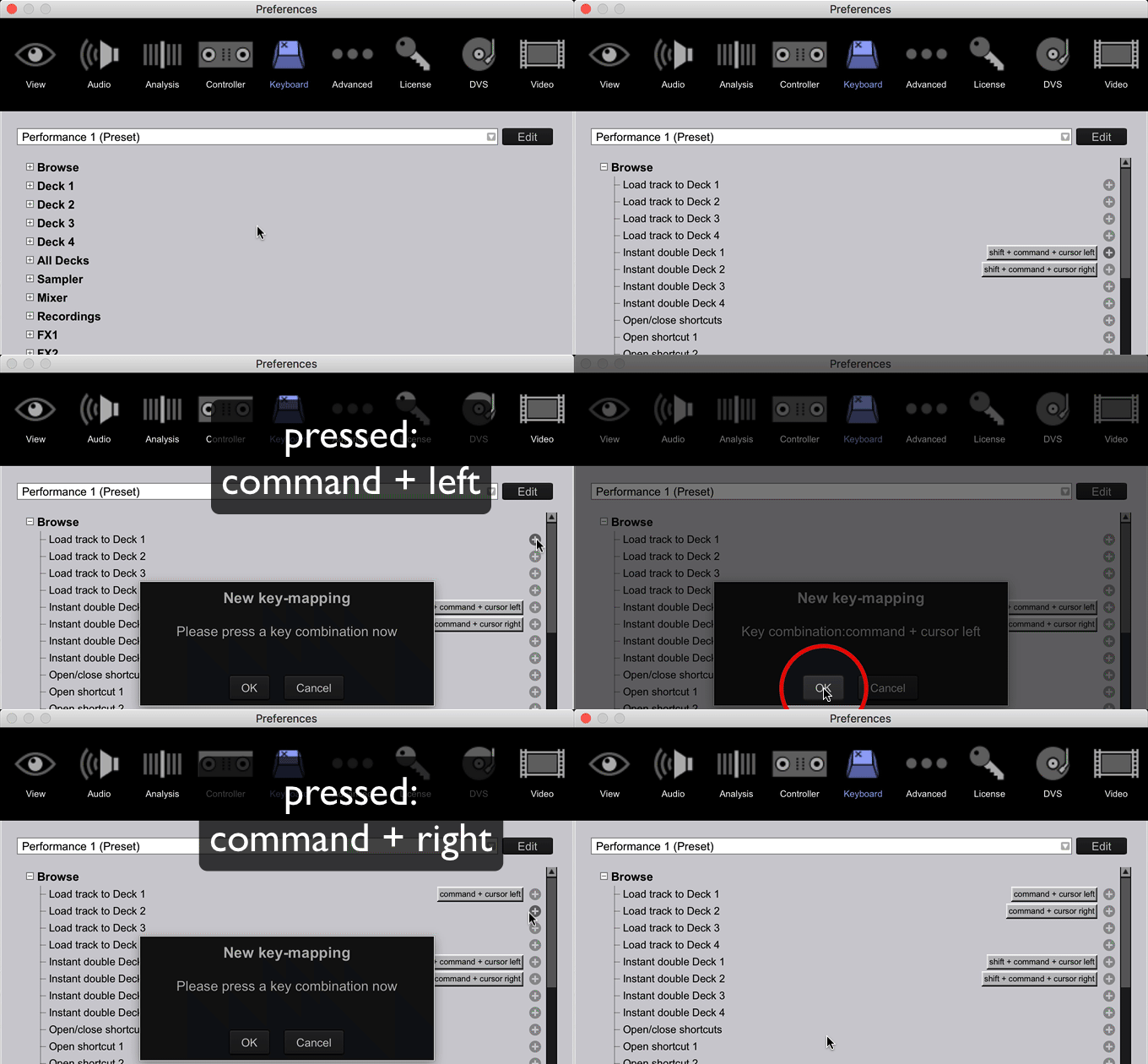
* *Tip - You can map keyboard short cuts for loading tracks to either decks of the RX this helps speed things up when your at a gig using pro-link. I mapped alt/option + Left key for deck 1 and alt/option Right key for deck 2.    Its a lot nicer this way as I find that sometimes when your trying to drag a song to the link player section at the bottom of the screen sometimes Rekordbox assumes your trying to move the track to a new playlist etc. so as your dragging the track it starts scrolling your list. using a keyboard short cut totally eliminates that issue!!.

  • Personally I agree with you that being able to scroll around with Rekordbox via the scroll wheel on the RX would be amazing but like I said currently Rekordbox is not midi mapable.
Anthony Howard -1 votos
Acciones de comentarios Permalink
0
Avatar

@LXC > As @Anthony outlines above, the RX is not designed to operate as a controller for rekordbox over USB; you must connect the RX via ethernet (LINK) to your computer.

Should you wish to control software with the RX, the RX itself is MIDI compatible, but rekordbox is designed more as a library / music source. You can still navigate the content by pressing the rekordbox button on the RX once it's linked.

Pulse 0 votos
Acciones de comentarios Permalink
0
Avatar

So, essentially, I could  have Rekordbox on my MacBook showing the software with all of my music files available and utilize it with XDJ-RX. Let's say I don't have a track someone could request. I download the track to my MacBook, Load it into Rekordbox, have the software analyze it then load it to the RX? At least I hope this is what this means. 

Cee El Bee 0 votos
Acciones de comentarios Permalink
0
Avatar

@Cee > If you are controlling rekordbox in performance mode with the RX, any track you import will be in the collection and thus available for you to play via the RX.

If you are LINKING to rekordbox in export mode, same thing applies; just find the track in your collection and load it.

Pulse 0 votos
Acciones de comentarios Permalink
0
Avatar

hi do i need to off these Ethernet adapter,

so i can link  im using a macbook

Daniel O'Connell 0 votos
Acciones de comentarios Permalink
0
Avatar

@Daniel > If you want to browse the content you have stored in rekordbox on your computer, you want to LINK over ETHERNET.

If you want to use the XDJ-RX to control rekordbox DJ (in Performance mode; a paid upgrade of rekordbox), you would then connect in HID mode over USB.

Pulse 0 votos
Acciones de comentarios Permalink
0
Avatar

Hi,

My question is related to the above; I am trying to connect my XDJ RX to my macbook via the LINK port (over Ethernet, like you said) but waveform and BPM are not displayed.

Info :

XDJ-RX version 2.10

Macbook Pro El Capitan 10.11.4

First of all I'd like to note that this workflow does work when I do it via my PC ( PC ethernet port directly into LINK port on XDJ - no problems; I can use my whole rekordbox library and all loads perfectly)

When I do the same thing via my macbook - one difference my macbook has no ethernet-port so I use an USB/ethernet adapter - it does not work ?

I get the two Linked up (LINK appears in rekordbox - click it and then press 'rekordbox' on RX) but like I said waveform, bpm, .. is not displayed - I can play the song but i get no information

So it seems that the analysed information by rekordbox is not displayed/does not come through ?

Putting a router between the XDJ RX and Macbook did not fix it.

Any other suggestions ?

Thanks in advance !


RandomShuffle 0 votos
Acciones de comentarios Permalink
0
Avatar

Can you use Ethernet to USB connection? 

Lee Heryet 0 votos
Acciones de comentarios Permalink
0
Avatar

I've finally gone back to trying this again after failing last time. I'm having the same issue as the guy above. Followed the same procedure but not getting anything on the XDJ.

Lee Heryet 0 votos
Acciones de comentarios Permalink
0
Avatar

@Lee > Are you using an Apple brand ethernet adapter?

Pulse 0 votos
Acciones de comentarios Permalink
0
Avatar

Hi Pulse, no just a cheapo off amazon. Do you think thats the problem? 

Lee Heryet 0 votos
Acciones de comentarios Permalink
0
Avatar

@Ian > Easy-peasy...

1) Open the Preferences > Keyboard window

2) Click the + beside Browse

3) Click the to the right of the Load command you want to assign

4) Press a key command (I use Command + Left Arrow for deck 1, Command + Right Arrow for deck 2)

5) Click OK

6) Repeat for each you wish to assign

To remove one that's already there, click on the shortcut and select Remove 

Pulse 0 votos
Acciones de comentarios Permalink
0
Avatar

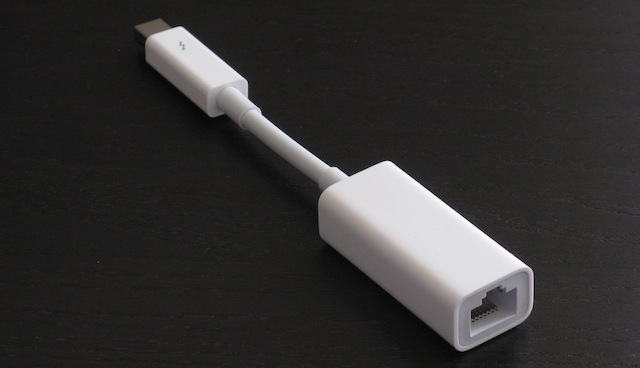
Would you kindly specify the exact cable configuration which would allow me to connect my XDJ RX to my Mac Book Pro 15 Ethernet port? A photo would be helpful if possible as a quality assurance. Trying to make sure I get the correct cable the first time. :)

Also, once connected, I should be able to utilize the record mode in Record Box to record my sets to my computer, correct?

Thank you,

Nathan

DJ Nathan Quinn 0 votos
Acciones de comentarios Permalink
0
Avatar

@Nathan > If your MBP has an ethernet port, you literally only need an ethernet cable; CAT5, CAT5e or CAT6 will all work; they are virtually identical.

If you DO NOT have an ethernet port (which many newer models to not), you should get the official Apple ethernet adapter:

They also sell a USB model, but I recommend the Thunderbolt one as it keeps your 2 USB ports free.

Pulse 0 votos
Acciones de comentarios Permalink
0
Avatar

Pioneer,

I bought the XDJ RX as an upgrade to my Traktor DDJ 1. I love my Traktor and the ease it affords in equalizing and recording my mix sets. While I like all the bells and whistles on the new XDJ RX, I was most looking forward to being able to easily record my vinyl collection and mixes due to the line input capabilities of the XDJ. Therein my issue with the XDJ-RX. I have read all the manuals and have searched online for help in figuring out how to be able to record my mix sets with the XDJ RX as it is not as easy as all the demo videos suggest - "put a USB in port two and press the record button." :(

I've bought the cables which can link the XDJ RX (both USB and ethernet) to my computer and the Recordbox software hoping that within one of those configurations - I would be able to record my sets - with no luck. 

What specifically, do I need to do to equalize, record and save my sets using Record Box   (or vinyl - if different) with the XDJ-RX on my Apple Macbook Pro 15" 2012 (OS  Sierra 10.12.6)? 

Please help. 

Thank you. 

DJ Nathan Quinn 0 votos
Acciones de comentarios Permalink
0
Avatar

Hej Nathan

If you want to record the main output of your XDJ-RX (which I think is what you are trying to do?) it really is as simple as putting in an USB and hit te record button. A file is than created on your USB-stick with the mix on it and all the effects, adjustments that you did on the XDJ.

Same goes if you do it via the Rekordbox software, hit record and a file is created on your computer ( for me thast in User/Music/PioneerDJRecord ).


RandomShuffle 0 votos
Acciones de comentarios Permalink
0
Avatar

@Nathan > Please start a new thread for your topic as opposed to piggybacking on an old one.  Thanks!

Mark Gallo 0 votos
Acciones de comentarios Permalink