Comentario oficial

Glad to hear you got it working, thanks for reporting back.
Acciones de comentarios

Hi.
I've got a problem with DDJ RX ASIO out.
There is a voice signal in the upper right corner near MIDI button, but no signal near the record button and also no sound.
The odd thing is, it was working fine until I had to move my computer and reconnect all the cables.
Tried reinstalling rekordbox and the driver but didnt help.
Im using DDJ RX with my Windows7 PC.
P.S. I can now record with 'Speakers (Realtek High Definition Audio)' output but I don't have control over master volume.
Glad to hear you got it working, thanks for reporting back.
La publicación no admite más comentarios.
Cues are not working as well with the 'Speakers (Realtek High Definition Audio)' so its not really an option.
Can you please provide a screenshot of your Preferences > Audio page?
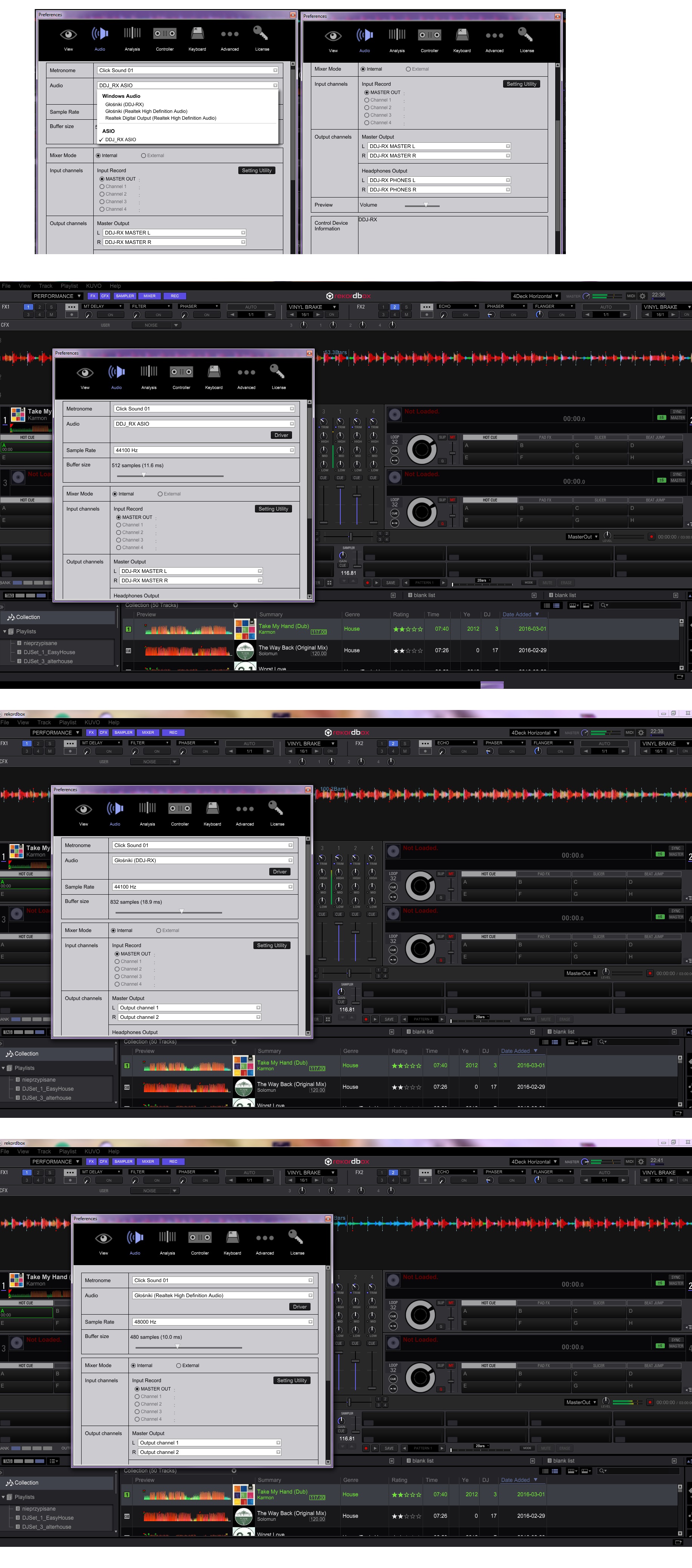
Hope thats enough. If you need anything else please let me know.
@Piotr > You need to have the DDJ-RX ASIO driver selected under the Audio settings, and it will work properly. There is NO control of the master level within the software; that's done via the hardware control knob.
Where is it you're not getting audio out? To speakers?
Yes, when I select DDJ-RX ASIO driver im not getting audio out to speakers. Thats the reason for this post.
Cues are not working as well, if thats useful. Im receiving no sound at all, as it says in the post title.
@Piotr > Two things... first, check that it's properly detected by your computer. Open the device manager and look for the XDJ-RX -- if you find one of the entries, click on it then go to View > Devices by Connection, you should see a DDJ-RX [2] (Out) DDJ-RX [3] (In), Microphone (DDJ-RX), and Speakers (DDJ-RX).
Second, if you have those items showing and you are still experiencing audio output issues, please check this FAQ to follow the step-by-step instructions.
Well... that wasn't really useful. My controller was connected properly and the problem obviously wasn't caused by voice settings as I told you, that it works with different audio output selected.
Anyways I disconected all the USB devices except mouse, keyboard and DDJ RX. Then I reinstalled rekordbox as well as the driver and it helped.
Looks like the driver somehow interfered with a bluetooth reciever, or more likely, a camera with built-in microphone.

lol @ Mark ... that's only part of the problem...
@Piotr > Here's what I can tell you: when properly installed by following the instructions, the DDJ-RX will work as expected. I have one here, I tested it on both Windows 8.1 and Windows 10 with no issue.
Did you follow the instructions I posted or not?

Thanks in advance,
comedy central up here.
Currently floundering on WINDOWS 10
followed above instructions.
Audio devices present and accounted for- microphone and speakers
-both reading they are working
non ASIO setting
Media player sends through to booth when DDJ-RX speaker setting is played but rekordbox track does not monitor
PHONO turntable reads and meters on master but no sound comes through booth
Everytime i select DDJ-RX speaker settings then revert to DDJ-RX ASIO setting the ASIO ERROR comes up which leads me to have to go through the unistall/reinstall process for the ASIO driver. Is this a normal function of the program.
Agitating to say the least but hopefully you may be able to set me on the course to the solution.
Kind regards,
Rhys
All good, did a full restart for the umpteenth time and its all functioning as it should.
thanks.


