Have a feature request or suggestion? Post your idea here!

Publicación

6 seguidores Seguir
0
Avatar

Shortening a loop on the DDJ RB

Is there a way to do this? I know that when the controller isn't plugged into the software you can shorten the 4 beat loop by clicking the arrows on Rekordbox but when the controller is plugged in this option is taken away?

Nathan Hall Respondida

Comentario oficial

Avatar

Thanks for the info, Nathan.


Unfortunately, there is no dedicated loop shortening/extending hardware button(s) on your DDJ-RB.  You can, however, assign keyboard shortcuts to "Halve the loop" and "Double the loop" on each deck.


Preferences  >  Keyboard  >  Select Deck 1 or 2  >  Scroll down to the "Halve the loop" and "Double the loop" options and assign any keyboard shortcut you like.

Mark Gallo
Acciones de comentarios Permalink

La publicación no admite más comentarios.

10 comentarios

0
Avatar

Which version of rekordbox are you using?

Mark Gallo 0 votos
Acciones de comentarios Permalink
0
Avatar

Hi Mark,


I'm using Rekordbox DJ, I'm assuming it's the most up to date release as I've had no pop ups when loading Rekorbox to tell me there's an update available.

Nathan Hall 0 votos
Acciones de comentarios Permalink
0
Avatar

Another option you have is to use the MIDI learn feature to manually map some of the buttons/pads that you may not use as often to act as loop cutters/extenders.

Mark Gallo 0 votos
Acciones de comentarios Permalink
0
Avatar

The rekordbox team has also informed us that in a future version of the software, the GUI will be changed to allow the direct control of the loop size rather than requiring a MIDI remap or keyboard shortcut.

Pulse 0 votos
Acciones de comentarios Permalink
0
Avatar

Any news of direct control of the loop resize, on Rekordbox v.4.2.4?

MiniBum 0 votos
Acciones de comentarios Permalink
0
Avatar

If it wasn't listed in the changes, probably not.

Pulse 0 votos
Acciones de comentarios Permalink
0
Avatar

Hello,

I'm trying to manually remap the pads when slicer is active into double/halve the loop. But I really can't figure it out in the midi window. Is this possible? And how? 

Sincerly,

Andreas Porters

Andreas Porters 0 votos
Acciones de comentarios Permalink
0
Avatar

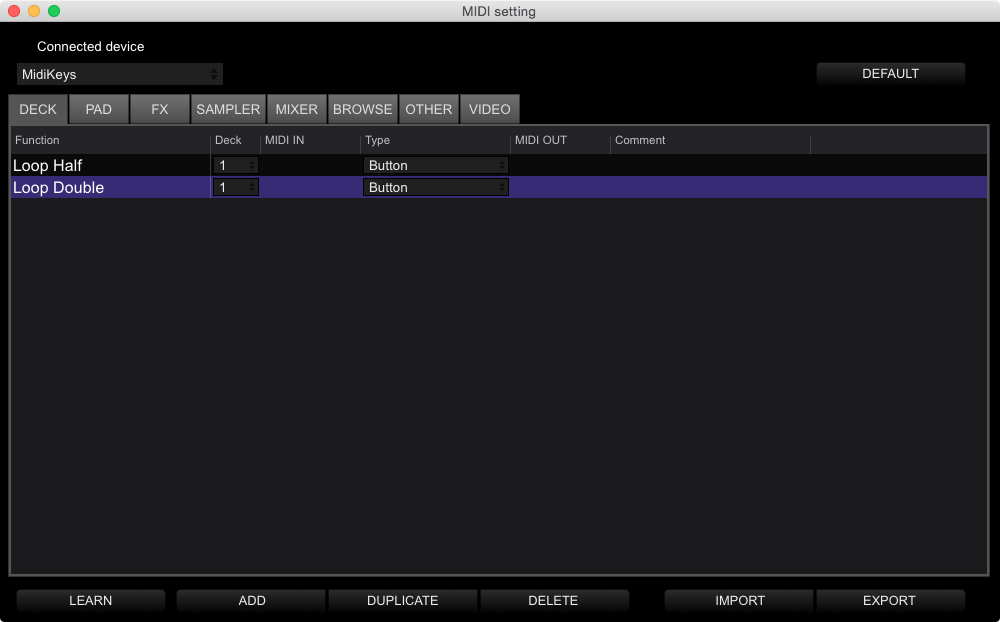
Can i map my midi keyboard for this extra functions?

Matt 0 votos
Acciones de comentarios Permalink
0
Avatar

You certainly can. Select your keyboard from the device list in the MIDI window, then map the loop half / double functions to your keyboard.

Pulse 0 votos
Acciones de comentarios Permalink