Have a feature request or suggestion? Post your idea here!

Publicación

2 seguidores Seguir
0
Avatar

DDJ-RR Cue Issues and more

I was happily using Serato until this week. Wife bought me the new decks and I 'updated' to Rekordbox. The program (latest update) crashed three times at a gig last night. Very embarrassing. Also (and excuse me if these are a rookie errors)...

• Cueing doesn't mute the other deck in my headphones (had the dial turned all the way to cue).

• Unless I pressed 'pause', songs auto-played when I loaded them up. How do I stop that happening?

And just generally, the program seems quite 'laggy' compared to Serato.

Apologies if these are simple solves. Just need some help or they're going back to the shop.

Thanks.

Simon Smedley Respondida

Comentario oficial

Avatar
  • If you're trying to cue one deck in your headphones, the cue button for the opposite deck must disengaged.
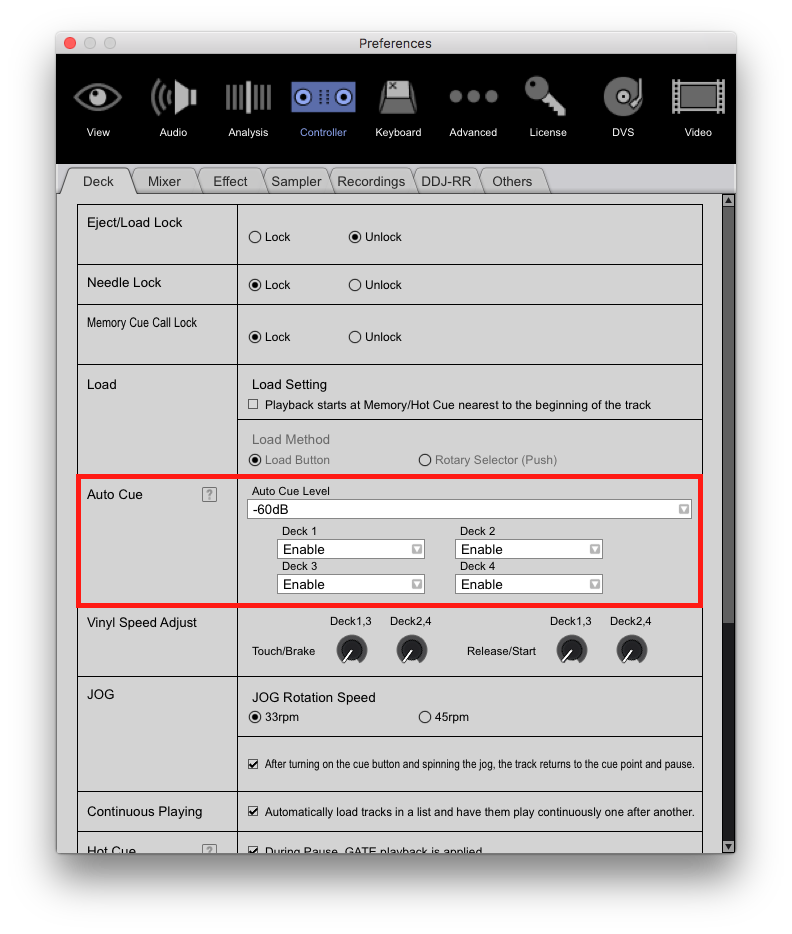
  • Enable Auto Cue in your preferences.  
  • As far as the lag you're experiencing, try adjusting your buffer size in preferences.  The lower the number the less latency you will experience but this puts a higher load on your CPU which may cause audio quality issues.


Mark Gallo
Acciones de comentarios Permalink

La publicación no admite más comentarios.

5 comentarios

0
Avatar

Thank you. Will give both a go when I get home from work and report back. Much appreciated!


Any help on stopping the songs from playing automatically when I load them?

Simon Smedley 0 votos
Acciones de comentarios Permalink
0
Avatar

That's what enabling the Auto Cue will do ;)

Mark Gallo 0 votos
Acciones de comentarios Permalink
0
Avatar

Hi. just back home. The only issue I'm still having is the first one. With both cue buttons deselected and the headphone knob turned all the way to CUE, I'm still getting playback from whatever's playing. If I click CUE on the track that's not playing, I can still hear the playing track. Help!

Simon Smedley 0 votos
Acciones de comentarios Permalink
0
Avatar

I've actually been reading on these forums that this problem can be caused by a mechanical fault. Other people on here seem to have suffered a similar problem. Taking the unit back today and upgrading to a better one (if the shop will have it back).

If there's another fix, let me know.

Simon Smedley 0 votos
Acciones de comentarios Permalink