
@Francesco > Do you see the filters moving within the software when you turn the hardware knobs?
Acciones de comentarios

Hi everyone. I hope you can help.
I have just updated the Rekordbox software and as soon as I started using my DDJ 400 I noticed both FILTER knobs do not work anymore.
I assume is a software issue but I hope you can help me understand what happened.
Thank you in advance!
La publicación no admite más comentarios.
@Francesco > Do you see the filters moving within the software when you turn the hardware knobs?
Hi, thank you for your answer.
They seem to have disappeared from the display. Perhaps I should enable them? Where can I find this option?
Thank you again
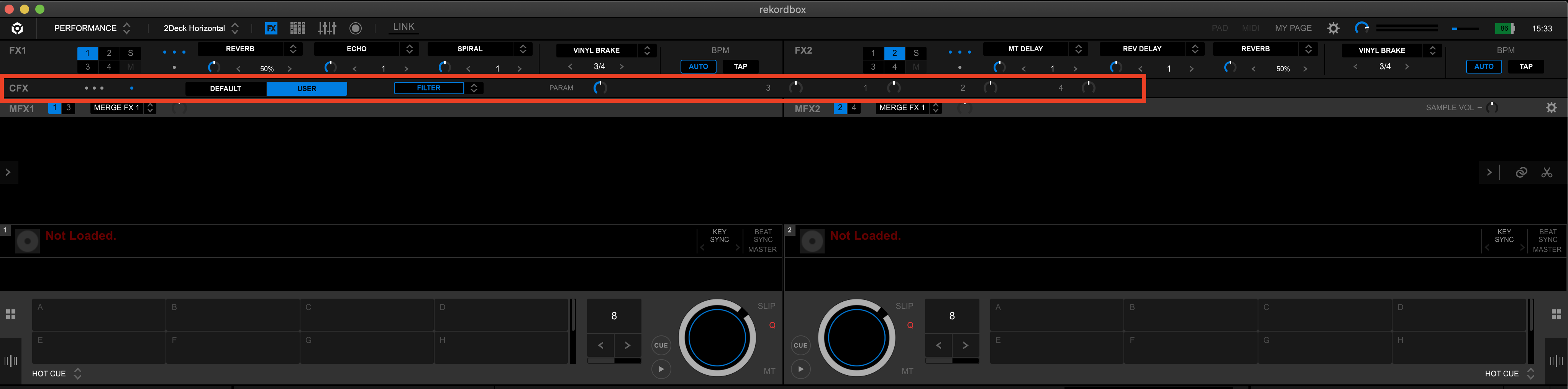
If you click the FX panel open, you should see them:

But if that doesn't appear, you may have it disabled in the preferences:


I also have the same issue, when updating to the new version, the filter knob on the, the one near the effects section dissapeared?
@Jack > Did you try the solution above?
After the software update the filter knob was simply off. If you click on the icon that says Filter at the top of the Rekordbox display it will activate again.
Thank you

Hello. I also don't see my filter knob on the Mxer panel DDJ - 400? 
The filter knob is in the FX panel, specifically on the CFX line:

Folks.. After messing around for a while, installing, uninstalling ect, found the solution. Disappointing that Pioneer did nothing to put out solution out there - shame on you. Press the FILTER button. It will start flashing and the sound colour will work. Use the above guidelines and then do this. Worked for me. Best of luck dude/dudette:)


