
Also, I have tried changing the predetermined device on my sound settings, from the LINE DDJ-400 to the Realtek(R) Audio and it does nothing
Acciones de comentarios
PC Master Output does not work, the PC MASTER OUT button in the upper-right of the screen is gray and I'm not able to activate it.

When I go to the audio settings I can select between DDJ-400 WASAPI or Speaker (2-Realtek(R) Audio).
If I select the first, audio comes out of the headphones in the pre-listening cue and out of the speakers conected to the DDJ-400 but I cannot make it come out of my computer built-it speakers.
If I select the second option, Audio now comes out of my computer built-in speakers but not from the headphones or the speakers conected to the DDJ-400.
There are no more optios available in the ASIO part. Also, there is not option that lets me select that I want to output the sound from my computer.


La publicación no admite más comentarios.
Also, I have tried changing the predetermined device on my sound settings, from the LINE DDJ-400 to the Realtek(R) Audio and it does nothing

This can happen if your Windows default audio device is somehow set to the same device you have selected as the main audio device within rekordbox.
Start by assigning your Windows default audio device to the Realtek - you can access that via the speaker icon down in the task tray.
Next, open rekordbox audio preferences and select the DDJ-400 WASAPI.
Then you should be able to engage the PC MASTER OUTPUT.

Same problem for me. Just got my new DDJ-400. Win 10 x64, no errors with device manager, default audio device works fine for other software, but pc master out is turned off and clicking on its icon does nothing.
Tryed to reinstall Pioneer software, all the drivers, folowed instructions in troubleshooting guide... But no any positive results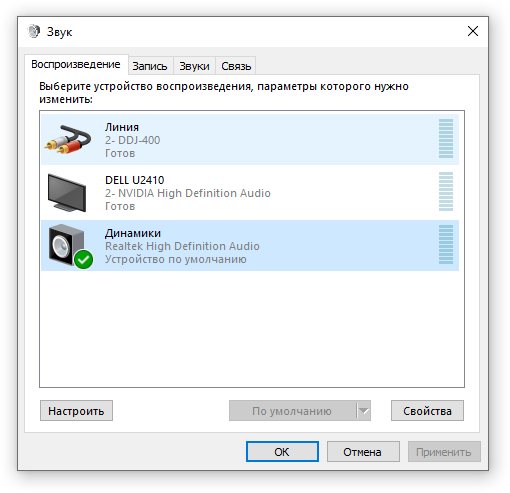


With the DDJ-400 connected, go to the device manager, sort by connection to show all of the DDJ-400 items grouped together, and remove them all. Then disconnect the USB from the 400. Ensure that you have all of the latest Windows updates applied, then reboot your computer, connect the DDJ-400 and try again.
Among devices sorted by connection, there is no DDJ-400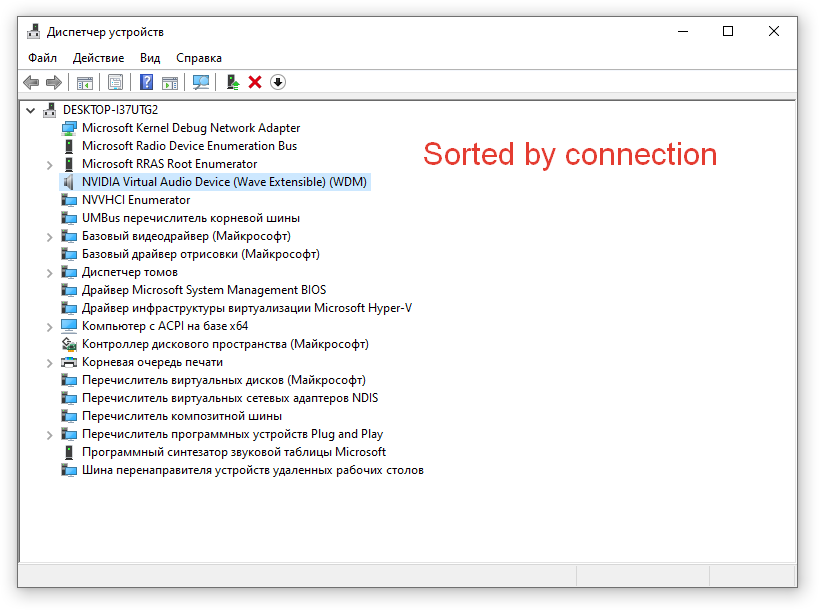
Anyway, all the DDJ-400 drivers was deleted, as you said, but still no progress
Hi there. Somehow this problem solved by reinstalling rekordbox software. But now I have another one: I can't hear master channel in my headphones. Any suggestions?
@Roman > When you sort by connection, you'll have to open the tree to find the USB controller and then under that you'll find the DDJ-400.
As for the master not being heard, have you pressed the MASTER button on the controller to send that audio to the headphones, and is the MIX knob between the CUE and MASTER?
Well... All problems resolved. thanks for the help.
cheers


