Commentaire officiel

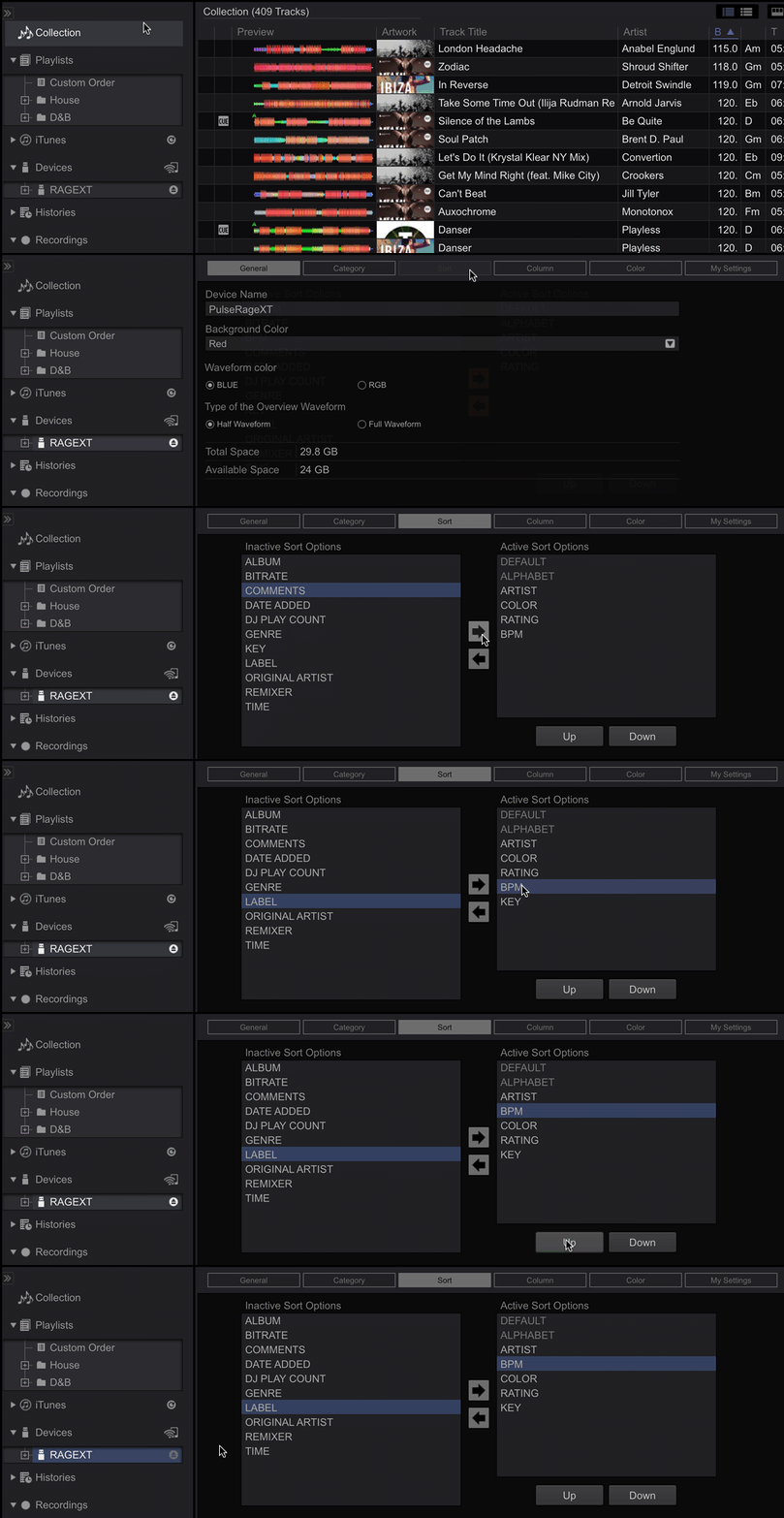
You need to add BPM as a sort option to the USB drive:


Actions pour les commentaires

Dear PioneerDJ forum,
There probably might be similar threads on the forum - regarding this topic - but I would appreciate a personal feedback and instructions from you, experienced, people in here.
I want to know one thing:
I have rekordbox on my Mac. If I want to transfer my music to the XDJ-RX via a USB for the next event (WITHOUT HAVING A COMPUTER WITH ME - just the USB stick) - how can I make sure that the songs will have BPM preloaded and ordered by BPM on the Pioneer XDJ-RX display?
Basically, I go to the club with my USB. Plug it in: BOOM the songs are displayes (say 230 songs) all with availible BPM and titles... Ordered in BPM.
Thank you in advance.
Best,
Novicer
You need to add BPM as a sort option to the USB drive:
Cette publication n’accepte pas de commentaire.
