Have a feature request or suggestion? Post your idea here!

Publication

3 abonnés S’abonner
0
Avatar

Need Help urgently!! rekord box can not create the analysis file in the folder that I specified in preferences

Hi, i got an imac and my rekord box can not create the analysis file in the folder that I specified in preferences, I already download to the previous version of rekord box, i already choose in the advanced options on iTunes that it could share its library xml with other applications, and im still having the same problem, any help please?


CrisHim Répondu

Commentaire officiel

Avatar

@Christian > Exactly what I had suspected. I can give you instructions on changing the settings file. First, you need to know your current username. To find it, open the "Users & Groups" System Preference pane:

  1. Open "System Preferences" application
  2. Click "Users & Groups"
  3. Click the padlock to unlock it, if it is not already unlocked. Enter user name and password for an Admin user.
  4. Right click on the User name you want to find the home directory for, select "Advanced Options..."
  5. Observe the path as noted next to "Home directory:"
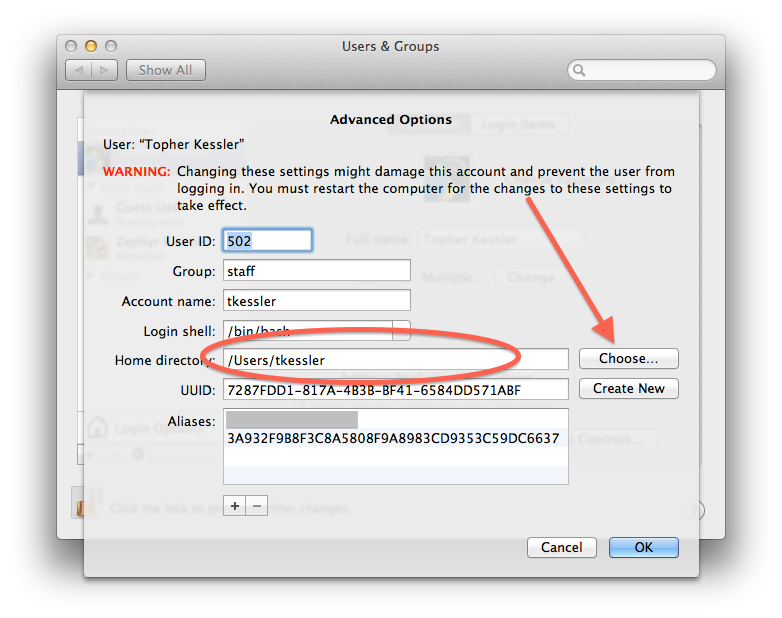
Don't click "Choose" (borrowed this image from the web).

Next, open your Finder, click Go > Go to Folder... and enter the following:

~/Library/Application Support/Pioneer/rekordbox/

...and click Go.

Open the rekordbox3.settings file. If it prompts you to choose a program, use the TextEdit application.

Before you make any changes, go to TextEdit > Preferences and uncheck the Smart Quotes box. Close the preferences and locate the following line:

 <VALUE name="pioneerDirectory"

You'll need to modify the VAL to change the username portion of the path to match the username you found in the steps above.

Save the changes, close the file, open rekordbox and cheer.


Pulse
Actions pour les commentaires Permalien

Cette publication n’accepte pas de commentaire.

7 commentaires

0
Avatar

I'd start by reparing the permissions in the disk utility app.

Marek 0 votes
Actions pour les commentaires Permalien
0
Avatar

There are several possibilities:

- you need to repair the permissions
- you've moved / deleted / renamed one of the folders in the path to that folder (could be your username)
- you've moved the installation from another computer and the location doesn't match

Pulse 0 votes
Actions pour les commentaires Permalien
0
Avatar

I just repair the permissions in the disk utility, but still having the same problem, a fact is that when I bought my Mac, I transfered all my data in my old macbook to my new Mac

CrisHim 0 votes
Actions pour les commentaires Permalien
0
Avatar

*Cheering in Spanish*


Thanks for the help and assistance! 


CrisHim 0 votes
Actions pour les commentaires Permalien
0
Avatar

Most welcome. Next time, having all the information about your situation in the initial post will help us provide accurate instructions without having to do much back / forth or guesswork. ;)

Enjoy!

Pulse 0 votes
Actions pour les commentaires Permalien