Have a feature request or suggestion? Post your idea here!

Publication

2 abonnés S’abonner
0
Avatar

RB duplicating some tracks

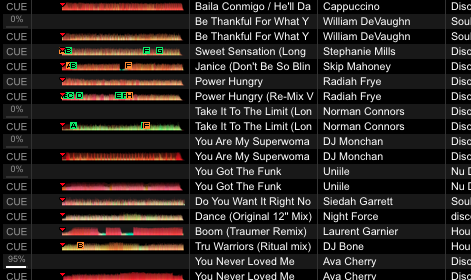
For some reason when I open RB it's duplicating certain tracks, the same ones every time, see screenshot. When I reveal the track in finder there's only one file, and a finder search confirms that there is only one instance of the file on my machine. Not the end of the world but quite annoying as the second version doesn't have any of my loops, cues or adjusted grid, which frustrates when I'm playing and load the wrong one.


I'm running V5.1.1 on a Macbook Pro, 10.11.6

J L Répondu

Commentaire officiel

Avatar

rekordbox itself does not have the capacity to duplicate tracks - that can only occur when you move or copy files and import them from that new location. Scroll over a bit to the right and take a look at the "Location" column (add it if it's not shown). That might highlight the true cause of this issue.

Pulse
Actions pour les commentaires Permalien

Cette publication n’accepte pas de commentaire.

11 commentaires

0
Avatar

I've figured out the cause, but not sure how I fix it.

The duplicated tracks have the same file name, but the 'Music' folder in the file path is capitalised on one version and not on the other e.g. 

Correct Version:
/Users/xxx/Dropbox/iTunes/iTunes Media/Music/Billy Ocean/Unknown Album/Are You Ready.mp3

Duplicate version
/Users/xxx/Dropbox/iTunes/iTunes Media/music/Billy Ocean/Unknown Album/Are You Ready.mp3

Pressing 'Reveal in finder' for both tracks in RB reveals the same file in the same folder. The capitalised version of the folder exists, the lowercase version does not, so I don't know how RB is finding that or displaying it. 

J L 0 votes
Actions pour les commentaires Permalien
0
Avatar

There ya go - somewhere along the line something changed the folder name from Music to music. You'll have to weed them out and remove them because technically they are the same, but at the same time, they're not... While it can occasionally be ignored, case sensitivity matters to software and file systems.

Pulse 0 votes
Actions pour les commentaires Permalien
0
Avatar

But when I delete those files from RB the next time I open the app they appear again, but that folder doesn't exist, anywhere.

J L 0 votes
Actions pour les commentaires Permalien
0
Avatar

So there are duplicates, one in Music, one in music, and you delete the music version, close rekordbox, open it back up, and both are still there?

Pulse 0 votes
Actions pour les commentaires Permalien
0
Avatar

Correct. When I re-open RB it's like the app has just found the 'music' version and analyses it like a new track

J L 0 votes
Actions pour les commentaires Permalien
0
Avatar

Are you using an XML file at all? rekordbox doesn't automatically add new tracks.

Pulse 0 votes
Actions pour les commentaires Permalien
0
Avatar

I'm not 100% clear what you mean? Exporting the XML? 

J L 0 votes
Actions pour les commentaires Permalien
0
Avatar

No - I mean do you have rekordbox loading from an XML file in your preferences? Or iTunes?

Pulse 0 votes
Actions pour les commentaires Permalien
0
Avatar

Yes I do have my iTunes xml file located in my preferences in RB. Is that bad?

J L 0 votes
Actions pour les commentaires Permalien
0
Avatar

What happens if you disable iTunes in the preferences? Does it stop automatically importing those?

Pulse 0 votes
Actions pour les commentaires Permalien