Commentaire officiel

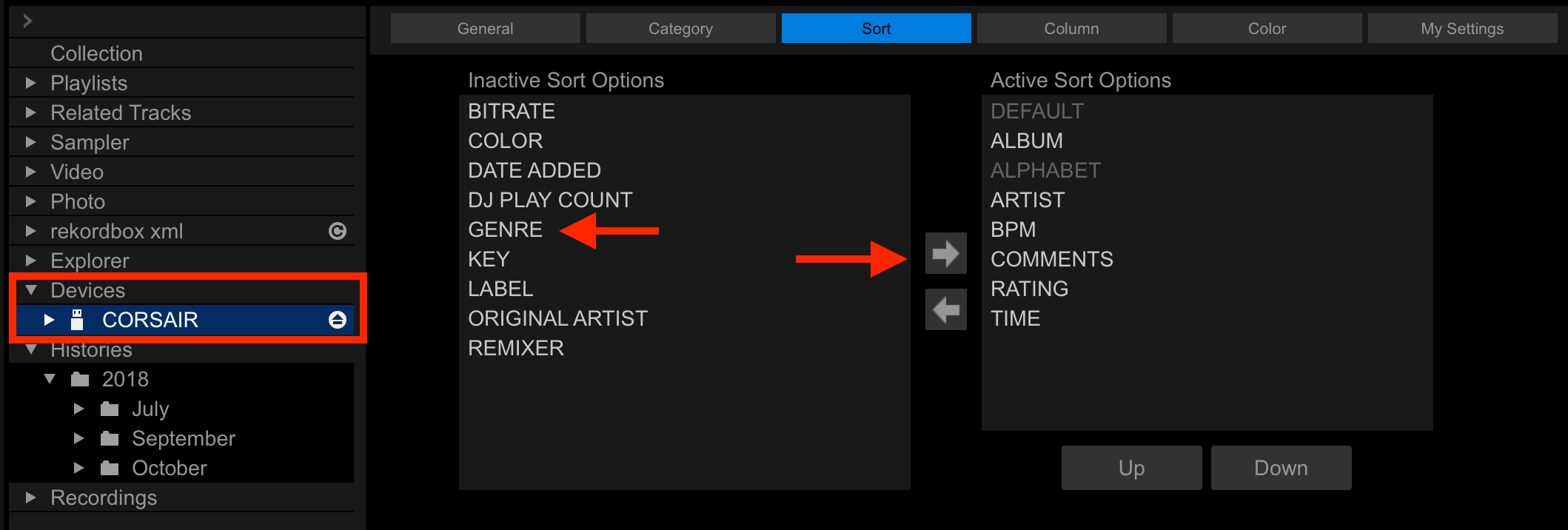
Click the drive itself in the tree at the left, then click the Sort tab, next click the criteria you want to add, then click the right arrow.


Actions pour les commentaires

Maybe I'm doing it wrong, but I just bought a new XDJ-RX2 (giving the all-in-one another shot) and I'm loving it. But, I thought I could sort by BPM and I can't seem to figure out how. I changed the settings in Rekordbox by clicking on the arrow to add BPM but on the RX2, I get, in this order: Artist, Album, Track, Key Playlist, History, Search, Matching, Folder, Pioneer DJ Rec ... but no BPM.
Click the drive itself in the tree at the left, then click the Sort tab, next click the criteria you want to add, then click the right arrow.
Cette publication n’accepte pas de commentaire.
Never mind... I figured it out... Good times :P

I have the same issue. How did you figure this out?
Thanks for the answer guys. Works like a charm. What a wonderful piece of DJ equipment this XDJ-RX2 is!
Pulse beat me to it. Ferrarist: I'm with you - the RX2 is AMAZING.

Hi, I have this very same issue and it still persists even after doing this. When I switched over to a new USB, everything else works fine except I don't have the choice to search via BPM. (I used to have the option on my old USB).
As advised above, I clicked onto the drive, then the "Sort" tab, but "BPM" was already on the right? So I moved it to the left, then back to the right into active sort options, and then later ejected the USB as per usual after I'd added some new tracks.
The only thing is, it still won't let me search via BPM. Can anyone help please?
Thanks,
Isaac.
Search and Sort are two different things; the sorting is a criteria available from the MENU button on the RX2, so when you open a playlist, you press MENU and then select BPM and that sorts the contents. This sort is available in a few places, but it's not a top-level browsing item.