
@Ivan > Is it possible to turn up your booth monitors, independent of the mixer?
Azioni per commenti

I have upgraded to the pioneer djm 2000 mixer from the rane mixer that had the rotary knobs. But i having a problem with the booth level of the pioneer djm 2000 mixer. It is too dam low when it is turned all the way up. But when i used the rane mixer my booth monitors would loud at just half way up. What can i do to fix this issue?
Il post è chiuso ai commenti.
@Ivan > Is it possible to turn up your booth monitors, independent of the mixer?
Gavin, do you mean the amp that is connected to the monitors speakers in my booth? If so, the amp is a qsc plx 1104.
Well on the front panel of the booth amp it's all the way up
Yes, the amp - is it possible to turn it up?
Yes, my amp is turned all the way up. And still too dam low.
Ok then there must be something up...
Can you try connecting the Master Output #2 to the amp instead and see if you notice any difference?
Can you try using a different cable?
Are you in an excessively loud environment? I can't understand why having the amp and mixer cranked to the last still wouldn't be outputting a loud enough sound from the monitor. What kind of monitor is it?
Yes, I am in a loud place but the booth monitors are too dam low for me. And other dj's also complain that the booth monitors are low. The booth monitors are the EV FORCE.
Another quick question on the pioneer djm2000 mixer, where should set the master attenuation switch on the back of the pioneer djm2000 mixer?
I really need the booth monitors to be loud for me to get into the music and mixing :(
@Ivan > You can set the Master Attenuation to 0dB. Again, I still don't understand why its so low - have you tried using different cables etc?
Well i have it to -6db, but a few days ago I had it set to 0db but was still low. However i do notice the booth monitors only get louder whenever I lower the master volume on the mixer and turn up the gain also on the mixer but raising the gain goes into redlining and i dont want to clip it.
And no i havent changed any cables yet.
Hey Gavin, do you think the problem im having is caused by leaving the send & return open on the back of the djm2000 mixer. Or it doesnt matter.
@Ivan > No, that doesn't matter. How long have you had the mixer? Did you buy it new or second hand?
I've only had about a week and yes it was purchased new.
@Ivan > Ok, then try swapping the cables or using the second master output and see if that makes any difference.
You can see the following from the manual:
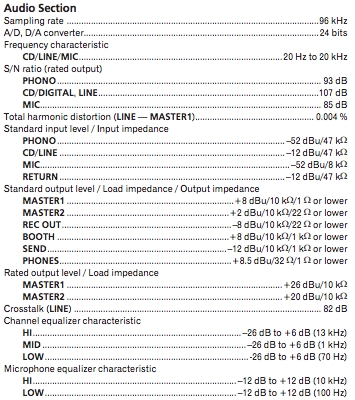
Ok I will try swapping the cables. Now if i connect to the second master output, i would have to control the level from the booth monitor amp right?
@Ivan > Correct!
Gavin, I am happy to inform you that my booth level has been resolved. It was that used the wrong 1/4 adapter. So I changed it to the TSR adapter and now it's working like it should work. Thanks again for the help.
Take Care,
Ivan
@Ivan > Good stuff - I knew it was nothing too sinister.

