Commento ufficiale

If you are having issues with the ASIO drivers in rekordbox, please see this article for troubleshooting tips.
Azioni per commenti

So I saw this post, but my this error keeps killing me...
Are you doing something to solve this issue? All day I was trying installing and uninstalling drivers, firmware etc. and I am REALLY pi..d off about this...
I am really really disappointed with Pioneer...
If you are having issues with the ASIO drivers in rekordbox, please see this article for troubleshooting tips.
Il post è chiuso ai commenti.

You should do something with this and I don't want to hear anything about windows updates...
One more error - no samples to be recorded.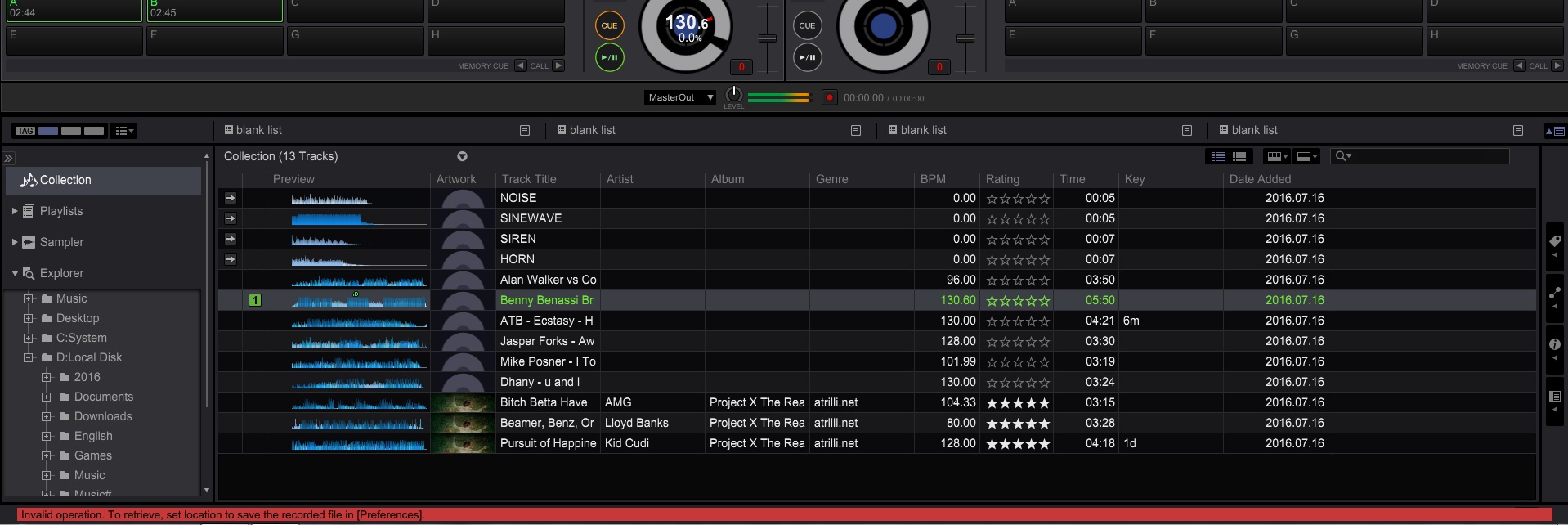 It says I should set location to save samples, nut the location is already set.
so what can I say - G R E A T job PIONEER !

I am having the same issue.... but only on my desktop PC... installed rekordbox on my laptops(yes, both worked) and got the RB up and running, no problems. I even formatted my desktop pc, fresh windows 7 professional install, all updates done, video drivers all updated, Rekordbox installed, RB drivers installed... more restarts than I can count... but alas... still get the "Error while opening "DDJ-RB ASIO" message, and yes, I have gone through all the other forms for troubleshooting who have had this issue, please fix this asap Pioneer... loving the DDJ-RB... but it shouldn't be this difficult to get a controller working from an end users point of view.
Two things for you to try...
First:
If that doesn't work...
Try putting Windows into Disable Driver Signing mode and tell me if that works:
FYI: After restarting again, driver signing will be re-enabled.

Hi, it's not a hardware problem.
Go to http://sospc.name/windows-7-service-pack-2-non-officiel/
You can update Windows seven 32 or 64 bits.
I have resolved and fix the same problem.
See step #2 above; run ALL updates.
So many Windows 7 users don't have all service packs installed and don't realize it.


