
Which device / iOS version are you using?
Azioni per commenti

Hello
I'm having a problem with the headphones-cue-button on a brand new DDJ-200. When lit, the sound is playing on the headphones but it's also leaking to my DMT40.
I've got my setup with the splitcable (for the box) connected to my laptop on the headphones exit, white split to headphones, black split to DMT40, and 'MONO SPLIT' enabled in rekordbox.
When I enable one of the headphone-cue's, sound starts playing on both headphones and DMT, even with both channel faders on zero.
Side-effect: The volume doesn't react when changing the 'headphone volume settings' in the rekord-box-menu.
I've tried a different laptop, with same effect. Maybe a driver-issue, a issue with the splitcable, ...?
Can anyone give me directions?
I bought this controller for my son's birthday next week and would love to fix the issue before handing it over :-)
Thanks in advance!
Il post è chiuso ai commenti.
Which device / iOS version are you using?
Hi Pulse
I'm using a HP ELITEBOOK 850 G3 I7-6500U 8GB 256GSSD with latest version of WIN10 64b...
Can you please post a screenshot of the Audio page of the rekordbox preferences? Thanks!

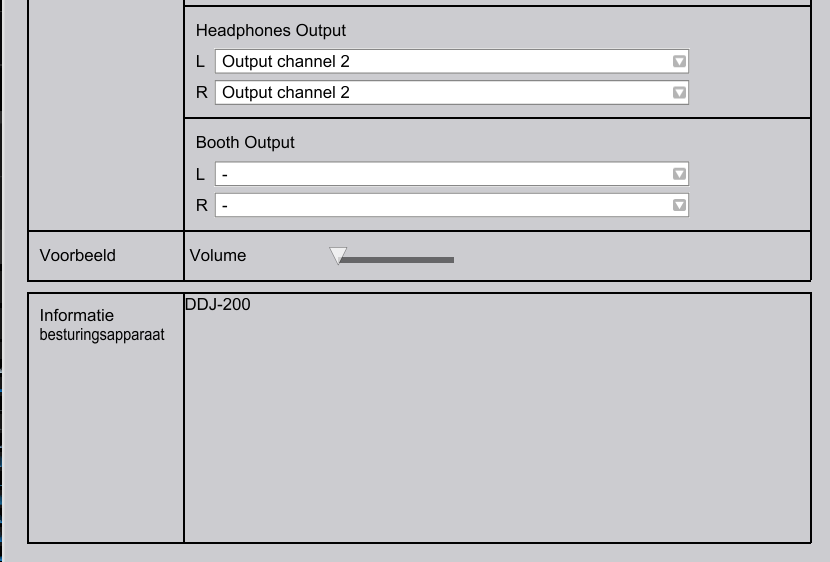

Hello Pulse, or anyone else...
Does someone have an idea what I can try to fix this issue?

Hi ,
Did this ever get resolved? I have the same issue!
Hi Kieran
Sorry for the late reaction, but sadly enough I have to tell you that I didn't get this fixed. A bit dissapointing from Pioneer...
@Raoul > Sorry for the miss on getting back to you. This could be one of three things...
1) The cable is bad.
2) The sound card doesn't properly isolate the channels.
3) rekordbox isn't properly sending the audio.
Try this YouTube video, if the audio is isolating properly for each of the outputs, you'll only hear sound from one of the connections when the sound is playing on that side (indicated in the video with the green dot on the speaker). If, during that test, you can hear sound from ONE side playing out both connections, this eliminates #3, but doesn't help with #2 or #1, so you may have to try this same test with another device. If the same thing happens on another computer, then it could point to #1 being the issue.

Hi,
The YT video Pulse posted above does not split the Stereo very well, so here's a better one. This one plays only L and only R, so it is perfect to test a splitter.
Hi,
I had the same "problem" but I figured out a workaround. In order to prevent CUEd deck being output through master channel, simply move the crossfader to the opposite direction. I have zero experience with any DJ equipment, but I think that this might be a feature. And it is definitely coming from Recordbox. The Controller has nothing to do with the sound – DDJ-200 simply controls the software, that's it. Also the split cable should be fine (check the video link in my above comment so you can test your cable).

Hristo Chakarov
This does not work as you can still here the jog wheel when going through a track
Nope. Unless the crossfade is in the middle position or to the side of the cue-d track – I can't hear it.
@Ickata > Can you please check the position of the knob as you change the cues:
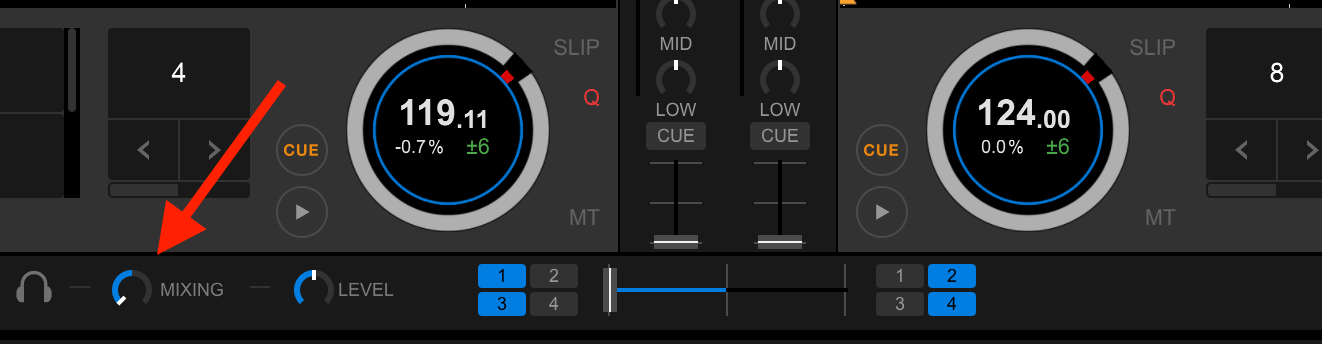
It will automatically set itself to the left for a channel cue, then jump all the way to the right if you enable the MASTER cue, but then set itself to 12 o'clock if you have all 3 cues enabled.
Finaly, after more then 8 months of searching, testing, yelling and cursing... I found the solution for my problem.
Turns out it's a WIN/HP-related problem with the sound-enhancement. When trying on different HP-devices I encounterd the same problem every time. Now wen testing it at a friends house on a nother brand of computer, it worked like a charm.
After more searching I finaly found that the sound-enhancement (system effects configuration) made the stereo behave in different ways on different sofware-solutions.
Turning it off did the trick!
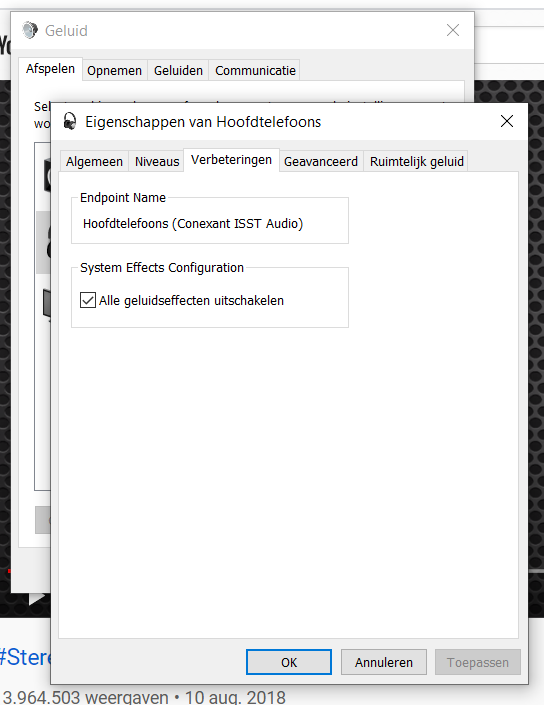

@Trixx_80
I know this is an old forum post, but I have exactly the same problem as you :(
I am also Dutch and found the same menu as you (i'm also dutch), except the 'Verbetering' Tab.
The problem somewhere in my HP laptop i think, but can't find out how to fix it.
My laptop has a Realtek audio card, anyone knows a fix for this?

@Freek Hakkers
Hey I was having the same problem. HP, Microsoft, Realtek audio.
Found out that there is an audio software driver called DTS Audio Control Panel, on the second tab there,Audio Experience, there is Audio Enhancements, go and deactivate that function, as well as the HP noise cancellation on Recording experience tab.
I deactivated both and my ddj-200 is now working just fine. Give it a test using the YT video posted here.
I hope it helps!

Hello everyone, first of all sorry for bad english.
Same problem as you guys, HP / Microsoft / Realtek audio.
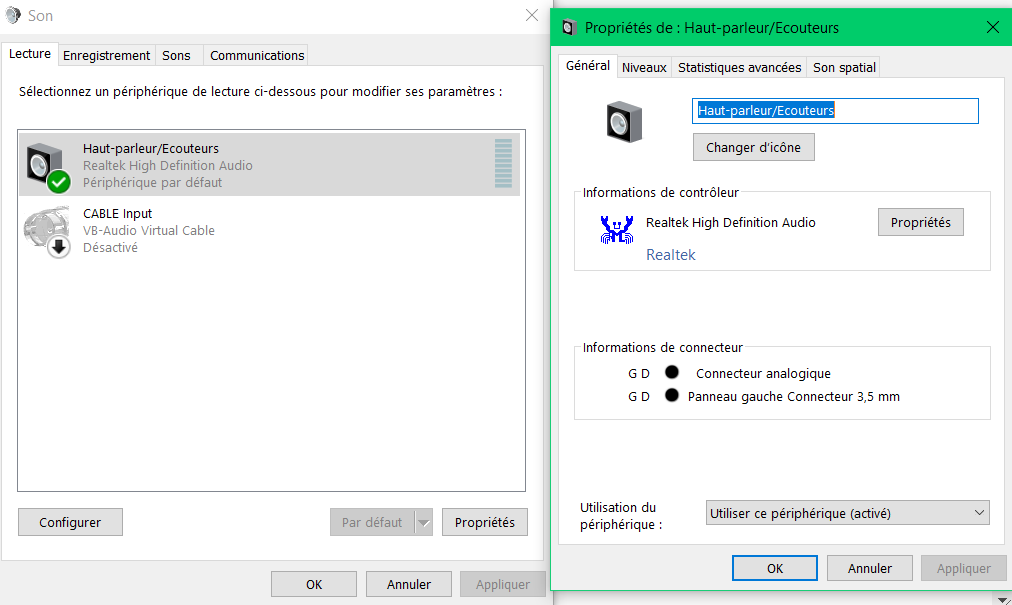
After hours trying to solve this problem, I'm asking for your help. I tried to turning off "sound effects", but on my laptop speakers and headphones are on same category : 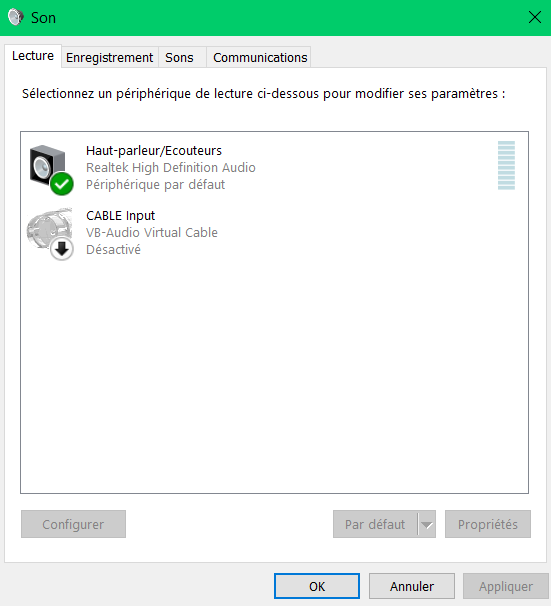
And, like @Trixx_80 they are not "sound-enhancement" tab :
What I did instead it's to turn of "sound enhancement" on "stereo mixing", in "recording" tab : 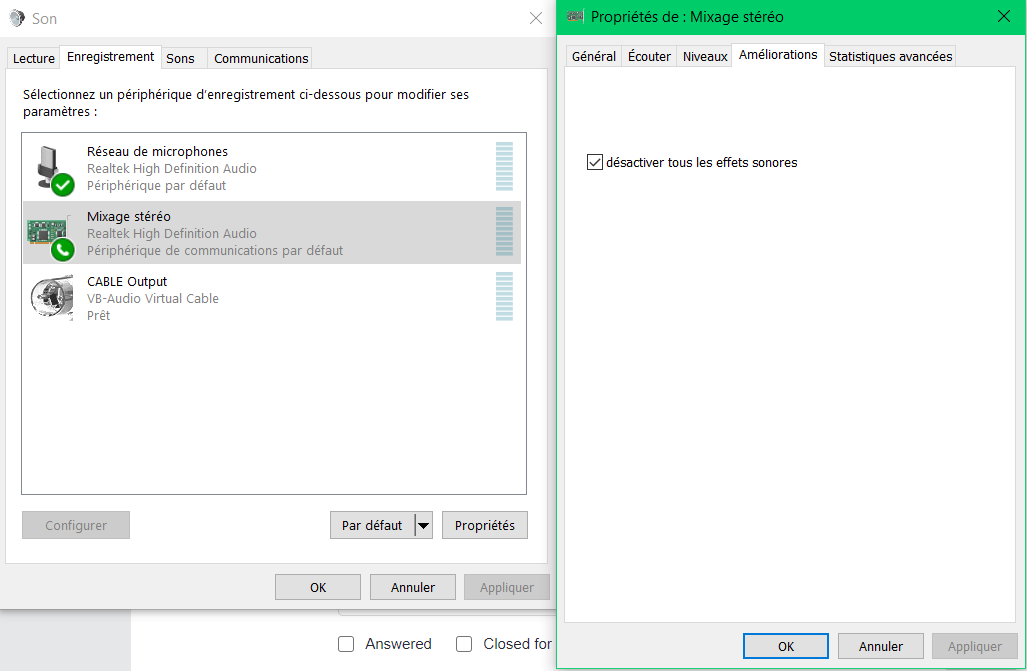
BUT NOTHING.
Also tried @Freek Hakkers solution, but I don't understand where to find "DTS Audio Control Panel" (I'm really not an expert, you would have understood).
Hope someone can help me, even if this thread is a few months old, thanks in advance !!
Hey @Maxime,
Sorry, I don't have access to a Windows machine at the moment, but have you checked to see if there are any other HP-specific applications running that might have anything to do with the audio?
Thanks for fast answer, unfortunately there is no other HP applications running ...
Have you checked the HP website to see if they have updated audio drivers? Unfortunately this may not be something you can resolve directly as it could be hardware design or software that's causing it to happen, so you might need to invest in a proper audio interface for output.
I have already update the audio drivers on the HP website, but thanks for the tips !
What do you mean by "invest in a proper audio interface for output" ??
The limitation of using a single headphone output is...
a) the quality of those is usually pretty low, and can often have interference / noise from other components on the motherboard
and b) you only have one stereo pair which must be split to two mono signals for the headphones and master outputs.
If you use a proper audio interface (say one with four channels out; two stereo pairs, with the capability of monitoring one on a headphone out), you could then have stereo outputs for both master and cueing.
Thanks for the explaination, so you're telling me that I maybe have to change my laptop ?? Or are they any divice (maybe like an adaptator or something like this), that could add a channel out with an additionnal stereo pair ??
Ultimately, the best solution is a different audio interface.
The next best is to try and fix the issue within software (or hardware configuration, whether by drivers or support from Lenovo; maybe it's a setting in the BIOS?)
Aggregating multiple devices is the last recommendation as that would require using two unmatched audio interfaces, then using a 3rd party application like ASIO4ALL which introduces latency and other potential issues.
I'm going to inquire on those solutions, thanks a lot for your time !! :)
Good news for everyone with this problem: I found another solution!
Following the steps in this video fixed the problem for me:
https://youtu.be/boWt-fBD4nc
I hope it also works for everyone that is still having problems right now, good luck!

Reply to Maxime Dupuy if you have not yet found a fix:
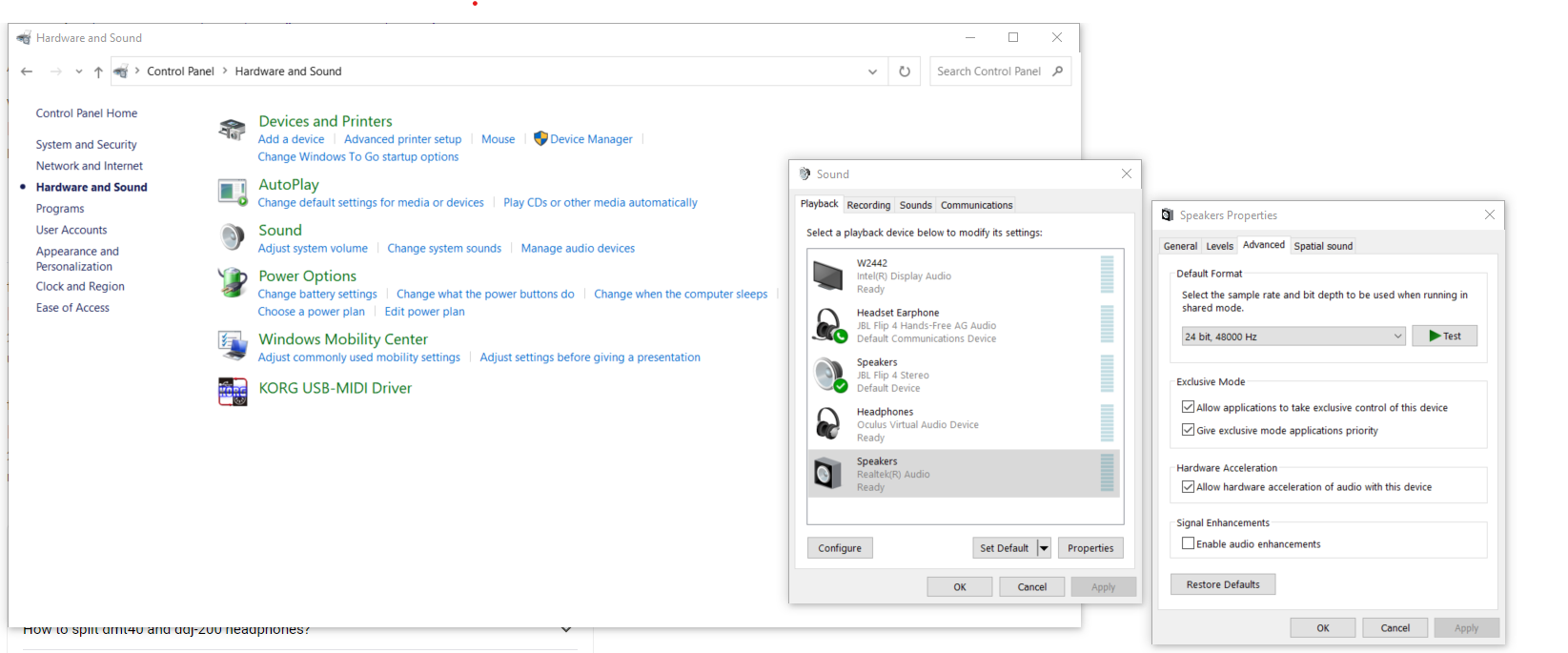
I had the same problem - on your screen shot you are in the "general" tab. If you go into the "advanced" tab you might find a heading called "signal enhancements" (statistiques advancee on your computer) and can untick the box next to "Enable audio enhancements".
It worked for me. I'm very happy I found this forum thread because I have only got it working for me last weekend after buying it 9 months ago as kind of gave up and packed it away!

I am having troubles again with the audio.
Exactly the same as the begining, when i press cue 2 same sound from headphones goes to speaker at the same time as deck 1 is playing .
All this after a wile without mixing,and it seems to be becouse rekordbox updated or windows 10....HELP


