
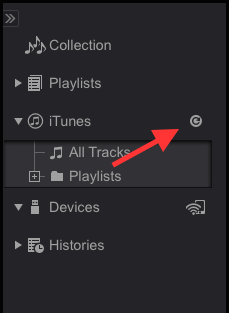
In rekordbox, try reloading your iTunes library.


コメントアクション

Coming up with the same issue as a lot of people here. Running latest versions of iTunes and Rekordbox.
I have clicked to share .XML file out to other applications in iTunes but no fix.
Any thoughts?
投稿コメントは受け付けていません。
In rekordbox, try reloading your iTunes library.
Hi Mark,
Yeah I've tried this too but it hasn't helped... Any other suggestions?
Thanks

The engineers are aware that some users experience this issue from time to time.
Which operating system are you using?
El Capitan 10.11.5
Have you checked that the proper iTunes library file is being loaded in rekordbox? Open rekordbox and go to the Preferences > Advanced > Database tab > iTunes Library File and verify it points to the correct library.
Just checked this and it points to the correct library.
Okay, so it shows the library and playlists, just not subfolders of playlists, correct?
Exactly :)
Okay, I'll pass that along - thanks.
Could you send over your iTunes Library.itl and iTunes Library.xml so the engineers can reproduce the issue?
One more thing, if you use the Sync Manager tool, do you see them visible there?
I see subfolders in the Sync Manager tool, yes.
https://www.dropbox.com/s/elout545kcbniej/iTunes%20Library.itl?dl=0
https://www.dropbox.com/s/j6kde4d0tam032f/iTunes%20Music%20Library.xml?dl=0
Good luck - hopefully they come up OK
How did you go with these?
Sorry, I've been out of town, just got them now - will pass them along. Thanks.

Is there any update on this issue? RB 4.2.4 is not loading ANY of the iTunes playlist folders or subfolders at all, but they are all appearing correctly in Sync Manager view.
Yes ... it works properly provided you have the correct iTunes library selected, and iiTunes is closed (and has been closed for about a minute).
Regarding the playlists not showing up, the release notes for 4.2.4 indicate the following solution to your problem:
When you sync playlists which were not synced in Ver.4.2.3,
firstly please untick the unsynced playlists and click the Sync button (the arrow icon).
Then, tick the unsynced playlists again and click the button to sync them.