
Hi,
Please create a ticket with the support team in your region for further assistance in resolving this issue.
コメントアクション

I want to start from scratch on my library as a test for slow Library Plus exports (reported already to engineers) but is there a way to backup all my cues? if i start over, drag in all my tracks and rebuild my playlists right now i lose all my saved cues which is hundreds of them i cannot really rebuild.
I have tried as a test to import the playlists from a usb drive but then i have to relocate all them being my tracks are internal and i feel like the relocate feature messes up the database in the long run and makes it bigger and more complicated to be read when you do relocations
投稿コメントは受け付けていません。
Hi,
Please create a ticket with the support team in your region for further assistance in resolving this issue.

Would the XML export help you with that? What I am hearing is that you want to start with an empty DB and import all tracks fresh. If you don't change the tracks, names, path etc. wouldn't you be able to import your previously exported XML to get your Cues back after you imported the tracks fresh? Maybe you check with a small batch and just import dedicated tracks from the XML to see if this can help.
I will test that but did not see how to import the xml, the restore only looks for library backup
You need to enable the rekordbox.xml view in the tree view.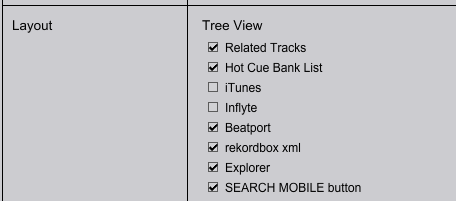
Once you have done it and entered the correct path to the exported XML file in the settings you can access the XML in the tree on the left hand side.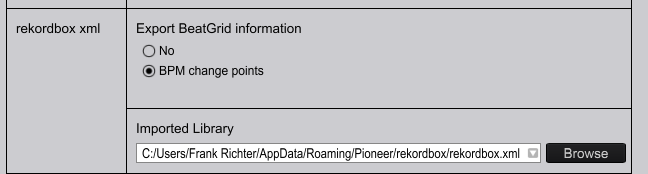
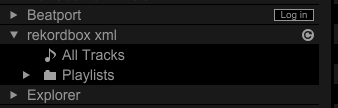
There you can access tracks or playlist from the XML and you can import from there. If the track exists in the DB already you probably get a pop up reminding you that the data will be overwritten. i.e. if you don't had cues after the fresh import of the track, it will add the cues from the XML file to it.
You may give it a try.
Please have a full backup of you DB before doing so - but I am sure you're having that anyway. I know you're a very experienced user :-)
Workflow would be:
1. Backup your DB
2. Export XML
3. Wipe DB and start fresh
4. Import a few tracks to a clean DB
5. Find the same tracks in the previously exported XML
6. Import from XML
7. Check the results.
thank you! ill give it a shot, I can't believe I didn't even think to try that, lol

