正式なコメント

You long-press this button to enter the edit mode:
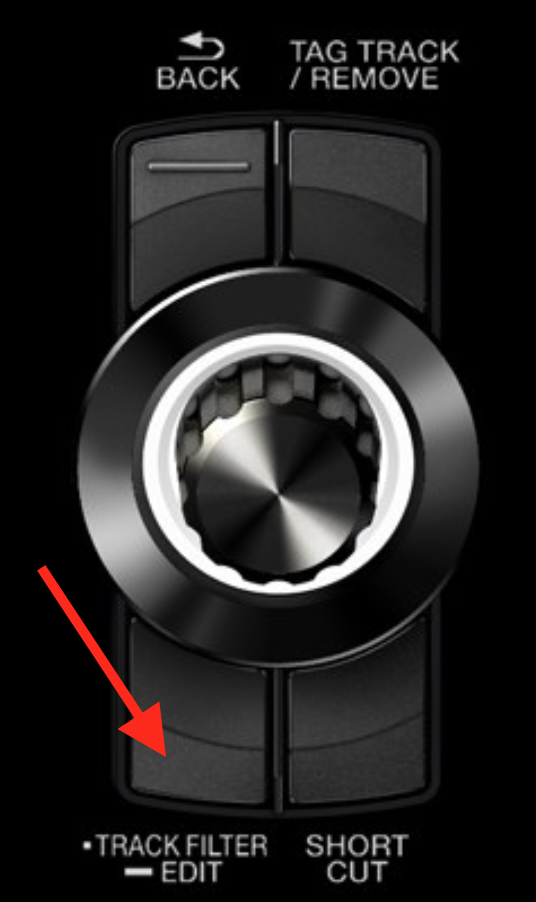
To engage or disengage the filter, just press the button. You'll see the number of tracks change in the count at the top right.


コメントアクション

I am trying to search for tracks on my XDJ RX2 by using the My Tag feature. I have added extra genres to the list of my tags in the RB software. (eg, uplifting psy, or psychill etc)
When I load my usb on my RX2 and press and hold the track filter edit button, from there I can select my tags and I can see the list of the sub genres I have added in the software.
I can then highlight one or more of these genres, but I cannot figure out the next step. How do I see the list of tracks that have been tagged with the genres I have just highlighted?
For eg... I want to see all tracks that have been tagged as Psychill.
How do I do this
Once I have highlighted the sub genre I want how do I see the list of tracks tagged as that??
You long-press this button to enter the edit mode:
To engage or disengage the filter, just press the button. You'll see the number of tracks change in the count at the top right.
投稿コメントは受け付けていません。

@Stephen
Toggling the filter does influence the results in the current view (folder, playlist etc.).
So if you want to see all Psychill tracks at a glance, I'd suggest to go the [TRACK] view and use the filter there.
Take a look at this nice presentation:
https://youtu.be/qU6dHDmh3OY?t=11m10s
Cheers
@chtamina > Are you using the XDJ in stand-alone mode or connected to rekordbox in either performance or export (link) mode?