正式なコメント

@mat cr > As @Steven says, you should check that the firmware is up-to-date (v1.01 as of this post), and that the software is the latest release.
コメントアクション

Hi, i've just received my first mixing table, anyways when i plug in my computer the driver dosent start at all. Ive checked online for manual drivers and all ive got was (You don't have to install this driver software.
Windows/mac OS standard audio driver will be automatically installed when DDJ-SB3 is connected to your Mac/PC with a USB cable.)
i have tried with 2 different computers and still got the same outcome. what to do?
@mat cr > As @Steven says, you should check that the firmware is up-to-date (v1.01 as of this post), and that the software is the latest release.
投稿コメントは受け付けていません。

Don’t worry that’s an easy fix. What u have to do is update the latest firmware on the controller and also check if. You have the latest Serato DJ Pro update. Once you do that you good to go. 😉

Im having the same problem, I have latest up date of Serato Dj Pro, download the firmware from Pioneer and I am getting: Your DDJ-SB3 in not connected Error ID 0x0E21.
Some help would be nice to sort this! Getting this on my Mac it is running 10.13.6 and on the Pc Window 10
Regards Arron
@Aaron > Can you please check the device manager on the Windows computer to see if the SB3 appears with an exclamation mark?
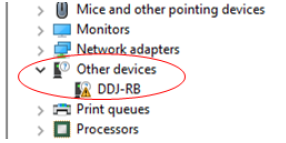

Hi! I have the same error on my SB3. On Win 10 is defined thus

quien te drivher sb3

alguien tiene los drivers del sb3
There are no drivers for the SB3:
https://support.pioneerdj.com/hc/es/articles/4405094496025-DDJ-SB3-Audio-Driver


