Have a feature request or suggestion? Post your idea here!

投稿

2フォロワー フォローする
0
Avatar

DDJ RB no sound on Mac (Troubleshooting done)

Hello Together, 

I have a MacBook (High Sierra 10.13.6), a DDJ RB (newest firmware) and rekordbox (newest version). I can control rekordbox without any problems, but I have no sound output. I installed the driver and turned off the security check in the system preferences. I read the trouble shooting instruction, but it doesn´t work...

I can´t choose the RB as sound output, although I installed the driver over and over again. I also uninstalled the driver and rekordbox and reinstalled it again. On my windows system it works like a charm. 

Thank you. 

Danny Viva 回答済み

正式なコメント

Avatar

You didn't disable the driver security (new in High Sierra)... to get things working:

- Install the drivers

- Disable the driver security

- Install the drivers again right away

Then you'll see the DDJ-RB as an audio device.

Pulse
コメントアクション パーマリンク

投稿コメントは受け付けていません。

7件のコメント

0
Avatar

Thank you for the fast reply. I checked it already. If I install the driver, there is no System Extension blocked window. Also there is no message in security and privacy tab. I installed and unistalled the driver 10 times in a raw.

Regards.

Danny Viva 0 票
コメントアクション パーマリンク
1
Avatar

That security prompt only appears after you've run a driver installation. Even if it's already installed, you'll need to run it again to access the driver security.

Pulse 1 票
コメントアクション パーマリンク
0
Avatar

I know, as I said, I read the instruction for High Sierra. I tried it already. It doesn´t appear after the installation :(

Danny Viva 0 票
コメントアクション パーマリンク
1
Avatar

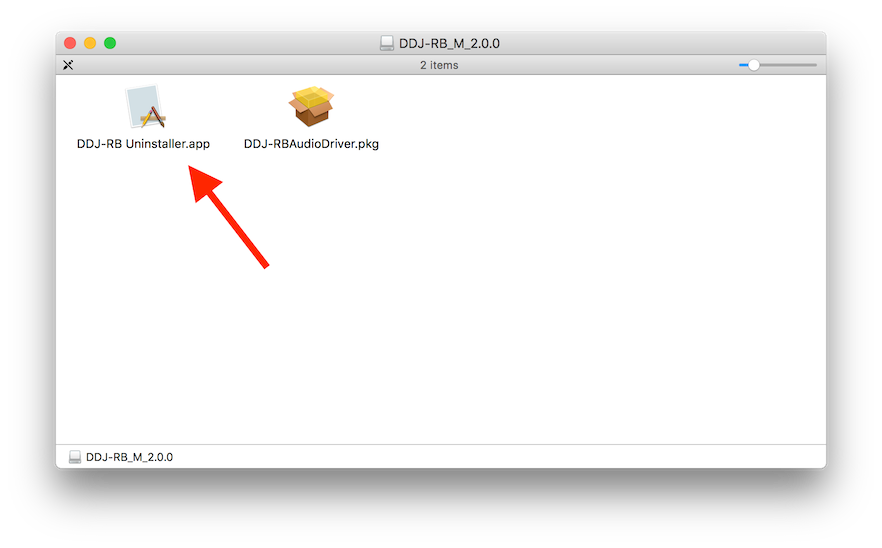
Try this... from the driver installation package, with your DDJ-RB disconnected, run the uninstaller:

Reboot your computer, then run the steps above, connecting the RB ONLY after the installation is completed.

Pulse 1 票
コメントアクション パーマリンク