Have a feature request or suggestion? Post your idea here!

投稿

5フォロワー フォローする
0
Avatar

Moving rekordbox database to a "NETWORK" drive

Hi,


Having spent a significant amount of money to set up network attached storage I’m shocked to find out that Pioneer doesn’t allow you to move the recordbox database to a network drive.  I found this on post from 2017, is it still the case? I assume so given the software does recognize my drive.


Has anybody found a way of getting round this?  I’m reasonably tech savvy so don’t mind hacking around.


Otherwise is there other software that will allow me to do it which allows tagging?  I use multiple devices and want to update my library, tags etc, so that these changes are reflected on all.  I figure I could use something else and transfer the info, tags to rekordbox when needed. 


Thanks

Tomski 回答済み

正式なコメント

Avatar

Provided you mount your network drive as a local volume, this can be accomplished, but as you note yourself - this isn't a supported operation so I can't provide specific instructions or support for it.

Pulse
コメントアクション パーマリンク

投稿コメントは受け付けていません。

10件のコメント

0
Avatar

the fact that you bought a nas for working with rb let me assume that you know how pro dj link works means you know about nfs configuration etc, right? so why don't you just set up your nas nfs Server the way the rb nfs Server works on a pc/mac and get it working?

Daniel Ventura 0 票
コメントアクション パーマリンク
0
Avatar

Cheers for the feedback guys, I'll have a little hack around and see if I can get it working.  Will give feedback on my experience.

Surely this must be a feature that Pioneer is looking to add soon.  Seems like a big draw back of the software to me.

Thanks

Tomski 0 票
コメントアクション パーマリンク
1
Avatar

Not something they're rushing to add - there are only a handful of DJs who have ever asked about even trying to do this.

Pulse 1 票
コメントアクション パーマリンク
0
Avatar

Hi,

I have a similar problem right now. I currently have my data on an external drive. Since this is too uncertain for me, I bought a Synology with two synchronous drives (RAID). This is how I want to prevent my current external hard drive from becoming defective at some point and I then no longer be able to access my data. Of course I also make backups of the library, but then they are not as current as a mirrored backup.

And you know what it means to reprocess over 6,000 tracks. Sorry, but also a no go for me that it is not supported.

elastic vibes 0 票
コメントアクション パーマリンク
0
Avatar

@elastic > It is supported... just mount the drive as a local symlink or local drive and rekordbox doesn't know the difference.

Pulse 0 票
コメントアクション パーマリンク
0
Avatar

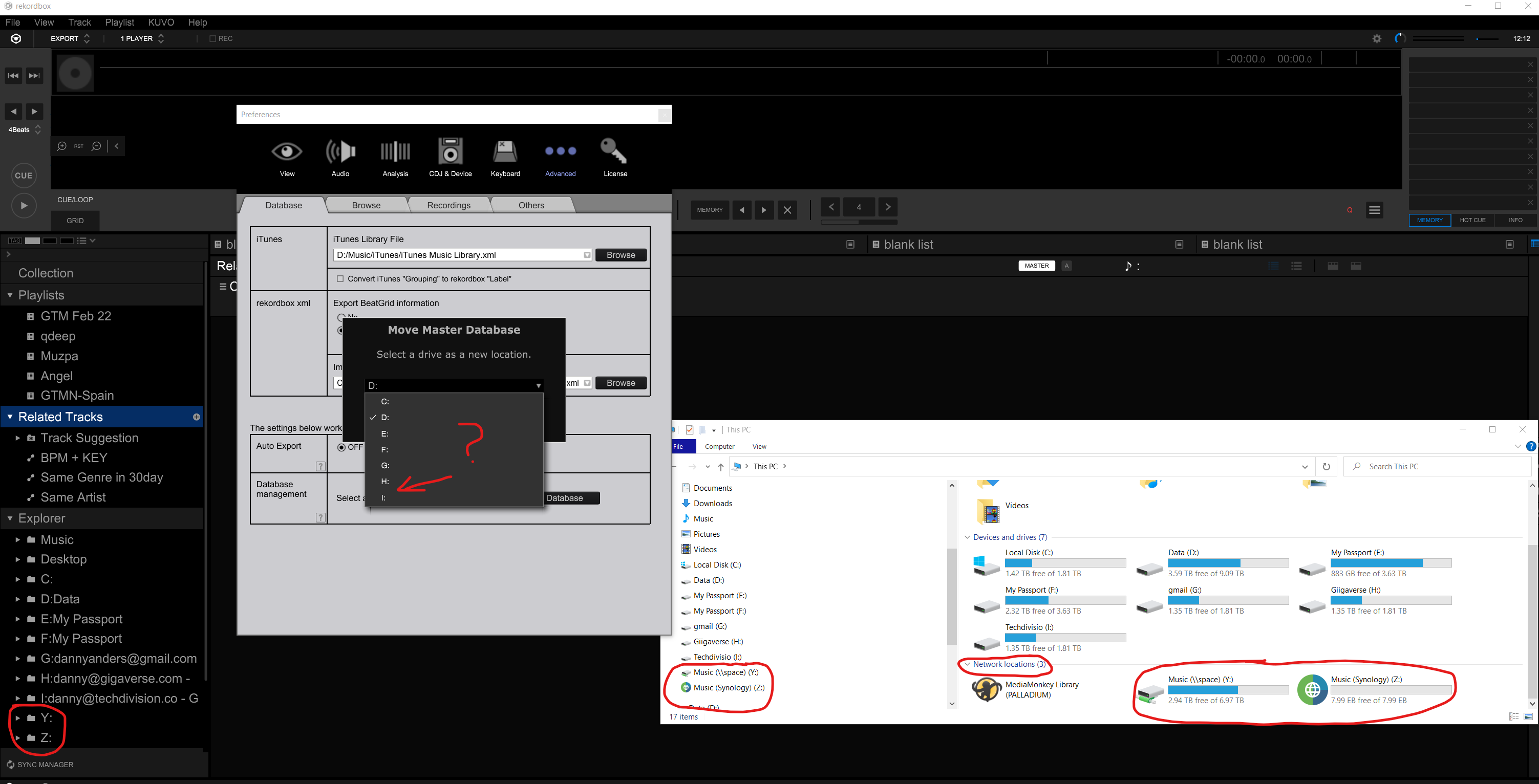
The move database dropdown does not recognize the network drive even if you mount it as  a local drive.  T

Daniel Anders 0 票
コメントアクション パーマリンク