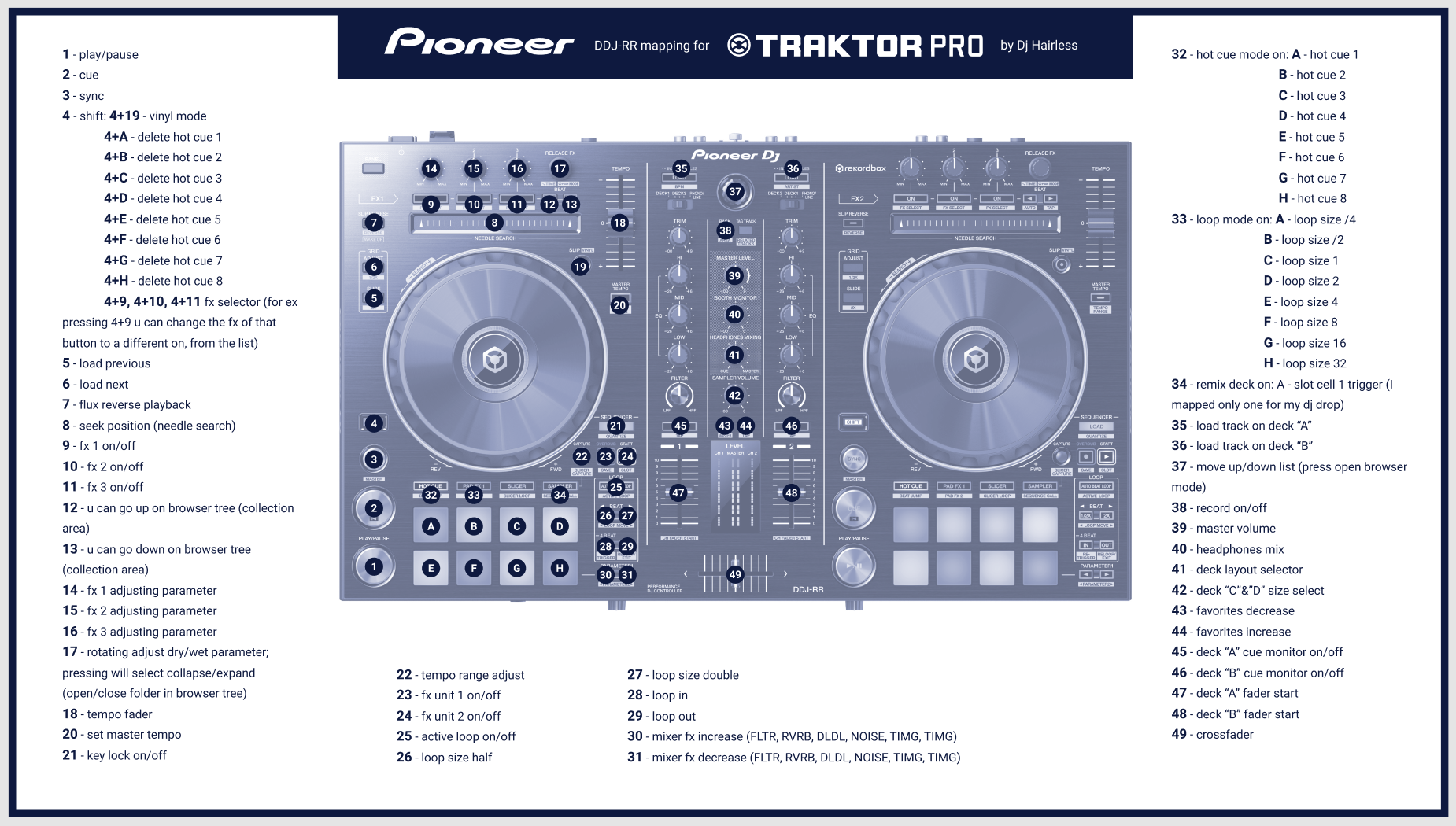
Edit: 2021 I've managed to map the jog led's. Enjoy!
This is my mappings for DDJ-RR with all the led’s and button’s working.
The mapping is all the same for the deck “B”
The only thing I didn’t manage to map was jog led’s.
If anyone can mapp the jog’s led please share the midi commands to finish mine.
I hope u will enjoy it.
Excuse my english!
U can download it from here
https://mega.nz/file/fl8FxYAT#V7JrcFi2FigXws8mdwa2Hi0UZb4g8GXWBQCVytIbY5g
or from here https://maps.djtechtools.com/mappings/11653

1 - play/pause
2 - cue
3 - sync
4 - shift: 4+19 - vinyl mode
4+A - delete hot cue 1
4+B - delete hot cue 2
4+C - delete hot cue 3
4+D - delete hot cue 4
4+E - delete hot cue 5
4+F - delete hot cue 6
4+G - delete hot cue 7
4+H - delete hot cue 8
4+9, 4+10, 4+11 fx selector (for ex pressing 4+9 u can change the fx of that button to a different on, from the list)
5 - load previous
6 - load next
7 - flux reverse playback
8 - seek position (needle search)
9 - fx 1 on/off
10- fx 2 on/off
11- fx 3 on/off
12 - u can go up on browser tree (collection area)
13 - u can go down on browser tree (collection area)
14 - fx 1 adjusting parameter
15 - fx 2 adjusting parameter
16 - fx 3 adjusting parameter
17 - rotating adjust dry/wet parameter; pressing will select collapse/expand (open/close folder in browser tree)
18 - tempo fader
20 - set master tempo
21 - key lock on/off
22 - tempo range adjust
23 - fx unit 1 on/off
24 - fx unit 2 on/off
25 - active loop on/off
26 - loop size half
27 - loop size double
28 - loop in
29 - loop out
30 - mixer fx increase (FLTR, RVRB, DLDL, NOISE, TIMG, TIMG)
31 - mixer fx decrease (FLTR, RVRB, DLDL, NOISE, TIMG, TIMG)
32 - hot cue mode on: A - hot cue 1
B - hot cue 2
C - hot cue 3
D - hot cue 4
E - hot cue 5
F - hot cue 6
G - hot cue 7
H - hot cue 8
33 - loop mode on: A - loop size /4
B - loop size /2
C - loop size 1
D - loop size 2
E - loop size 4
F - loop size 8
G - loop size 16
H - loop size 32
34 - remix deck on: A - slot cell 1 trigger (I mapped only one for my dj drop)
35 - load track on deck “A”
36 - load track on deck “B”
37 - move up/down list (press open browser mode)
38 - record on/off
39 - master volume
40 - headphones mix
41 - deck layout selector
42 - deck “C”&”D” size select
43 - favorites decrease
44 - favorites increase
45 - deck “A” cue monitor on/off
46 - deck “B” cue monitor on/off
47 - deck “A” fader start
48 - deck “B” fader start
49 - crossfader