Have a feature request or suggestion? Post your idea here!

投稿

3フォロワー フォローする
0
Avatar

I cannot see a PC MASTER OUT icon

Hi,

I'm going to set up Rekordbox to stream on OBS and following these instructions: https://forums.pioneerdj.com/hc/en-us/articles/115004807346-Streaming-with-OBS-a-DDJ-Windows-

However I can't find the icon for PC MASTER OUT.

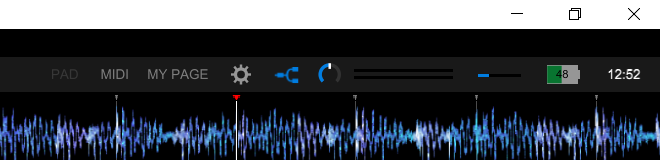
My Rekordbox window looks like this:

I wonder if there is somewhere else I should find this setting so I can stream to OBS?

Thanks a lot.

Deep Singh 回答済み

正式なコメント

Avatar

Not all DDJs have that function, especially yours (a DDJ-200, which I can tell from the split-output icon). You should be able to use OBS to pick-up the master audio output from your computer, however I'm not sure it will work with just one channel as it's typically stereo.

Sorry, but you may need to use an external audio interface to route the signal back in and capture that source in OBS.

Pulse
コメントアクション パーマリンク

投稿コメントは受け付けていません。

3件のコメント

0
Avatar

And what if I had this button on my ddj-flx4 but after replacing the laptop it suddenly disappeared? also, I cannot set my controller + headphones in audio settings. However, I can use the remote in the program

Vladislava Ivanova 0 票
コメントアクション パーマリンク
0
Avatar

@Vladislava > You need to make sure you DO NOT have the FLX4 assigned as the default output for the system already as it wouldn't be available if you then try and use it within rekordbox, or try to enable the PC Master output.

Pulse 0 票
コメントアクション パーマリンク