Have a feature request or suggestion? Post your idea here!

投稿

5フォロワー フォローする
0
Avatar

Ridgeyard 7R Beam 230W Moving Head Beam Light (Fixed channel numbers) Please fix ASAP!!

Hey guys, I FINALLY figured out what was wrong with the programming for the Ridgeyard Beam Light (Standard 16 ch) light in the RB dictionary. Earlier I had given you guys a paper from the manufacturer and you entered in the data but there is one thing that we figured out trying to replicate our issue. We detailed it in a YouTube video as well as an attached screenshot. Everything you guys programmed was right except for the channel 6 which is explained exactly why in the video below. I hope there is enough time for this to be added in tomorrows update. Thank you and sorry for the hassle.

The fixture you all added is located under Ridgeyard>Beam Light (Standard 16 ch) I believe

https://www.youtube.com/watch?v=hOL83TDnT1M

Screenshot of correct strobe config below but I will also attach the previous documents for the rest of the channels for reference

https://drive.google.com/file/d/13hoC3zx094A7hkFvYib8TzgduGQO6aT5/view

Lord Nikita Huttenlocher 回答済み

投稿コメントは受け付けていません。

35件のコメント

0
Avatar

I'm not here to speak ill of pioneer though. I was really hoping to help solve the problem. But this way of working through the bugs seems archaic to me. I tried 10 different profiles, many of them "ridgeyard 230...etc". It is indeed the nature of these Chinese lights to be varied in mapping and short on documents. I just feel like this process could be streamlined if there was more user end control.

Brian Hodnett 0 票
コメントアクション パーマリンク
0
Avatar

Lord Nikita Huttenlocher, your explanation in the previous comments describes exactly how the situation really is. Thank you for understanding how hard is to implement such vague and poor documentation from so many manufacturers.

In the meanwhile, I have passed your messages to Pioneer agents internally. However, I have made previously a question not answered by you yet about the fixture Beam Light. We need to know if the color wheel DMX ranges/changes are snap from one color to another or gradual (at the moment according to your documents it is set to gradual). It is different forus to say DMX:0 to 10 from white gradually to red, and 0 to 9 white, 10 to 19 red etc. And this might be causing all the issues you are facing. The same question applies for the gobo wheel.

On behalf of Pioneer DJ,

AtlaBase Ltd

Pavlos Mavridis 0 票
コメントアクション パーマリンク
0
Avatar

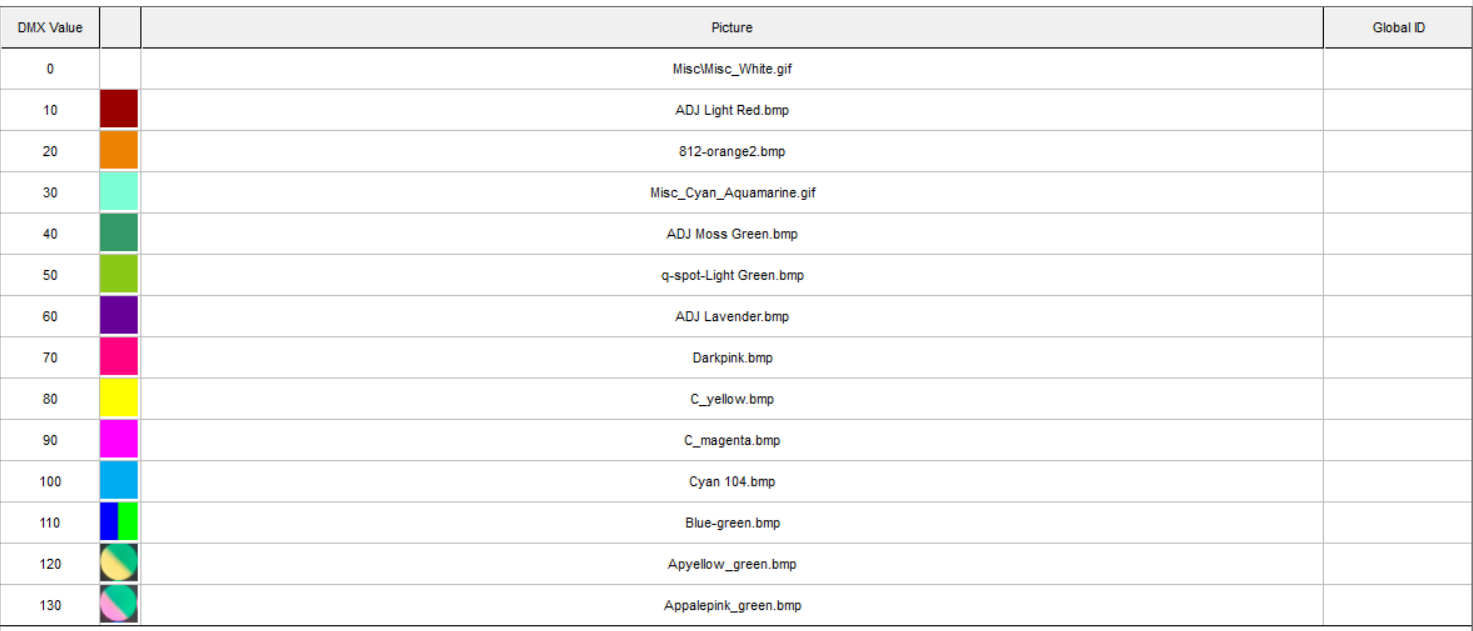
in FreeStyler I believe mine is set to Gradual in terms of the color wheel. My DMX values for the colors that seem to be functioning normally are as follows in the picture below. In terms of GOBO, I have not put anything into FreeStyler for the gobo, my end goal is to just have it stay on a beam anyway. I dont need it going through gobos.

Lord Nikita Huttenlocher 0 票
コメントアクション パーマリンク
0
Avatar

Hey guys, have not heard anything in a while. Still need help. Thank you!

Lord Nikita Huttenlocher 0 票
コメントアクション パーマリンク