Comentário oficial

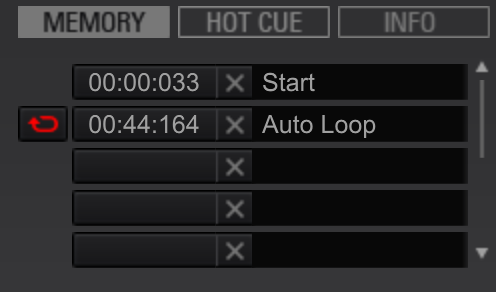
Yes; as long as you have set that memory loop to a RED loop mode, it will automatically loop when you get to that point on your XDJ-RX.


Ações de comentário

Hi,
I have the XDJ RX and use rekordbox.
I have set memory loops in rekordbox but I do not know how to set them so they play automatically on my XDJ RX when I'm playing..
Does anyone know what to do to make sure they automatically loop? Sometimes need to leave for bathroom etc!!
THANK YOU!!!
Yes; as long as you have set that memory loop to a RED loop mode, it will automatically loop when you get to that point on your XDJ-RX.
Publicação fechada para comentários.

hit loop button again and icon or symbol should turn red you can only have one active loop red
do you mean on the xdj-rx or in rekordbox? I'm hoping to have it already set up in rekordbox.. thank you!

I can not see this RED little "loop-symbol".
I make an loop. Push "Memory" and its time come up in one of the Memory-slots. I can there write a name(a text field) for it and change color for a "colored dot" that showes up at the right in the "text-field".
But NO "Loop-symbol"!!! What is wrong or how to see it and use it?
Very frustrating this... things is not so intuitive..
One more related question:
I do all this i "Export-mode", is there any way to do it in "Performance-mode"?
I would appreciate help here. Thank you.
I took a screen-shot. And it looks like this: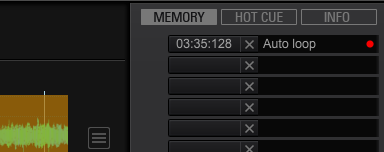
@Nightlife > I think you're doing the process wrong... the colour of the memory point doesn't matter.
1) Create a loop.
2) Press the memory button.
3) The loop is stored in memory with an orange loop indicator.
4) Click the orange loop indicator to change it to red; this is now an active-loop.

Nice thank you Pulse! Now it works! =)
And other question. Can I do this in Performance mode too? It would be awsome. Its not so practical to swith between these modes all the time. Even if it is an great option.
Freedom to be able to do it in both would be nice. Is it possible?
You bet you can - just change the deck into MEMORY CUE mode by clicking the drop-down below the deck number (you need to hover the mouse over the deck number to see it), then away you go.


Hello there, could all this be done on a cdj nxs 2 as well? That would be great! thx in advance!

Any way to create an active loop on the decks while I'm DJing? Ie. Outisde of rekordbox


