
Have you tried connecting one device directly to the computer via ethernet?
Ações de comentário

Hi there,
My issue is that rekordbox is able to link with my XDJ-1000s somewhat properly. They are able to see one another and the XDJ sees the correct name of the computer. The XDJ is throwing 8309 link errors though. All firewalls are off. Network Sharing is off. It will not work correctly while networked or connected directly. Please advise. Thank you.
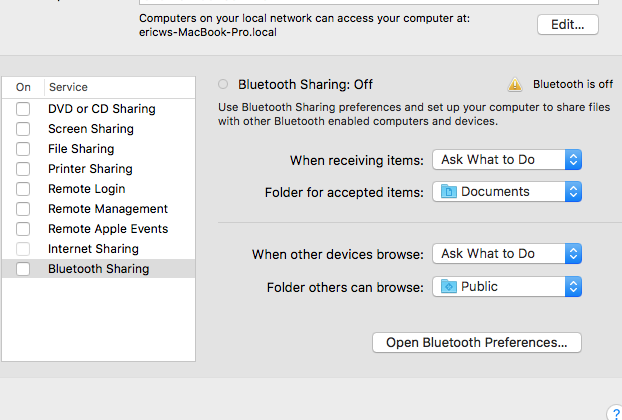
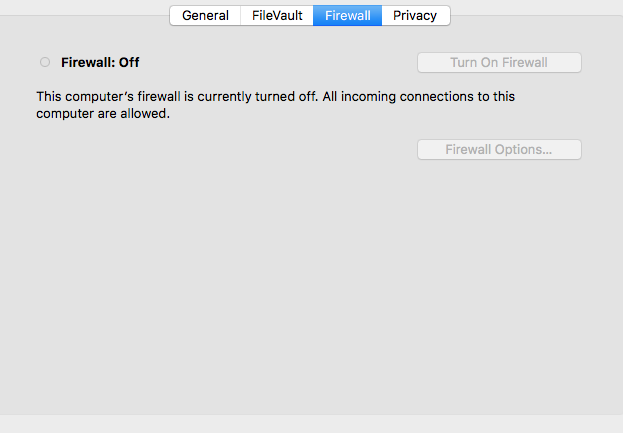
0) Have you read the "READ ME FIRST" thread in its entirety AND TRIED THE SOLUTIONS THERE before posting: Yes like all of them
1) Operating System: OS X 10.12.2
2) OS Type: 64bit / 32bit
3) rekordbox version: 4.2.5
4) Using LINK: Yes
4b) LINK Connection method: ethernet into airport extreme in switch mode (firewalls disabled)
4c) Using with CDJs: XDJ-1000 1.05
7) Have you scanned your files for errors: No
7b) Have you scanned your drive for errors: No
8) Is rekordbox crashing at all: No
8b) If not crashing, are there any error messages: XDJ is throwing a link error
9) Are you able to repeat / reproduce the problem: Yes
9a) If yes, can you do it consistently: Yes
10) Does the problem occur with one specific song: No
Publicação fechada para comentários.
Have you tried connecting one device directly to the computer via ethernet?
Yes. It functions in a similiar fashion.

Had the same issue yesterday and it was due to the nfs server holding the port...
When I connected my computer to the players, I saw the link button but the players were not able to see the library, returning the same error. Basically its something on your computer, holding the port that is the rekordbox trying to use...
Try this command in your terminal to see if you have a nfs server running:
sudo nfsd status
If it will say its enabled, try stopping it using using the command below, shut down the RB and start it once again:
sudo nfsd stop
If still having issues, you can use this command below to list the ports in use:
sudo netstat -a
And check if there is something using one of the ports needed by the RB. I am not sure from the top of my head what ports but I am sure that @Pulse will help...
M.
Marek,
MY HERO! Wow. I've tried everything and this worked. This information should be stickied. Thank you so much!
cool! I am really happy that it helped!
Interesting that you have the nfs server enabled on your laptop - not very common :)
If you are not using it, you might want to disable it otherwise it will start on the next restart of the computer...
Use "sudo nfsd disable" so its not starting automatically and you should be good to go...
I believe disabling all servers is in the general setup troubleshooting. ;)